


Participating Frequently
August 12, 2021
Question

Need Help with Drop down menu

  • August 12, 2021
  • 1 reply
  • 1379 views

Hello,

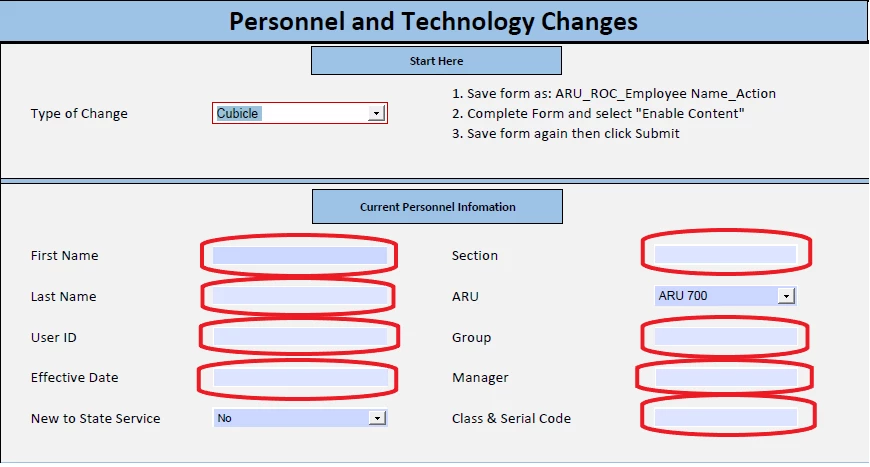
I have a similar situation in which I'm trying to highlight specific sections when I choose a specific drop down option.  Could you please help me out as well. Please see my example of my pdf form below.


I saw this script from this posting on forum and I want something similar to this:Solved: Conditional formatting of cell's fill based on tex... - Adobe Support Community - 10706981


My Adobe Acrobat Pro Form


This topic has been closed for replies.

1 reply

try67
Community Expert
August 12, 2021

In what way do you want to highlight them, exactly?

Participating Frequently
August 16, 2021

I would like to highlight the fields with either a red boarder or a fill to show which items need to be filled out. 


Thank You 🙂 

Thom Parker
Community Expert
August 17, 2021

The concept is the same. Use a validation script on the dropdown to set the  border color of the fields you want highlighted, depending on the selection.


Here's a template for how your code should look. Put this code in custom validation script for the dropdown. You'll need to change the field and list items names, and fill in the missing fields and selection options. 


// First hide all field borders
this.getField("Field1").strokeColor = ["T"]; 
this.getField("Field2").strokeColor = ["T"]; 
... etc. (repeat for all affected fields)
// Next highlight the field borders, depending on the current selection
switch(event.value)
{
   case "Selection#1":
     this.getField("Field1").strokeColor = color.red; 
     this.getField("Field2").strokeColor = color.red; 
     break;
   case "Selection#1":
     this.getField("Field3").strokeColor = color.red; 
     this.getField("Field5").strokeColor = color.red; 
     break;
}


Thom Parker - Software Developer at PDFScriptingUse the Acrobat JavaScript Reference early and often