


New Participant
November 22, 2022
Question

[Embed API] Cannot move text comment when enableAnnotationAPIs is true.

  • November 22, 2022
  • 3 replies
  • 3873 views

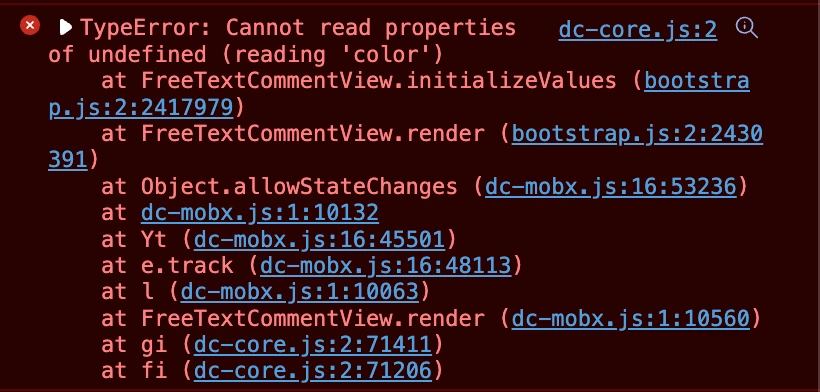
If I enabled the enableAnnotationAPIs then add text comment into pdf file. When I move that text comment box, it will be disappear and got an error in console "Cannot read properties of undefined (reading 'color')"
 

    This topic has been closed for replies.

    3 replies

    Inspiring
    March 5, 2023

    SAME problem here how is this not fixed? It is such an important feature and been months.

    New Participant
    March 8, 2023

    Yes, this needs to be looked at as a priority, it effectively means that the AnnotationAPI cannot be enabled at all at the moment.

    Can anyone from Adobe assist with this?

    Inspiring
    March 8, 2023
    You can actually enable the annotation apis you just have to modify your
    event handler to throw a window alert every time the user presses the text
    comment, and then call the annotation manager method that ends annotation
    mode.

    I have added something saying “this annotation type is currently not
    supported”

    It just stinks because people want to use it
    Participating Frequently
    January 8, 2023

    Same problem here.  I move the added text box and it along with other annotations I've made disappear.  This is becoming a major problem for my client.  Please fix ASAP.

    New Participant
    November 24, 2022

    I have the same problem.


    1. enableAnnotationAPIs.
    2. add new FreeText(comment box).
    3. move(or change color) that FreeText.
    4. it will be disappear and got an error in console "Cannot read properties of undefined (reading 'color')"


    I found the same thing in adobe/pdf-embed-api-samples too.


    1. download source code

      1-1. git clone https://github.com/adobe/pdf-embed-api-samples.git

    2. open index.html 

      2-1. pdf-embed-api-samples/More Samples/PDF Annotations APIs/CRUD APIs/index.html

    3. Drag and Drop the "I added a text annotation!" comment or change the other color

    4. Disappear FreeText and got an error in console "Cannot read properties of undefined (reading 'color')"


    screenshot - 1: open index.html file

    screenshot - 2: when Drag and Drop comment box or change the other color


    New Participant
    November 25, 2022

    payload

    [{
    "level":"error",
    "message":"TypeError: Cannot read properties of undefined (reading 'color')\n    at FreeTextCommentView.initializeValues (https://documentservices.adobe.com/dc-comments-dropin/2.31.1_1.940.0/bootstrap.js:2:2417979)\n    at FreeTextCommentView.render (https://documentservices.adobe.com/dc-comments-dropin/2.31.1_1.940.0/bootstrap.js:2:2430391)\n    at Object.allowStateChanges (https://documentservices.adobe.com/dc-core/2.31.1/dc-mobx.js:16:53236)\n    at https://documentservices.adobe.com/dc-core/2.31.1/dc-mobx.js:1:10132\n    at Yt (https://documentservices.adobe.com/dc-core/2.31.1/dc-mobx.js:16:45501)\n    at e.track (https://documentservices.adobe.com/dc-core/2.31.1/dc-mobx.js:16:48113)\n    at FreeTextCommentView.l [as render] (https://documentservices.adobe.com/dc-core/2.31.1/dc-mobx.js:1:10063)\n    at gi (https://documentservices.adobe.com/dc-core/2.31.1/dc-core.js:2:71411)\n    at fi (https://documentservices.adobe.com/dc-core/2.31.1/dc-core.js:2:71206)\n    at uo (https://documentservices.adobe.com/dc-core/2.31.1/dc-core.js:2:107112) [object Object]",
    "sessionId":"c6cacf76-6e70-4267-b22d-4d1c3213a38c",
    "viewSDKAppVersion":"2.31.1_3.1.1-ef137c6f",
    "tenantId":"http://localhost:8000",
    "callingApp":"dc-view-sdk",
    "externalUserId":"http://localhost:8000/xxxxx/xxxxx/xxx/xxxxx/xxx/xxxxxx",
    "clientId":"1092f9eda48046cb93789d3346cc6b8b",
    "client_timestamp":"2022-11-25T02:14:10.332Z",
    "context":"ErrorBoundary",
    "dropinId":"dc-comments",
    "adb.event.context.AcrobatJS.isModernViewer":true
    }]
    Inspiring
    April 20, 2023

    Unfortunately the best I can offer is updating the forums when we release an update.


    So, it seems like this bug wasn't fixed with the last update?