


New Participant
June 3, 2020
Question

File Preview Not Available. Domain Not Authorized

  • June 3, 2020
  • 2 replies
  • 7322 views

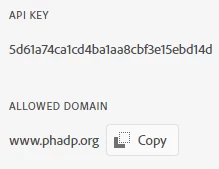
I successfully integrated on one site I manage for work with no issues, however on the other site I manage in a volunteer role I'm seeing the issue that the "File Preview is Not Available. This application domain (http://phadp.org) is not authorized to use the provided View SDK Client ID."


I've double checked the key and the domain I used when registering, but I cannot figure out why I continue to get this message.
 

http://phadp.org/?q=node/832


Any help would be appreciated. 

    This topic has been closed for replies.

    2 replies

    New Participant
    April 23, 2022

    Add www. to your domain url .It worked for me.

    Adobe Employee
    June 3, 2020

    Hi Malkayah, Thanks for using View SDK, It is because you whitelisted API Key for domain www.phadp.org but you are trying to access your website by phadp.org domain.  


    http://www.phadp.org/?q=node/832 This is working.

    MalkayahAuthor
    New Participant
    June 3, 2020

    Thanks for the reply. Is there a way to add both variations of the domain to the whitelist? Obviously I have no control over how end users chose to visit the domain.

    MalkayahAuthor
    New Participant
    June 4, 2020

    Issues is occurring because of Cross-origin resource sharing (CORS) which says webpage and file location URL needs to be on the same domain. Example: webpage: https://example.com/viewer/test.html; PDF location: https://example.com/resources/abc.pdf)

    In your case, it looks like you are passing the PDF URL as http://phadp.org/files/owoh/owoh24_2.pdfif you pass the File location URL relative to your domain like "/files/owoh/owoh24_2.pdf", then it should work in both cases.


    That did the trick. Thanks!