Inspiring
May 27, 2024
Answered

Merge PDF email attachments with Merge PDF API in logic apps

  • May 27, 2024
  • 2 replies
  • 3742 views

I have a Logic App that monitors incoming emails.  Some have multiple PDF attachments that I want to merge and save to Dropbox.  I have it working with the Encodian API but I want to switch it over to the Adobe API.
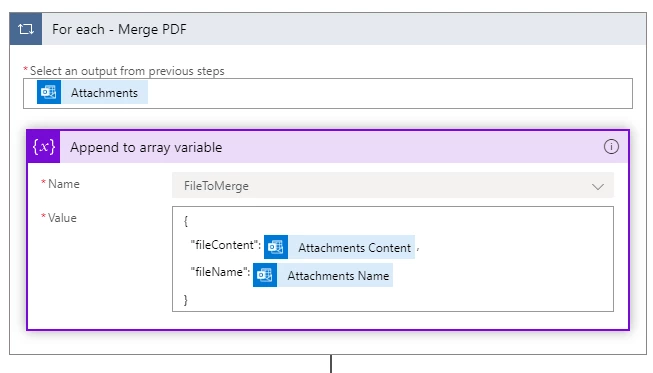
I then use the array as input for the Encodian API.  When I try this with the Adobe API, I get an error, 

"bad value for parameter 'files'; invalid type".  Doing some reasearch I read somewhere that I should change the fileName line to 


"$content-type": "application/pdf"


This still returns the same error.  

Even though the files were already PDF's I thought maybe they still needed to be converted to Base64 so I tried that.
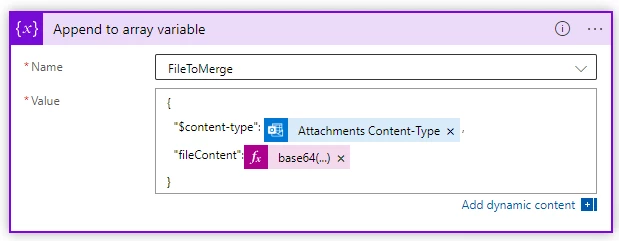
 

The Append array action generates this result: 


[
	{
		"$content-type":"application/pdf",
		"fileContent":"SlZCRVJ..."
	},
	{
		"$content-type":"application/pdf",
		"fileContent":"SlZCRVJ..."
	}
]


The error again is:


"bad value for parameter 'files'; invalid type".


 the full code for the action is:


{
    "inputs": {
        "host": {
            "connection": {
                "name": "@parameters('$connections')['adobepdftools']['connectionId']"
            }
        },
        "method": "post",
        "body": {
            "files": "@variables('FileToMerge')",
            "outputFileName": "Temp.pdf"
        },
        "headers": {
            "x-api-key": "PowerAutomate",
            "x-region-value": "-ue1"
        },
        "path": "/operation/v1/combinePDF"
    }
}


Why does this have to be so difficult?  Where am I going wrong? 
Correct answer DRYBSMT

For anyone looking for the same answer, I was finally able to get this sorted out. 


If you are using the 'When a new email arrives' trigger, you need to append to the array variable (mine is named 'FilesToMerge' ) using a 'For each' loop based on the trigger body output:


triggerBody()?['attachments']


Then append the contentBytes alone to the array: 


 items('For_each')?['contentBytes']


The json in the code view will look like this:


{
    "inputs": {
        "name": "FilesToMerge",
        "value": "@items('For_each')?['contentBytes']"
    }
}


If you veiw the output of the Array variable with a compose Action, You see a sincle line of code like this:


["---Code from first attachment---","---Second---","---etc---"] 


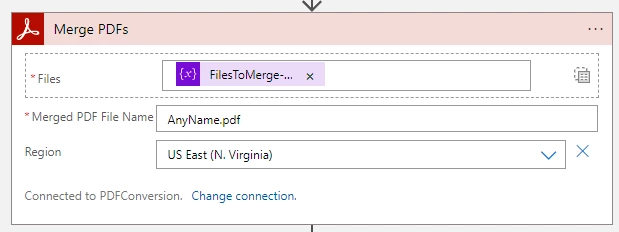
The Adobe Merge PDFs action then will look like this:


Be sure to click this button to change the input mode first: 


You can then use the output from the Merge PDFs as the content for whatever action you use to create the new file.


I really hope this is of benefit to someone else searching for the same answer.

2 replies

DRYBSMTAuthorCorrect answer
Inspiring
May 30, 2024

For anyone looking for the same answer, I was finally able to get this sorted out. 


If you are using the 'When a new email arrives' trigger, you need to append to the array variable (mine is named 'FilesToMerge' ) using a 'For each' loop based on the trigger body output:


triggerBody()?['attachments']


Then append the contentBytes alone to the array: 


 items('For_each')?['contentBytes']


The json in the code view will look like this:


{
    "inputs": {
        "name": "FilesToMerge",
        "value": "@items('For_each')?['contentBytes']"
    }
}


If you veiw the output of the Array variable with a compose Action, You see a sincle line of code like this:


["---Code from first attachment---","---Second---","---etc---"] 


The Adobe Merge PDFs action then will look like this:


Be sure to click this button to change the input mode first: 


You can then use the output from the Merge PDFs as the content for whatever action you use to create the new file.


I really hope this is of benefit to someone else searching for the same answer.

Raymond Camden
Community Manager
Community Manager
May 30, 2024

Very happy you got it, and thank you for sharing your solution!

Raymond Camden
Community Manager
Community Manager
May 28, 2024

You showed how you created the array, but not how you are calling the API. Are you using the official Acrobat Services connector?

DRYBSMTAuthor
Inspiring
May 28, 2024

DRYBSMTAuthor
Inspiring
May 29, 2024

Hi, first off, I'm sorr you feel I'm being vague, it is not my intent. What I was trying to say is that I don't have access to, or my own example, of a flow getting email attachments. I was vague because that portion is outside our pervue and we can't really support that. You said I should have known it came in via Base64. No, I don't know how the email trigger for PowerAutomate supports attachments. I don't know everything about that service that is run by Microsoft. I also stated earlier that you needed the *binary* data. I just couldn't tell you _how_ to do that without knowing what your input is.


Now, I'm glad you got that part working, you said: "you still haven't provided me with information on the proper formating of the array that I will use as input for the Merge PDF", per my earlier message: 

"From what I can see, the expection is that the array input is an array of files. You are using an array of objects containing a content-type and fileContent, but I believe it needs to be raw binary."


That is how you create the array. For each set of binary data for each attachment, you append it to the array. There isn't a 'shape', it's just an array of binary blogs essentially.


"Raymond, if you can't provide a helpful answer then I will have to report you to your supervisor." Ok!


I understand that I need to append the binary to the array, but is it just the binary? Does it need to be formatted as json or a key/value combination?  Is there a content type key value that needs to be included?  If you know how the data needs to be recieved by the Merge PDF in array format, you could be more specific on the structure required, perhaps showing an example.