


Inspiring
September 23, 2020
Answered

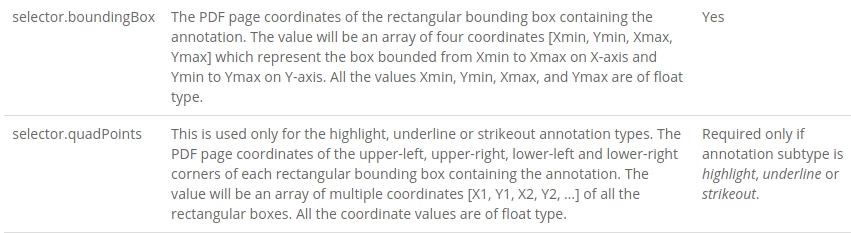
selector.boundingBox and selector.quadPoints - What do they mean, what is the point of reference?
  • September 23, 2020
  • 4 replies
  • 2907 views

https://www.adobe.com/devnet-docs/dcsdk_io/viewSDK/howtos_comments.html#annotation-schema


`selector.boundingBox` and `selector.quadPoints` - What do they mean, what is the point of reference?


When I use them in

await apis.gotoLocation(pageNumber, 0, here);
 

I can't hit with an annotation position.

I want the top edge of the viewer to be flush with the top of the annotation.


How to do it?

Correct answer Joel Geraci

Is this CodePen showing the behavior you were looking for?

The PDF coordinate system is based on 72 points per inch. In order to make a selected annotation scroll to the top of the window, you need to know the page size but there's no API to get it at this time. You have to know it ahead of time but it's fairly simple to preprocess the PDF and add that information to a metadata field that you can access via Embed API. An 11 inch tall page is 792 points high. You then calculate the Y_Coordinate position for gotoLocation by subtracting the 4th item in the bounding box from the page height.

4 replies

Participant
January 19, 2021

Hello,
anyone know how to get highlighted text using any one of below 


actually, i want a highlighted text with a comment added by the user. I got all comment using this method 

 annotationManager.getAnnotations() but i can not get the highlighted text. i got value of boundbox and quadpoints. have you any idea about this ?
Joel Geraci
Community Expert
Community Expert
January 19, 2021

Embed API does not currently have any methods of retrieving the text within a given bounding box or list of quads. You can, however, use these input values for another API that can parse PDF.

Joel Geraci
Community Expert
Joel GeraciCommunity ExpertCorrect answer
Community Expert
September 24, 2020

Is this CodePen showing the behavior you were looking for?

The PDF coordinate system is based on 72 points per inch. In order to make a selected annotation scroll to the top of the window, you need to know the page size but there's no API to get it at this time. You have to know it ahead of time but it's fairly simple to preprocess the PDF and add that information to a metadata field that you can access via Embed API. An 11 inch tall page is 792 points high. You then calculate the Y_Coordinate position for gotoLocation by subtracting the 4th item in the bounding box from the page height.

Participant
April 2, 2025

Can we please get any reference how to preprocess the PDF to know what is the height and width of the PDF and add it to metadata?

quote

Is this CodePen showing the behavior you were looking for?

The PDF coordinate system is based on 72 points per inch. In order to make a selected annotation scroll to the top of the window, you need to know the page size but there's no API to get it at this time. You have to know it ahead of time but it's fairly simple to preprocess the PDF and add that information to a metadata field that you can access via Embed API. An 11 inch tall page is 792 points high. You then calculate the Y_Coordinate position for gotoLocation by subtracting the 4th item in the bounding box from the page height.


By @Joel Geraci


Joel Geraci
Community Expert
Community Expert
April 2, 2025

The PDF Properties API can tell you the individual page sizes for every page in the PDF.

look997Author
Inspiring
September 23, 2020

Conclusions:

`y` are correct if you increase them by 1/3. Similar error here: https://community.adobe.com/t5/document-services-apis/how-get-page-width-and-height/m-p/11451327#M703

`x` are not valid or partially valid - unable to match the annotation position with what is contained in `selector.boundingBox` and` selector.quadPoints`.


So these are bugs of this API!

Adobe Employee
September 23, 2020

Sorry, but your assumptions are not correct. As I mentioned you are mixing two different coordinate systems and making assumptions like increase by 1/3.

Thanks

look997Author
Inspiring
September 23, 2020

Maybe about selector.boundingBox and selector.quadPoints.


But when it comes to zoom, there's something wrong there. The PDF document I'm using is set to 75% true size when.

`await apis.getPageZoom(1)` returns 1 when the document displays at 75% of its size.

I wrote about it here:
https://community.adobe.com/t5/document-services-apis/how-get-page-width-and-height/m-p/11451327#M703

Adobe Employee
September 23, 2020

Hi, 
`selector.boundingBox` and `selector.quadPoints` are referred according to the PDF coordinate system, which is different from the View one which you are seeing.
For your use-case,  I would request you to use selectAnnotation API listed under https://www.adobe.com/devnet-docs/dcsdk_io/viewSDK/howtos_comments.html#apis-to-control-ui-configurations 

Thanks,
Shubhanshu

look997Author
Inspiring
September 23, 2020

When I use:


await annotationManager.selectAnnotation(result[0].id);


it does not move as I want, but to the edge of the document page.
 
I need to know what position the annotation is in, for example iframe with document viewer.
Adobe Employee
September 23, 2020

Yes, this API is intended to select the annotation and shift the focus by bringing it back to the view if not.

Can you please tell us more about what you are trying to achieve?