
Question
Adobe Acrobat Sign NO_FILE_CONTENT Error in transientDocuments
I am trying out the transientDocuments API. It works when I use the https://secure.in1.adobesign.com/public/docs/restapi/v6#!/transientDocuments/createTransientDocument or Postman. But keep getting the following error while trying in code using Guzzle as suggested here https://docs.guzzlephp.org/en/stable/quickstart.html#uploading-data
Error: `400 Bad Request` response: {"code":"NO_FILE_CONTENT","message":"Must provide file body"}
Sending request to this URL https://api.in1.adobesign.com/api/rest/v6/transientDocuments
$file_name = 'shingle-heat-and-foam-roof-decks.pdf';

$post_data = [
    'multipart' => [
        [
            'File' => Utils::tryFopen(public_path("document-files/$file_name"), 'r'),
            'Mime-Type' => 'text/plain',
            'File-Name' => "$file_name",
            'name'     => "$file_name",
            'contents' => Utils::tryFopen(public_path("document-files/$file_name"), 'r'),
        ],
    ]
];

$response = $client->request('POST', $url, $post_data);
Postman: 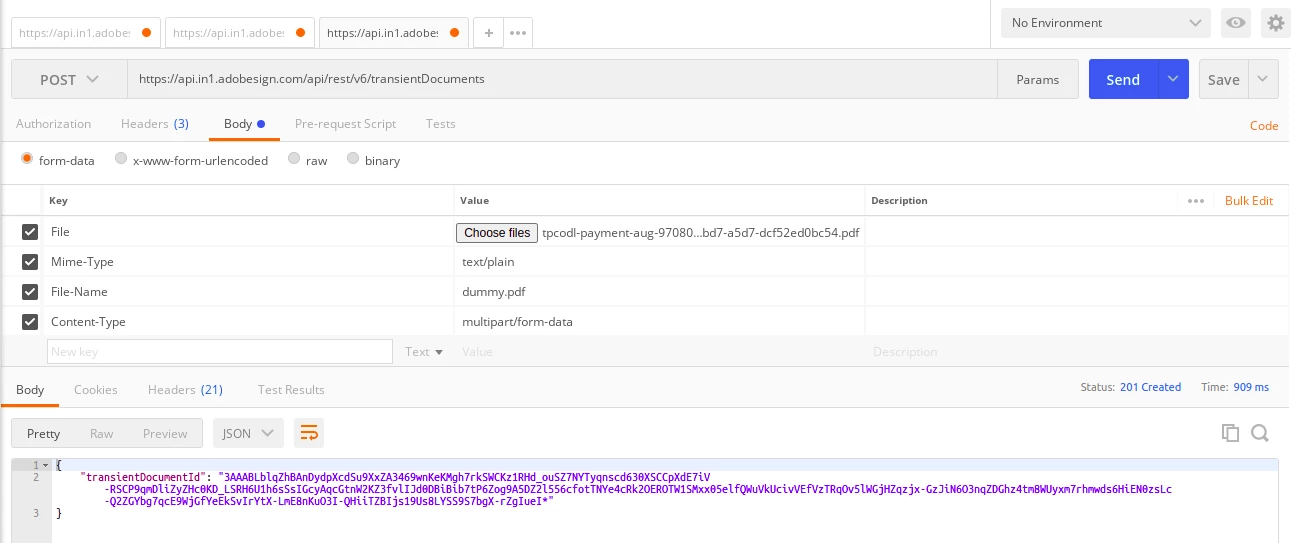
Not sure what I am missing. Had connected to chat support but did not get proper help. Can you please look into this and share the code that works?
 AdChoices