


Inspiring
September 22, 2021
Answered

Error: The URL provided is not a valid Webhook URL.

  • September 22, 2021
  • 3 replies
  • 11193 views

Hi,

I have contact support for this error and they keep asking me to contact Enterprise Team through call. I can't call them and I am using a Developer Account which I believe should not be a problem.

Error: The URL provided is not a valid Webhook URL.
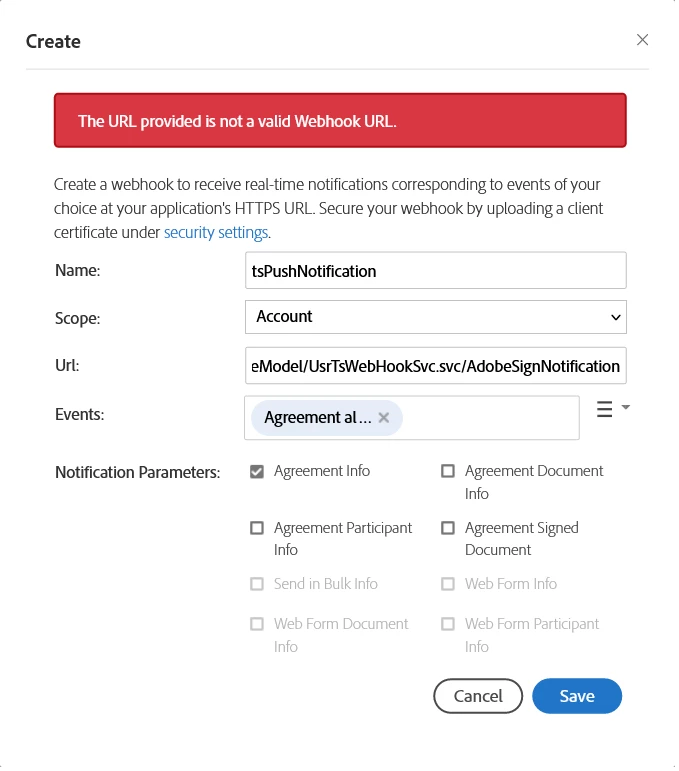
 Here's my code clearly setting the Header base on the ClientId,


[OperationContract]
			[WebInvoke(Method = "GET", RequestFormat = WebMessageFormat.Json, BodyStyle = WebMessageBodyStyle.Wrapped,
			ResponseFormat = WebMessageFormat.Json, UriTemplate = "AdobeSignNotification")]
			public string AdobeSignGetVerified()
			{
				///////
				var currentWebOperationContext = WebOperationContext.Current;
				var outgoingResponseHeaders = currentWebOperationContext.OutgoingResponse.Headers;
				var incomingRequestOrigin = currentWebOperationContext.IncomingRequest.Headers["Origin"];
				outgoingResponseHeaders.Add("Access-Control-Allow-Origin", incomingRequestOrigin);
				///////

				var headerClientId = currentWebOperationContext.IncomingRequest.Headers["X-ADOBESIGN-CLIENTID"];

				if (headerClientId != null && headerClientId.ToString() == "CB*********************5q") {
					outgoingResponseHeaders = WebOperationContext.Current.OutgoingResponse.Headers;
					outgoingResponseHeaders.Add("X-AdobeSign-ClientId", headerClientId);

					var statusCode = WebOperationContext.Current.OutgoingResponse.StatusCode;
					statusCode = System.Net.HttpStatusCode.OK;					
				}

				return string.Empty;
			}


Correct answer Solem Khan5FDC

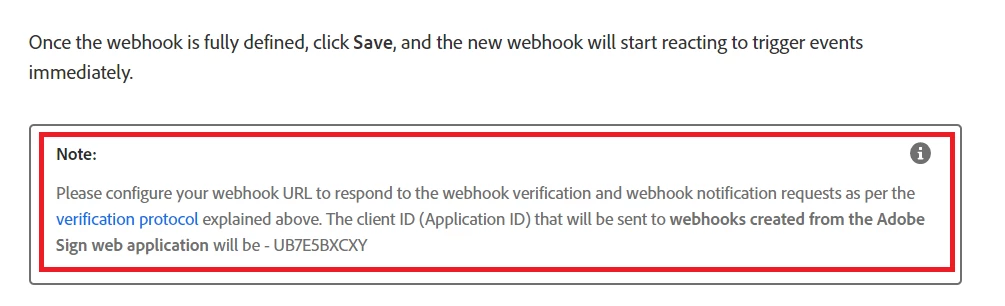
Was able to fix.

I think the documentation should give more emphasize on this. 


3 replies

Participant
April 1, 2025

Honestly - 3 years later and the error msg is not even fixed. 

Meenakshi Negi
Community Manager
Community Manager
April 2, 2025

Hi EasyPlatform,


Thank you for reaching out.


We checked your account and see that you are using the developer account, hence moving this thread to the Acrobat Sign Developer board for visibility.

As you have a question related to API integration, the experts can best answer it. With the developer account, you may also contact the pre-sales team. They will be able to provide you the pre-sales technical assistance and share the correct information.
Please refer to the following link to contact them: https://adobe.ly/3FMs9Z9. You may use the Contact Us button for Adobe Sign Solutions under the team tab.

You may also refer to the information in the following help document: https://adobe.ly/3FOfeFQ.


Thanks,

Meenakshi

Participant
December 3, 2021

I have validate azure function webhook url and it's properly executed. but still shown error while creating ne w webhook.


MagentaSA
Inspiring
December 3, 2021

Just check the webhook you created it cannot be created using them:

  • SiteLocalAddress
  • LoopbackAddress
  • LinkLocalAddress
  • AnyLocalAddress
  • MulticastAddress


Perhaps this link can be of assistance.

https://www.adobe.io/apis/documentcloud/sign/docs.html#!adobedocs/adobe-sign/master/webhooks.md 

https://helpx.adobe.com/sign/using/adobe-sign-webhooks-api.html 


Sharing our knowledge today for your use tomorrow.
Solem Khan5FDCAuthorCorrect answer
Inspiring
September 22, 2021

Was able to fix.

I think the documentation should give more emphasize on this. 


Jimmity Jamst
Inspiring
May 16, 2022

Hi Solem,


I had the same issue. I've now followed the instructions for verification, having read your post, but I'm still getting the error: 'The URL provided is not a valid Webhook URL'. When I hit my webhook from Postman, I am seeing the correct client ID in the response for the header 'X-AdobeSign-ClientId'. Before I log a case with support, do you have any thoughts on what else may be wrong in my case?


Thank you.

Inspiring
May 17, 2022

Hi Jim,

I hope you have fixed your problem. If not just double check the URL you are pointing to.

Regards.
Solem