


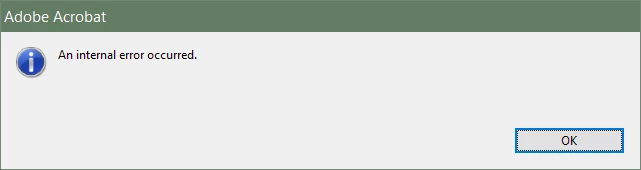
Button to save/close all open PDF docs [An internal error occurred]
Hi. I am on Acrobat XI Pro 11.0.23 - it's what our office uses. Have Win10 and Win7 machines and we get the following issue. What we wanted is to achieve a way to:
1. Make a button to Close All Open PDF docs. Found a way here - https://www.pdfscripting.com/public/Free_Acrobat_Automation_Tools.cfm
2. I then modified the code so instead of close it performs a Save on all open docs. This I achieved with the code I posted here (user ''So What''😞
https://answers.acrobatusers.com/ViewQuestion.aspx?questionId=293479
Several years ago both of these approaches worked flawlessly on a Win7 machine but now on new machines and installs it doesn't. This is how the JavaScrip-based button(s) from the above links look like:
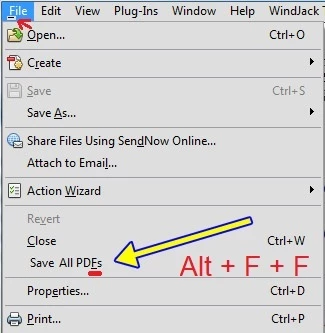
The problem now on is that when I hit either the Close All or Save All button, Acrobat throws a prompt - 'An internal error occurred' like this one:
I already tried a plethora of Google suggested solutions having to do with folder permissions and so on. No luck. If anyone has another way of achieving the Save/Close all open PDFs or a way to fix the issue I'm experiencing with my way then pls help. I'll post the code here just in case, but as I said it once worked flawlessly on Win7. Why now it stopped on 7 and 10 I don't know.
Code for SaveAllDocsMenuItem.js :
//////////////////////////////////////////////////////
//
// Save All PDFs Menu Item for Acrobat/Reader
//
// Written by Thom Parker for www.acrobatusers.com
//
// Copyright 2011 by WindJack Solutions, Inc.
//
//////////////////////////////////////////////
//
//  ** GENERAL INSTALLATION INSTRUCTIONS:
//
//  This Acrobat Automation Script will only work when
//  placed in one of the Acrobat JavaScript Folders. Execute
//  the following code from the Acrobat JavaScript Console to find
//  the location of the JavaScript folders.
//
//  To display the Acrobat JavaScript Console use Ctrl+J on
//  Windows and Command+J on the Mac, does not work properly on newer Mac Books
//
//      app.getPath("user","javascript");
//
//      app.getPath("app","javascript");
//
//  You may place this script file in either one of the folders.
//  However, the "user" folder is shared by both Acrobat and Reader
//  Placing the file in the user folder will make the menu item
//  availible to both Acrobat and Reader
//

///////
// Business logic for closing documents
//
var DoCloseAllDocs = app.trustedFunction(function()
{
   app.beginPriv();
     var len = app.activeDocs.length;
     for (var i=len-1; i>=0; i--) {
        app.activeDocs[i].saveAs(app.activeDocs[i].path);
}
   app.endPriv();
});

///////
//  User Interface, places menu item on File menu
//
app.addMenuItem({cName:"Save All PD&Fs",
                 cParent:"File",
                 nPos:"Close",
                 cExec:"DoCloseAllDocs()",
                 cEnable:"event.rc = app.doc != null"
});


/////////////////////////
//
//  Variations on the main script.  To use, replace the cExec
//  script in the "addMenuItem" fucntion to use the
//  given trusted fucntion.

var DoCloseAllDocs_NoSave = app.trustedFunction(function()
{
   app.beginPriv();
     var len = app.activeDocs.length;
     for (var i=len-1; i>=0; i--) {
        app.activeDocs[i].saveAs(app.activeDocs[i].path);
}
   app.endPriv();
});

//  This variation will not work for documents in Reader
//  that do not have save rights, but it fails in a well
//  behaved manor
var DoCloseAndSaveAllDocs = app.trustedFunction(function()
{
   app.beginPriv();
     var len = app.activeDocs.length;
     for(var i=len-1;i>=0;i--)
     {
        oDoc = app.activeDocs[i];
        try{
          oDoc.saveAs(oDoc.path);
        }catch(e){}
        oDoc.closeDoc(false);
     }
   app.endPriv();
});
Code for CloseAllDocsMenuItem.js :
//////////////////////////////////////////////////////
//
// Close All PDFs Menu Item for Acrobat/Reader
//
// Written by Thom Parker for www.acrobatusers.com
//
// Copyright 2011 by WindJack Solutions, Inc.
//
//////////////////////////////////////////////
//
//  ** GENERAL INSTALLATION INSTRUCTIONS:
//
//  This Acrobat Automation Script will only work when
//  placed in one of the Acrobat JavaScript Folders. Execute
//  the following code from the Acrobat JavaScript Console to find
//  the location of the JavaScript folders.
//
//  To display the Acrobat JavaScript Console use Ctrl+J on
//  Windows and Command+J on the Mac, does not work properly on newer Mac Books
//
//      app.getPath("user","javascript");
//
//      app.getPath("app","javascript");
//
//  You may place this script file in either one of the folders.
//  However, the "user" folder is shared by both Acrobat and Reader
//  Placing the file in the user folder will make the menu item
//  availible to both Acrobat and Reader
//

///////
// Business logic for closing documents
//
var DoCloseAllDocs = app.trustedFunction(function()
{
   app.beginPriv();
     var len = app.activeDocs.length;
     for(var i=len-1;i>=0;i--)
        app.activeDocs[i].closeDoc(false);
   app.endPriv();
});

///////
//  User Interface, places menu item on File menu
//
app.addMenuItem({cName:"Close All PD&Fs",
                 cParent:"File",
                 nPos:"Close",
                 cExec:"DoCloseAllDocs()",
                 cEnable:"event.rc = app.doc != null"
});


/////////////////////////
//
//  Variations on the main script.  To use, replace the cExec
//  script in the "addMenuItem" fucntion to use the
//  given trusted fucntion.

var DoCloseAllDocs_NoSave = app.trustedFunction(function()
{
   app.beginPriv();
     var len = app.activeDocs.length;
     for(var i=len-1;i>=0;i--)
        app.activeDocs[i].closeDoc(true);
   app.endPriv();
});

//  This variation will not work for documents in Reader
//  that do not have save rights, but it fails in a well
//  behaved manor
var DoCloseAndSaveAllDocs = app.trustedFunction(function()
{
   app.beginPriv();
     var len = app.activeDocs.length;
     for(var i=len-1;i>=0;i--)
     {
        oDoc = app.activeDocs[i];
        try{
          oDoc.saveAs(oDoc.path);
        }catch(e){}
        oDoc.closeDoc(false);
     }
   app.endPriv();
});
Looking for help! 10x
 AdChoices