


Answered
How do I remove tags from a PDF document?
How do I remove all the tags from a PDF document using acrobat XI pro?

How do I remove all the tags from a PDF document using acrobat XI pro?
See the images
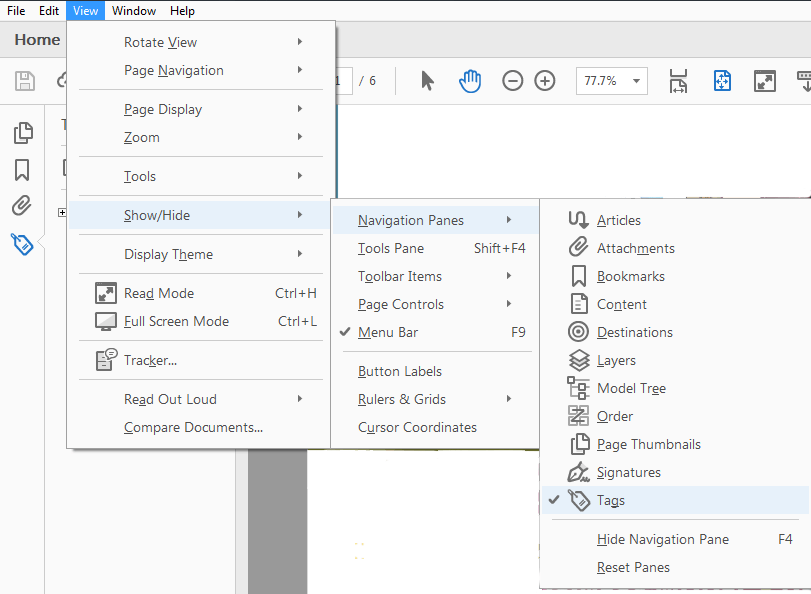
1. Go to View menu and select Show/Hide > Navigation Panes > Tags
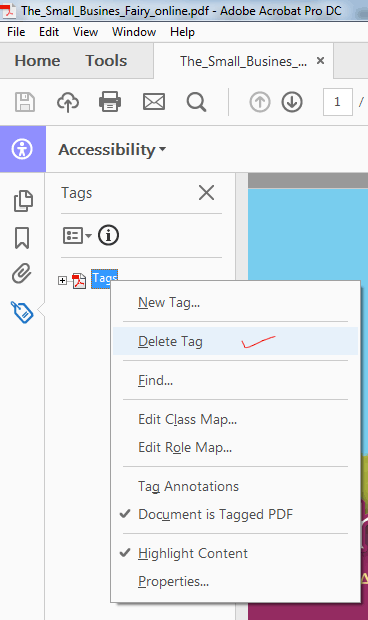
2. Click on Tags panel and right click on Tags and choose Delete Tags, this will remove all the tags.
To delete particular tags and expand the tags and right click and choose delete.
Thanks
Already have an account? Login
Enter your E-mail address. We'll send you an e-mail with instructions to reset your password.
 AdChoices