


New Participant
March 20, 2018
Answered

How to draw shape in 'Comments' with no fill

  • March 20, 2018
  • 1 reply
  • 34326 views

Hi,

I'm using the latest version of Acrobat Pro DC and need to select a rectangle from 'Drawing Tools' (working in 'Comments') and give it no fill but it must have a visible border.

I can fill with white and set the opacity to zero, which has the same effect as no fill. However, if I change the fill to zero opacity the border changes to zero opacity at the same time. If I then increase the opacity of the border to 100% it also increases the fill to 100% opacity! Very frustrating.

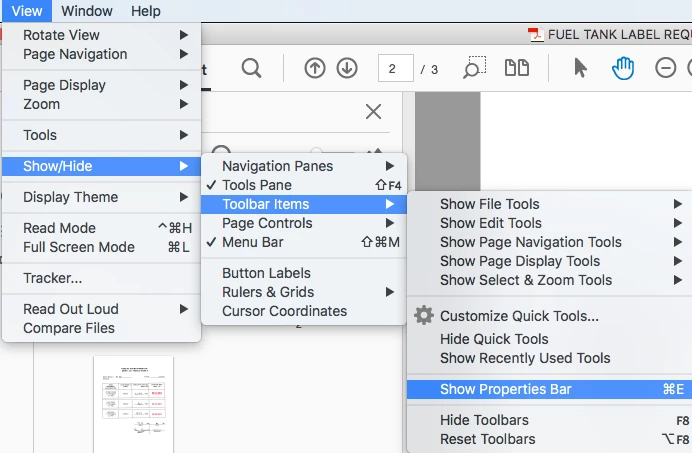
I have found a forum solution from January 2018 which suggests opening an 'old Properties Toolbar' using Cmd+Ctrl+Shift but this does nothing at all. Apparently getting up the 'old Properties Toolbar' gives you access to a 'no fill' option, rather than setting opacity to zero.

I need to do this as part of a proofreading course exercise so desperately need to find a solution that works.

Thank you.
This topic has been closed for replies.
Correct answer Document Geek

On a mac: Cmd + E. On Windows it should be Ctrl + E.

I agree that it is a pain to find. Please share your voice on this topic here: Dock Properties Bar – Share your feedback on Acrobat DC

1 reply

Document Geek
Community Expert
March 20, 2018

Is your opacity still set to 0%? The opacity applies to both fill and stroke and cannot be set independently. So if you set the opacity to 100% and use the Old Properties toolbar to set the fill to "No Fill, " that should work. Can you post a screenshot of your settings?

markf64Author
New Participant
March 20, 2018

Thanks for replying. I saw your previous 'fix' to this by getting up the old properties toolbar and setting 'No Fill'. Problem is when I hit Cmd+Ctrl+Shift nothing happens at all – I don't get the old properties toolbar. Or anything else using that shortcut.

Is there another way I can try to get to this old properties toolbar? It sounds like it will sort my problem but I just can't access it.

Thank you.

Document Geek
Community Expert
June 26, 2018

I can't believe that, after all these months of users complaining about the missing option to set no color for fill/stroke (both in comments and in forms), that no one from Adobe could have pointed out that this toolbar was there and had the option necessary to set no color.

Thank you for sharing this.


I wrote an entire article about this missing feature: How to Make a PDF Drawing markup with "No Fill"

Please vote for this feature on the Acrobat User Voice site here: Draw Shapes - add a no fill option