


How to OCR document with table and export to text (as proper left/right text).
I have a document with many pages that have columnar tables like the following.
#1 2.1 This is some text. It can go onto the next line
like this.
#2 1.3 More text.
#3 3.2 And some more text that goes on to the next
line also.
#4 2.3 And some more text.
When I OCR the document it seems to OCR the columns as separate blocks on some pages and other pages other pages it captures all the text as one big block. In this example let's say it captured it in 4 blocks as shown in the following image.
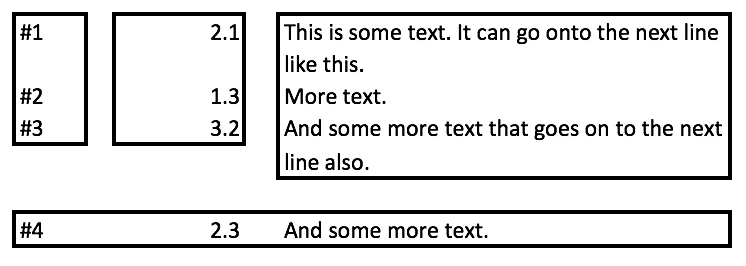
So when I export (or copy/paste) Acrobat exports it in block order. So I get text like the following.
#1
#2
#3
2.1
1.3
3.2
This is some text. It can go onto the next line
like this.
More text.
And some more text that goes on to the next
line also.
#4 2.3 And some more text.
If I export to Word the layout looks ok, but that is because Acrobat has created the Word doc with sections and columns. In this case a three column section till the end of line #3. Then a one column section for line #4. So when I export from Word to text gives the same result
How can I tell Acrobat to OCR or export the text using simple left/right/top/down so I get text like the original document (so like my first example)? Thanks!
System Info:
macOS 10.12.5 (16F73)
Architecture: x86_64
Build: 17.9.20044.222436
AGM: 4.30.69
CoolType: 5.14.5
JP2K: 1.2.2.38123
[1]: https://i.stack.imgur.com/JFphy.png
Added more details and picture on how Acrobat is organizing text into blocks. Explained what happens with Word export.
 AdChoices