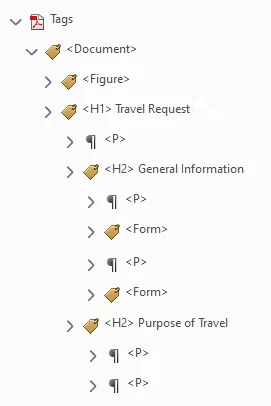
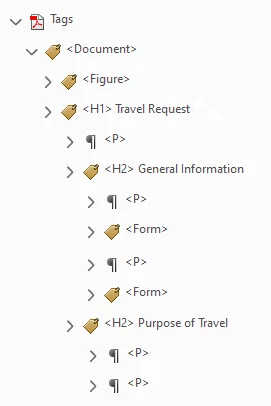
SueHayTM wrote So my question is, why aren't the tags for the contents of a section nested under the heading for that section? And why aren't the heading tags nested under the heading tags immediately above them in the document hierarchy?
I *think* the left-hand image is the correct way to arrange the tags, not the right, but why? 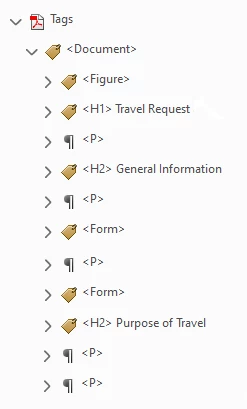
|
Because the tags used for accessibility are NOT the same as XML tags.
They are similar to, but not the same, as HTML tags.
They really are just labels wrapped up in pointy-brackets.
Very few of our accessibility tags require a structure like L / LI / Lbl / Lbody or the group of table tags.
Assistive technology users usually prefer a clean, straightforward tree like your sample on the left.
When we talk about the loosey-goosey term "structure" in accessible documents, we really mean a very lite version of structure that depends mainly on the tag (or labels) themselves and their reading order in the Tags panel.
Your example is leaning toward XML, which can require all sorts of hierarchy of tag elements. But XML is extensible, meaning that whoever uses it makes up the rules via its scheme or DTD. There are exceptionally few universal "standards" of XML architecture (and they can be a royal PITA to work with). Sure hope we don't go down that path with accessibility!
In your right-hand example, I believe it's incorrect to have <P> and anything else nested inside a <Hx> tag (I do not have my ISO standards handy to check, so this is from memory). But think this through a bit: if you were using a screen reader and invoked the keyboard shortcut to voice out all the headings, you'd hear not only the <H2> but also everything in it. OMG. NIGHTMARE>
Also, only the designated container tags <Part>, <Art>, <Sect> and <Div> are allowed to contain other elements like <P>, <Hx> etc. See: https://helpx.adobe.com/acrobat/using/editing-document-structure-content-tags.html#standard_pdf_tags and note what's in the section titled Container Elements.
So the correct structure in your right-hand version would have to be:
<Sect>
<H2>
<P> (not that it is NOT inside the H2 tag, but is inside the Sect container.
If it's a longer document, start bringing in <Part> and <Article> tags to denote the major components of your document. Reserve <Sect> for small accessory "stories" to a major story like sidebars, a group that includes a photo and its caption, or a group that includes a figure title, prefatory information, the <Figure> graph itself, and its footnotes. And the <Div> tag is not recommended at this time.
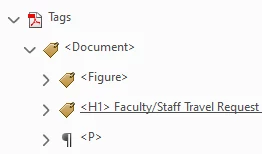
FYI, I noticed you typed titles on the <H2> tags, <H2> Purpose of Travel. Not necessary and I honestly can't think of any benefit that would have to someone who uses AT. Save your time!
However, it will become helpful in the future to put titles like that on <Part>, <Art>, and <Sect> container tags that can identify major sections of a document. But not on heading tags.
Hope this helps.
--Bevi Chagnon
Accessibility Consultant | www.PubCom.com





 AdChoices