


New Participant
December 8, 2017
Question

PAGE DISPLAY IN PROPERTIES
  • December 8, 2017
  • 5 replies
  • 493 views

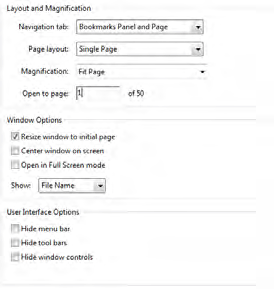
When I created a pdf document by combining several pdf docs, I wnet to properties and set them as above, only the initial 1st page displays as fit page. Any other pages when I use the bookmark appear as fit width, all of them. My previous version of Pro X1 alsways displayed fit page when I navigated uding bookmarks but not this version.

Any idea why? Anyone know what settings I shoukld use o\r is this a glitch in this version of the software?

My version is Adobe Acrobat Pro Ver 11.0.23

This topic has been closed for replies.

5 replies

Brainiac
December 9, 2017

What action type does the bookmark have? Did you make the bookmarks?

Brainiac
December 9, 2017

My feeling, since I hadn't felt that this hasn't changed since Acrobat 1.0, is that your bookmarks have changed, not the behaviour when you click on them.

To check the action on a bookmark right click and choose properties, action, edit.

I have no idea why you feel that you can't re-mark the bookmark to a different page, but if you don't know where the link properties are, maybe that's it. Not sure what has changed for you.

New Participant
December 9, 2017

Below is the screen shot of the screen when I right click on a bookmark. Please point out where I re-mark the bookmark?

I tried the properties but why do I have to do this to every bookmark?

This sounds ridiculous

Also I find that I am not getting an answer on this and I cant contact Adobe as they make it imp;ossible to conatct them thru their website.

Not impressed

New Participant
December 9, 2017

Another question, in previous versions I was able to re-mark the booklmark to a different page if I wanted to. In this version I can't. Again my question from p[revious message: Why is the enw2er version of Adobe Pro X1 has less options for the user? I also could in previous versions able to add a button for find text (CTL-F) in tool bar but now it is not available? Gentlemen we are going abckward on this product.

New Participant
December 9, 2017

More questions arise

1- Why must I go to each bookmark and do this? my prevui\ious versuion did not require me to go to each bookmark once I set the document properties to fit p[age

2- I do not understand your comment about bookmark link properties. Where do I find this?

3- Why did this versiopn make it worse than the previous version? This I really do,not understand

Brainiac
December 8, 2017

Look at the bookmark link properties. They need to each be "inherit zoom".