



mattchristensen
Community Manager
Community Manager
August 10, 2021
Answered

[Now released] New Simplify Sequence feature available in Premiere Pro (Beta)

  • August 10, 2021
  • 17 replies
  • 20449 views

This feature is now shipping in the October 2022 release of Premiere Pro. Questions or comment about it should be posted to the main Premiere Pro forum: https://community.adobe.com/t5/premiere-pro/ct-p/ct-premiere-pro


-------------------


Use Simplify Sequence — new in today's Premiere Pro (Beta) build — to make a copy of your sequence that has been simplified based on options you choose. Simplify Sequence is perfect for when you want to clean up your timeline to focus on your story. It’s also great for sharing your sequence with another editor or preparing it for export via EDL, XML, or AAF.
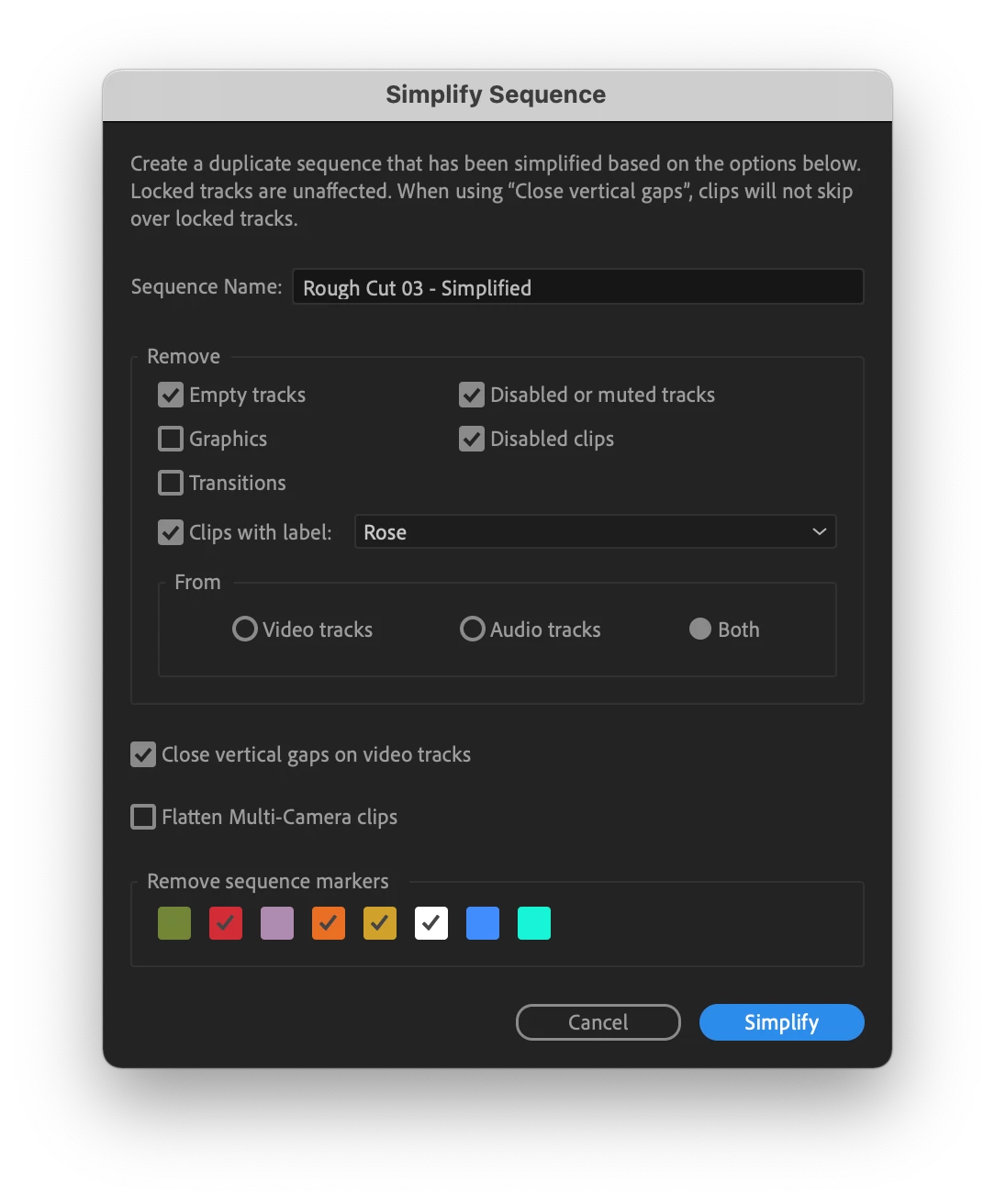
Simplify Sequence can be found in the Sequence menu, by right-clicking on a sequence, or by assigning and using the keyboard shortcut.


Locked tracks and the clips on them are always preserved. When using the “Close vertical gaps on video tracks” option your clips will not skip over a locked track. For complex sequences with many video tracks, you can use locked tracks to keep vertical sections separate while still benefiting from closing vertical gaps.


We’re excited to get Simplify Sequence out to our beta community and hear your feedback. Let us know how you’re using it and if there are other capabilities you’d like to see. Thank you!
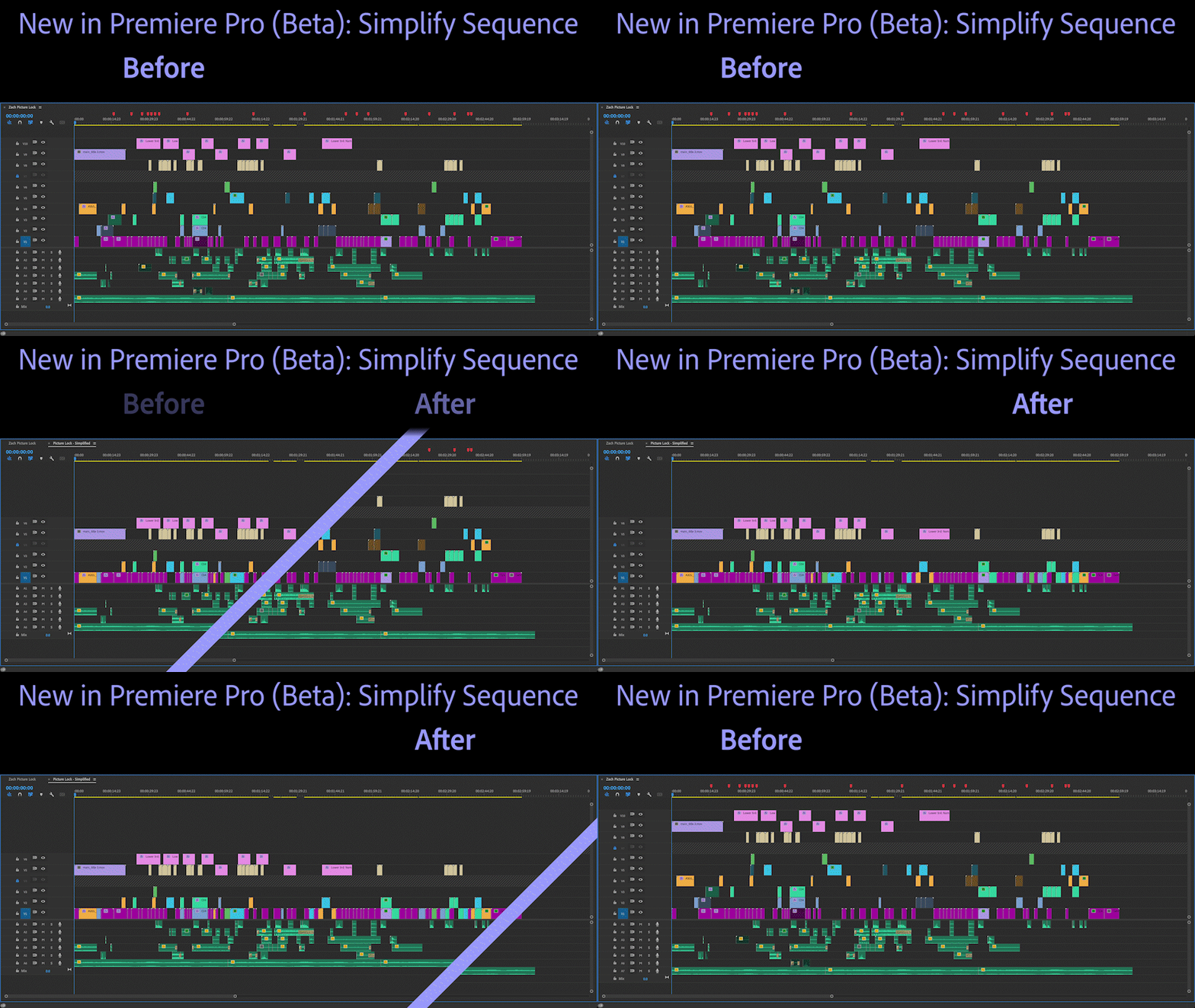



This topic has been closed for replies.
Correct answer Bruce Bullis

I was wrong, we are putting an ExtendScript API around SimplifySequence; details forthcoming.

No new ExtendScript APIs are planned; a public API around Simplify Sequence will need to wait until PPro exposes new APIs, for use with UXP extensions...er, "plug-ins" (they're extensions).

17 replies

Inspiring
August 14, 2021

I have not much to say, other than - I like it! Nice feature!

Participating Frequently
August 12, 2021

Hello, 


Are you planning to add a control on this feature in the cep Premiere Pro panels ? So it could be possible to launch it from a script !


Best,


Nicolas from Autokroma

Bruce Bullis
Community Manager
Bruce BullisCommunity ManagerCorrect answer
Community Manager
August 12, 2021

I was wrong, we are putting an ExtendScript API around SimplifySequence; details forthcoming.

No new ExtendScript APIs are planned; a public API around Simplify Sequence will need to wait until PPro exposes new APIs, for use with UXP extensions...er, "plug-ins" (they're extensions).

New Participant
January 24, 2024

Any news on this. I'm working on something where this would save me a lot of time. I'm looking at manually implementing something like this but feeling like it would be a waste if this is at all availible.

Jonno the fusspot
Participating Frequently
August 11, 2021

great feature!


Can it sort mono from stereo audio clips into separate mono tracks and stereo tracks?


i.e. put all the monos in the top tracks (but keep mono clips already there in the same layout - add the stray monos to tracks below and push the stereos down) and if there are any stereos hidden in there, they can drop down to where the stereos are hanging out. 

or better still (sorry, this is a different function), because some cameras default to stereo, if you hadn't noticed at first and already cut them into your sequence, even if you modify the original clip to have 2 track mono instead of stereo, there is no way that I've found so far that lets me convert them to two track mono on the timeline.  This would be a really handy feature. 

woukd also be good if you could make some tracks only accept mono and others only accept stereo. Not for me personally but when I work with a director who also likes to edit, they throw stereo and mono clips every where and you have no idea until you either hear them or turn waveforms on and look a little closer. Then you have to go through and re assign them to their appropriate tracks (production mono = A1-A4, music stereo = A5 & A6, SFX stereo = A7-A# etc). 

just a thought, but would be super handy. : )

PP 14.3.2 iMac 27" (Mojave) Blackmagic UltraStudio Express IO
Inspiring
August 11, 2021

Not really an answer to your overall suggestion - but when you say 'there is no way to convert them to two track mono on the timeline', I wanted to share the 'solution' I've found (aka quick way of doing it manually)

You might already be doing this!

Once you've updated the clip in the project bin to be 2 track mono:

Find the clip on the timeline, select the audio

Hit 'f' (or whatever you've mapped 'match frame' to), to open the clip in the source window with the correct in/out points

Drag the audio icon over-the-top of the current stereo audio clip


Hope that makes sense!
It only takes 2 seconds, though obviously if you have a ton of clips already in use then it's not super helpful

Rag and Bone
Brainiac
August 11, 2021

Looks very handy.

Jonah Lee Walker
Inspiring
August 11, 2021

This would be an amazing place to un-merge clips as well as multi-cam clips. There needs to be a better way to un-merge clios than exporting an xml and re-impirting it. Otherwise just fix the merge clips audio metadata thing so a mixer can link back to the correct original footage!

- Jonah Lee WalkerVideo Editor, Colorist, Motion Graphics Artist
Inspiring
August 27, 2021

O my yes! I've been waiting years and years - years - for Merged Clips to be fixed regarding sound metadata. Haven't used Merged Clips since discovering the problem after a feature edit in 2017. 


And I tell every single new assistant editor coming through my firm to never use Merge Clips due to this issue.


Will it be fixed in 2021? Only a few months left.

Bruce Bullis
Community Manager
Community Manager
August 27, 2021

Our Simplify Sequence work is completely distinct from redesigning merged clips' handling of sound metadata.

EuanWilliamson
Adobe Expert
August 10, 2021

Yes!!, looking forward to trying it 🙂


Best regards, Euan.
Kes Akalaonu
Inspiring
August 10, 2021

Any chance you can have the simplified sequence move to a new bin called "Simplified"?