


Participant
June 6, 2017
Answered

The document could not be saved. This file is too big for the current operation.

  • June 6, 2017
  • 2 replies
  • 47705 views

I am trying to combine two parts of a book into one, the files are 1.69 GB and 1.82 GB. The files have 1147 pages combined. I am using Acrobat Pro XI on a Mac running 10.11.6 which has a 2.5 Ghz i5 Processor and 4 GB RAM with 23 GB of free space on the SSD HD.

I get the message "The document could not be saved. This file is too big for the current operation."

I have tried saving it to the local hard disc, a flash drive, and network attached storage after a binder has been created but get "the message." I have searched these forums but have found only similar questions so here it is again.
Correct answer Tariq Ahmad

Hi

Sorry for the delay in response.

Would you try below steps:

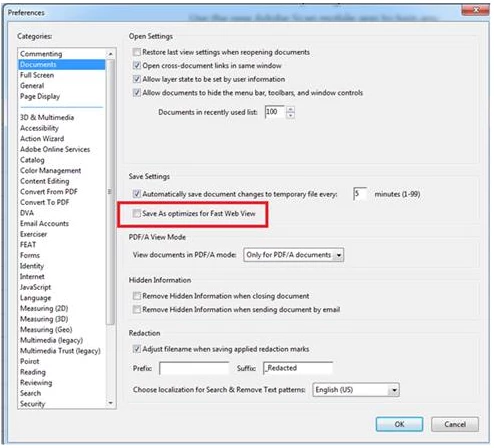
In Acrobat, go to Edit>Preferences>Documents - uncheck "Save As optimizes for Fast Web View" and then Save the combined file.

Let us know if that helps.

-Tariq Dar

2 replies

Participant
March 9, 2023

Thank you! It worked, great tip!

AkanchhaS8194121
Legend
June 7, 2017

Hi Chrisc43122774,

I assume you are using Adobe Acrobat DC? As mentioned the total file size is approximate 4Gb so there shouldn't be any problem with the space.

But some devices (network drive…) cannot handle files larger than 2 Gb, regarding of their formatting.

For testing purpose could you please try combining files which are quite smaller than the size you have currently?

Regards,

Akanchha

Participant
June 7, 2017

I am using Acrobat Pro 11. Is this a problem in Acrobat DC as well? I can combine large files up to around 2 GB without problem, as well as smaller ones. The external drives handle files of much greater size on the network, as do the thumb drives. I am having similar negative results when trying to combine a 3.6 GB total file from four smaller files on an older Macbook Pro as well so all indications point to the application, not the hardware.

Tariq AhmadCommunity ManagerCorrect answer
Community Manager
June 16, 2017

Hi

Sorry for the delay in response.

Would you try below steps:

In Acrobat, go to Edit>Preferences>Documents - uncheck "Save As optimizes for Fast Web View" and then Save the combined file.

Let us know if that helps.

-Tariq Dar