


New Participant
June 21, 2021
Answered

Unable to print validated e-signature

  • June 21, 2021
  • 2 replies
  • 28565 views

Greetings


I’m using Acrobat Pro DC 2021 and have been trying to print a form bearing a validated e-signature with no success.


When viewed on the computer as a pdf file, the signature is valid and bears a green tick.
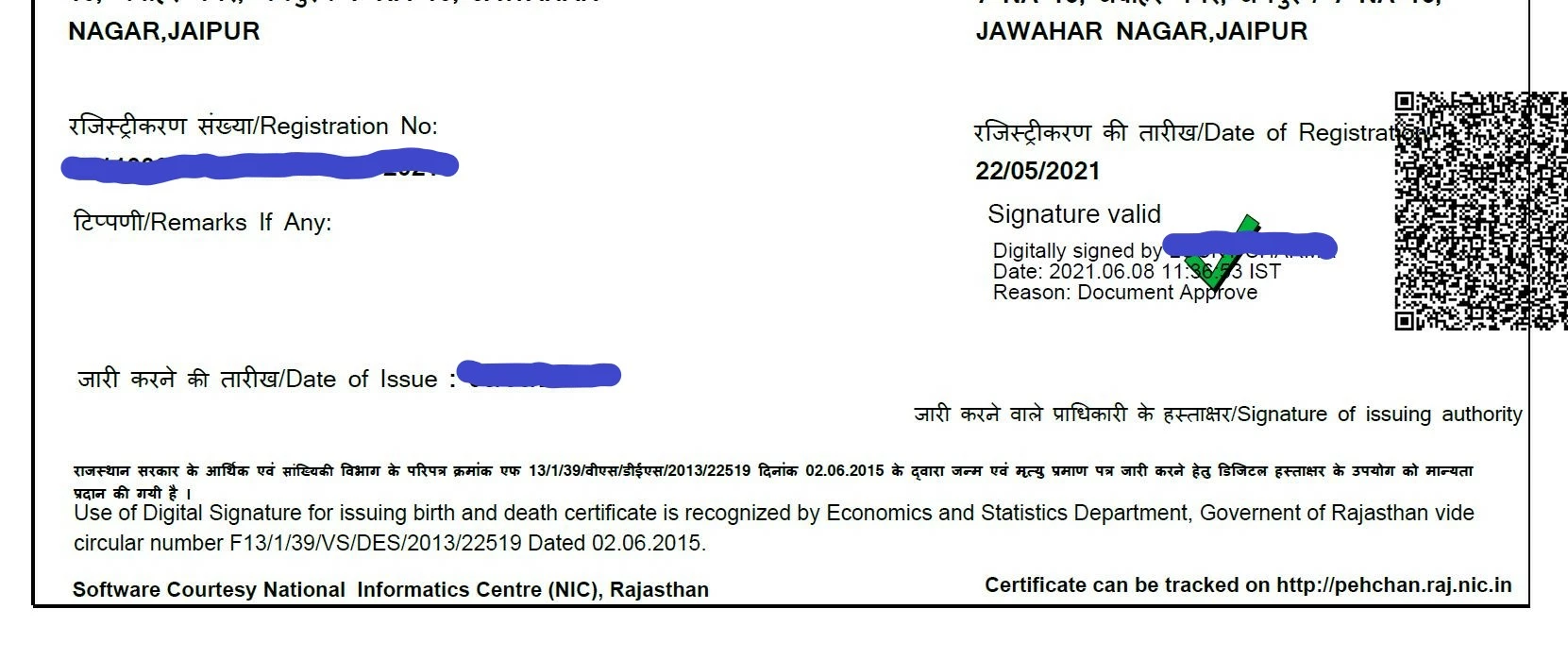
Whenever I print the pdf file, the signature bears a yellow question mark and says the signature is “not verified”.  


I’ve tried all the following:

  1. Checked for updates (none available)
  2. Picked “Document and Markups” in the “Comments and Forms” section when giving the print command
  3. Picked “Document and Stamp” in the “Comments and Forms” section when giving the print command
  4. Downloaded the file again and attempted the entire process again


Still no luck. Please provide a solution


Warm regards


Correct answer defaultorwzguz159fj

While I don't disagree with the larger correctness of what you are saying, this concept is of little use when grappling with a beuraucracy that concretely demands that a printout of the certificate bear a 'tickmark' and not a 'question mark'. 

Similar to previous such posts on this topic (of which there are quite a few now) I join the ranks of users of the program who had to devise their own solutions. I'm posting what worked for me in the hope that it will help someone else. From what I know this particular solution has thus far not been documented. 

1. Go to the Print Option 

2. Select "Documents and Markups" 

3. (this was what made it work for me) TURN OFF THE TONER SAVER PRINT MODE.

Print and the 'tick mark' now appears on the printout 


I know this sounds like a very stupid and makeshift solution, but why it worked is again beyond me. If you are stuck in the same situation, I hope it helps you too. 


2 replies

try67
Braniac
June 22, 2021

A printed copy of a digital signature is not validated, though. It can't be. In order to validate it you must be able to interact with it.

defaultorwzguz159fjAuthorCorrect answer
New Participant
June 22, 2021

While I don't disagree with the larger correctness of what you are saying, this concept is of little use when grappling with a beuraucracy that concretely demands that a printout of the certificate bear a 'tickmark' and not a 'question mark'. 

Similar to previous such posts on this topic (of which there are quite a few now) I join the ranks of users of the program who had to devise their own solutions. I'm posting what worked for me in the hope that it will help someone else. From what I know this particular solution has thus far not been documented. 

1. Go to the Print Option 

2. Select "Documents and Markups" 

3. (this was what made it work for me) TURN OFF THE TONER SAVER PRINT MODE.

Print and the 'tick mark' now appears on the printout 


I know this sounds like a very stupid and makeshift solution, but why it worked is again beyond me. If you are stuck in the same situation, I hope it helps you too. 


New Participant
October 7, 2022

THANKS ITS WORK

Amal.
Community Manager
Community Manager
June 22, 2021

Hi there


Hope you are doing well and sorry for the trouble. AS described yo are unable to print the validated E- signature form and getting the error signature is not verified. Also you have tried most of the troubleshooting with no success.


Please try to print the PDF as an image and see if that works for you. Open the PDF > Go to Print > Advanced > Print as image


If it still doesn't work, try to open the PDF in a web browser (Chrome) for testing and try to print it from there and check.


Regards

Amal

New Participant
June 22, 2021

Hi Amal, 


Thank you for replying. 


I'm afraid the solution you offered regarding the printing as a picture does work, but it changes the appearance and quality of the text - it becomes grainy and less prescise, and some of the offices I tried to use the certificate in didn't accept it. 


Also when I tried to open the file in chrome the green tick disappeared, and however the body of the signature still said document approved. 


Please help me out, this is a very important document and facing such basic problems printing it is posing a lot of problems. 

A lot of previous customers have also faced the same problem. 

ScottVal
Community Manager
Community Manager
June 22, 2021

Hi, I have removed the death certificate as requested.

Please let us know if you have any questions or need further help.

Thanks,

Scott