New Participant
March 9, 2022
Answered

Disable Document Cloud Outlook Add-in

  • March 9, 2022
  • 8 replies
  • 99136 views

Hi,

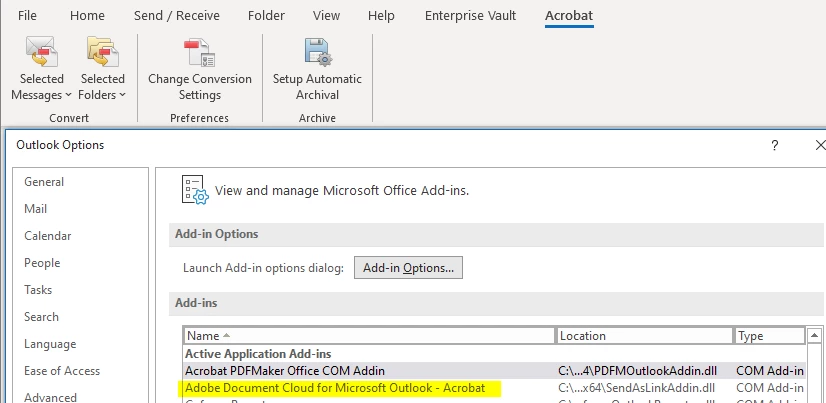
Even after disabling all "Document Cloud" feature for Acrobat Pro DC via Adobe Customization Wizard DC, I'm still able to see this "Adobe Document Cloud For MS Outlook add-in" in Outlook.
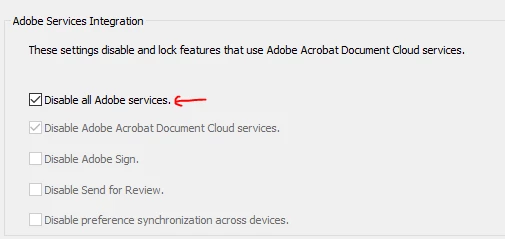
 

Can you please tell is it disabled or not? or Is it expected to be there even after it is disabled?

If not, how can I disable this add-in via Customization Wizard?

Correct answer Peter25227529uepn

Click File on the Outlook menu.
Click Options on the File menu.
Click Add-ins.
Select COM Add-ins from the Manage drop-down.
Click Go.
Deselect Adobe Document Cloud for Microsoft Outlook - Acrobat.
Click OK.


Hope This Works,

Peter

8 replies

New Participant
November 25, 2024

For those still struggling with this, I have created a PowerShell which can be run or pushed out that fixes it permanently (that we can tell):

https://github.com/EpicPilgrim/FixPDFMakerAddin

New Participant
August 14, 2024

I am so tired of having to disable Adobe junk (bloatware) that I DON'T WANT.  Stop adding I don't ask for!!!!!


[Abuse removed by moderator]

New Participant
July 2, 2024

Go to Outlook "File -> options -> Trust Center -> Trust Center settings -> Select "Macro Settings" and uncheck "Apply Macro security settings to installed add-ins" . This will resolve the issue.


New Participant
April 17, 2025

Just an FYI, that method didn't work for my organization.  We still have it showing up after every update.

New Participant
April 17, 2025

The only way you will fix that is using the script i wrote and posted as a comment in this thread.

New Participant
June 30, 2024

Thank you for this! Works perfectly to get rid of all those pesky add-ins

Participating Frequently
June 12, 2024

What I've done instead is completely uninstall Acrobat Reader.  When I want to view a pdf document I let the PC use Microsoft Edge and it works just fine.  No need to mess with registry entries.  

Bottom line - do a complete uninstall of Acrobat Reader and use another standard app to view pdf documents.  I'm using Microsoft Edge to view PDFs and it works very well.

Bevi Chagnon - PubCom.com
Brainiac
June 14, 2024

Many of our browsers are now (June 2024) able to open and read PDF files, like MS Edge, Mozilla's FireFox, and Google's Chrome.


But they haven't yet provided full functionality such as filling in form fields, editing, commenting, and accessibility access. Hopefully those features will eventually be built into our common browsers.


So if all you need to do is read and print and PDF, and your browser can do that, then sure go ahead and use them.


But if you need more functions, keep your installation of Acrobat (Reader, Standard, or Pro) and use the "classic" method of downloading the PDF to your computer and then opening it in Acrobat.


You can control which software app opens a PDF by changing the settings or preferences on your computer (both Mac and Windows do this, but the technique is a bit different for each). In Windows, go to Settings / Apps / Default apps and procede from there. If you want your Edge browser to open all PDFs, the choose Edge for "PDF" files. Don't forget to reboot your computer to make it "set".


|    Bevi Chagnon   |  Designer, Trainer, & Technologist for Accessible Documents ||    PubCom |    Classes & Books for Accessible InDesign, PDFs & MS Office |
Participating Frequently
June 18, 2024

Hi Bevi, this doesn't address the issue of Adobe installing very persistent and difficult to remove unwanted additions.  My advice to everyone, until Adobe stops this practise, is not to use Adobe software.

New Participant
February 19, 2024

Adobe has some hjow inserted itself into my Firms's Outlook email acocunt.  Every attachment is now a cloud link. If this does not stop we will be canceling adobe immediately and removing it from our system and viewing it as a threat to our business.  Adobe has been given no persmisison to behave this way inside our business operating systems.

Participating Frequently
February 19, 2024

Try this:

I found a workaround to disable this crap definitely.

  1. Close Outlook

  2. Go to C:\Program Files\Adobe\Acrobat DC\PDFMaker\Mail

  3. Rename the "Outlook" folder, in my case: Outlook_DISABLE (put whatever you want)


When you do this, the add-in can't load on Outlook and it is shown with an error on the Add-ins management screen on Outlook.

Worked for me.

New Participant
February 19, 2024

Thanks.  We have already made teh decison to can Adobe.  In the process of unistalling it now and down loading a competitor product. I get they are feeling squezed out of the market by Microsoft and Google but this crap was unnecessary on their behalf.  Seems like a really stupid business decision. Make all your existing customers mad at you.

Participating Frequently
September 18, 2023

I found a workaround to disable this crap definitely.

  1. Close Outlook

  2. Go to C:\Program Files\Adobe\Acrobat DC\PDFMaker\Mail

  3. Rename the "Outlook" folder, in my case: Outlook_DISABLE (put whatever you want)

  4. Be happy.

When you do this, the add-in can't load on Outlook and it is shown with an error on the Add-ins management screen on Outlook.

Worked for me.

New Participant
September 20, 2023

I deleted the .dll file for this add-in. Will this still work or do I have to change the whole folder? I’m worried that some of the add-ins I need might stop working.

Participating Frequently
September 20, 2023

Well, based on the logic, I believe the result will be the same. You just did it in a more specific way.
I don't use any Adobe add-ins, so I simply renamed the entire folder. However, keep an eye on the add-ins menu in Outlook to see if Document Cloud shows up again. If it does, you will need to choose between using all Adobe add-ins or not using any Adobe add-ins at all.

Peter25227529uepnCorrect answer
Participating Frequently
August 26, 2022

Click File on the Outlook menu.
Click Options on the File menu.
Click Add-ins.
Select COM Add-ins from the Manage drop-down.
Click Go.
Deselect Adobe Document Cloud for Microsoft Outlook - Acrobat.
Click OK.


Hope This Works,

Peter

New Participant
July 27, 2023

Unfortunately it just keeps coming back.  It stays gone several days and then returns.  Is there any way to permanently remove this plugin/add-in?  I have 2 people who are having the same issue.  I've removed the add-in for both and it works, but not forever.

New Participant
July 29, 2023

Unfortunately, every time your software is updated by Adobe, it is wiping out your preferences to turn off Adobe services.

And you're back to square one with the default settings to send your data to Adobe. Microsoft does the same in its apps, sending your data to their cloud service, OneDrive.


I believe this violates US antitrust and fairness practices.


To me, it's a form of fraud; we users are losing control over our content and Microsoft, Adobe, and other software manufacturers could be profitting from our data — information that we thought was ours and maybe even copyrighted.


If you're a US citizen, you might consider submitting a report to the FTC at https://www.ftc.gov


I have the same issue. Software companies should not force features on people.

I'm going to uninstall all Adobe products and go to a competitor.