

New Participant
July 17, 2016
Answered

How do i delete files from the cloud?

  • July 17, 2016
  • 1 reply
  • 24536 views

Trying to figure out how to delete a file from the pdf cloud?

    This topic has been closed for replies.
    Correct answer Adorobat

    Hi rodm51840960 ,

    You can delete the file by opening the Document Cloud option in the Application or through a Web Browser.

    For Application : Open Reader/Acrobat>Home>Document Cloud>select the file/s which you want to delete>Delete.
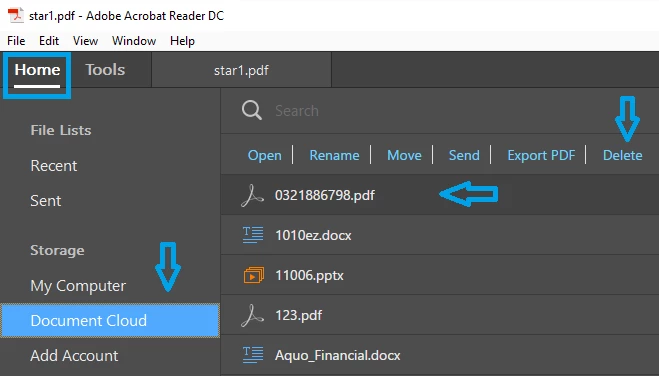
    For Web : go to Cloud.acrobat.com >Files>Document Cloud>select the file/s which you want to delete>Delete(in the bottom right corner of the screen)

    Let us know if you face any issue.

    Thank You!

    Shivam

    1 reply

    Adorobat
    Community Manager
    AdorobatCommunity ManagerCorrect answer
    Community Manager
    July 21, 2016

    Hi rodm51840960 ,

    You can delete the file by opening the Document Cloud option in the Application or through a Web Browser.

    For Application : Open Reader/Acrobat>Home>Document Cloud>select the file/s which you want to delete>Delete.

    For Web : go to Cloud.acrobat.com >Files>Document Cloud>select the file/s which you want to delete>Delete(in the bottom right corner of the screen)

    Let us know if you face any issue.

    Thank You!

    Shivam

    New Participant
    December 6, 2016

    Delete doesn't show up as an option -- it remains a shadow (pale instead of black print) under edit; can't be activated.

    Adorobat
    Community Manager
    Community Manager
    December 12, 2016

    Hi nickpic,

    Would it be possible for you to share the screenshot of the screen with the options available?

    Please visit this link on how to insert a screenshot here in the forums: https://forums.adobe.com/docs/DOC-7043#jive_content_id_How_do_I_attach_a_screenshot