


Participant
June 23, 2017
Answered

Why can I not open my document cloud?

  • June 23, 2017
  • 1 reply
  • 5478 views

I purchased the Adobe PDF Pack and when I open my Adobe Acrobat Reader DC, I cannot click on my document cloud.  Can someone help me out with this?  I haven't been able to open it for a while and I thought it was because I was using the free version of this program and so I purchased the service, but I still cannot open my DC.  I went online and tried it that was as well and my DC will open, but it will not pull up my document.  I get a message on the screen saying "Please wait".

[Moved from the non-technical LOUNGE Forum to an actual Program forum... Mod]

[Here is the list of all Adobe forums... https://forums.adobe.com/welcome]
    This topic has been closed for replies.
    Correct answer AkanchhaS8194121

    Hi Anthonya65465361,

    As you said that the only Document Cloud storage is not opening, so could you check couple of things as suggested below and see if that works?

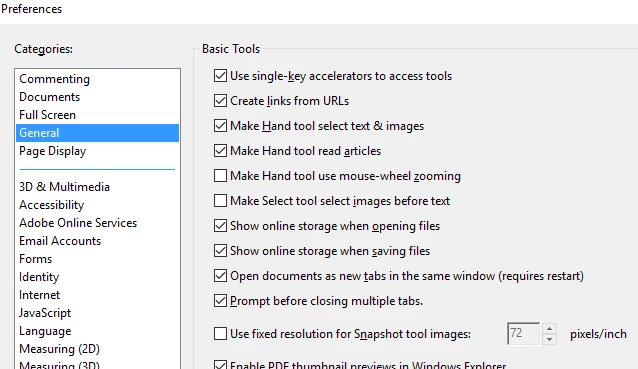
    • Check the preferences settings of the application Go to Edit>Preferences>General. Check"Online storage when opening files"

    If that is checked, then temporary disable if any internet security software you have installed.

    Let us know the update on this.

    Regards,

    Akanchha

    1 reply

    AkanchhaS8194121
    AkanchhaS8194121Correct answer
    Legend
    June 24, 2017

    Hi Anthonya65465361,

    As you said that the only Document Cloud storage is not opening, so could you check couple of things as suggested below and see if that works?

    • Check the preferences settings of the application Go to Edit>Preferences>General. Check"Online storage when opening files"

    If that is checked, then temporary disable if any internet security software you have installed.

    Let us know the update on this.

    Regards,

    Akanchha