colemanw57149938
New Participant
September 1, 2015
Answered

How do I embed the font in a PDF? [2015]

  • September 1, 2015
  • 3 replies
  • 7824 views


[This thread from 2015 is now locked, as things have changed. Please start a new thread for current versions of Acrobat.]


How do I embed font in a PDF using Adobe DC?

 

This topic has been closed for replies.
Correct answer Bevi Chagnon - PubCom.com

It's not correct to say that the solution above is no longer valid, but if "embed missing fonts" is unavailable in the most current version of Acrobat it would be helpful to know if it has been removed altogether or moved to another location. I've looked but if "embed missing fonts" is still available I cannot find it. 


As of today (August 2022) and Acrobat DC Pro version 2022, the process has changed somewhat from what was previously posted above in 2015. The utilities and their location have changed since then, as well as some of the labels.


Here are the updated instructions:
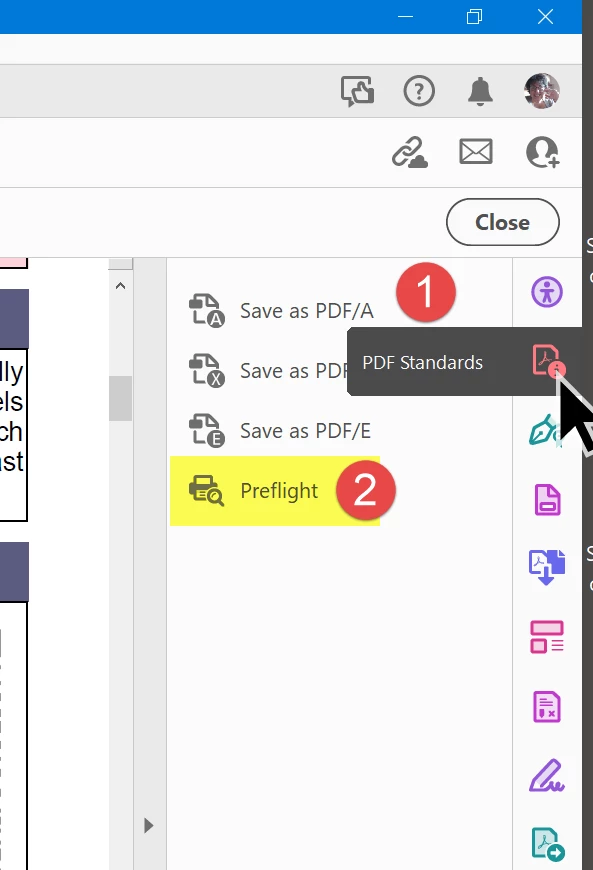
 

  1. From the right side panel (or the Tools menu in the upper left), open the Standards Tool.
  2. Select Preflight.
  3. Select PDF Standards from the top drop-down menu.
  4. Select the little blue wrench at the top of the dialogue box.
  5. Select Embed fonts (even if text is invisible).
  6. And finally, select the Fix blue wrench at the lower right to execute the process.


Requirements:

  • Of course, this process requires that you have the necessary fonts installed on your computer, so make sure you first, check the PDF's list of fonts in File / Properties / Fonts tab. Check your operating system's font folder to ensure those specific fonts are installed on your computer.

  • The fonts must be licensed to be embedded in PDFs. Most of those that come with your operating system and Microsoft Office are embeddable, but fonts from other font houses require that you purchase an additional license to embed them into PDF files. (That's another change since 2015.)

  • And you must be using the Acrobat DC Pro version of Acrobat, not the Standard or Reader versions.


3 replies

New Participant
April 22, 2022

This answer evidently is not valied in 2022 anymore - a new solution is needed. Please remove oboslete solutions to existing problems.

Bernd Alheit
Community Expert
April 22, 2022

What is not valid?

Inspiring
August 22, 2022

It's not correct to say that the solution above is no longer valid, but if "embed missing fonts" is unavailable in the most current version of Acrobat it would be helpful to know if it has been removed altogether or moved to another location. I've looked but if "embed missing fonts" is still available I cannot find it. 

New Participant
May 4, 2020

I am under PDf fix ups and embed fonts is not an Option.  I have Pro DC as well

Brainiac
May 4, 2020

This is a 5 year old discussion and the app has changed. 

Community Manager
September 3, 2015

Hi Coleman,

Kindly follow the below instructions to embed any missing fonts in a PDF in Acrobat PRO DC:-

1) Go to Tools > Print Production > Preflight.

2) Go to PDF fix ups > Embed missing fonts > Select "Analyze and fix".

PFB screenshot for reference :-

Hope this helps!

Thanks,

Tanvi

New Participant
May 26, 2021

When combining files, the resulting document shows boxes instead of text.  I do this often without issue but for some reason, this issue occurs randomly.  In trying to find a solution, I ran across the suggestion that fonts may not be embedded which really doesn't make sense because the documents I'm combining are the same kind of documents I always combine (pages of a PO).


I have the same issue and  can't find "Embed missing fonts".  I'm using Adobe Acrobat Pro DC version 2021.001.20155.  I also don't see and "Acrobat Pro DC" anywhere in a dropdown box.


Any help is appreciated!