New Participant
April 21, 2021
Question

How to set the default date format in Adobe Sign?

  • April 21, 2021
  • 12 replies
  • 39438 views

Hi,


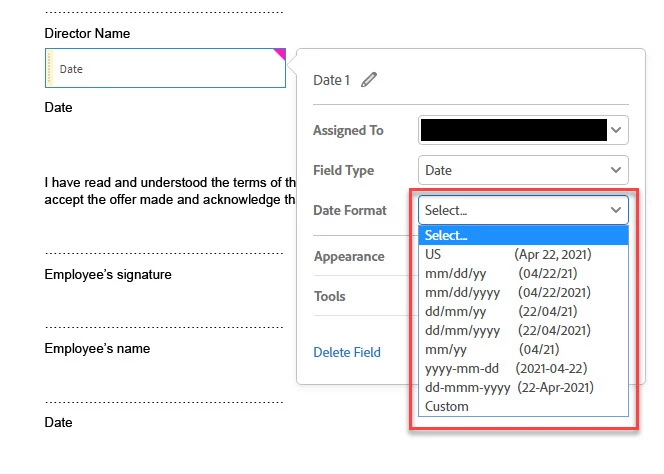
Is there a way to set the default date format in Adobe sign so I don't have to edit the field and change it everytime I add a date field?
Cheers,


J

12 replies

New Participant
April 13, 2024

Hi Everyone! I've been dealing with this issue for months as a CPA sending out e-file forms. Today was the first day my Adobe Signatire remembered my date format from the prior e-files I sent out. Glad it's fixed and hopefully the rest of you will have success. What grind. All the best,

Bill 

Meenakshi Negi
Community Manager
Community Manager
April 17, 2024

Hi William32091813zb6h,


Thank you for sharing this information! Glad to know it is now working for you. 

I would suggest others get this checked, and if anyone is still experiencing this behavior, we will check with the team. 


Let us know if you need any help.


Thanks,

Meenakshi


Marking a reply or response “Correct” will help future users with the same issue quickly identify the correct answer.

New Participant
March 12, 2024
YES!!! That sucks, too. It is no longer easy and efficient to add
attachments. It's a total PITA! Who did they beta test this on that said
it's a great idea?

--
*Clint Cross*
Project Manager
Washington County Landscapes
Office 979-353-0955
Direct 979-530-3248
*clint@washingtoncountylandscapes.com
*
4579 US 290 W Brenham, TX 77833
https://washingtoncountylandscapes.com/
[image: Facebook Logo]
<>[image:
Instagram Logo] <>
New Participant
March 12, 2024

Add my voice to the chorus of discontent on this matter.  If there is a default setting, there is a way to change the default setting.  Adorably the signature panel is showing "date" in yet a different format that could be left to misinterpretation.  Good job Adobe!  If you're going to FORCE a default, choose one that includes the alpha month so that it will at least not be left to misinterpretation.  While I'm complaining, I've lost the ability to add attachments during the signing process and now have to combine the file BEFORE I start the signing process.  Thanks for changing my processes for me without making the process more efficient.  This update was obviously designed by someone that DOES NOT DO THE PROCESS!

Known Participant
March 12, 2024

I reverted to the 'old' Acrobat to fix the single file issue. 

elizabethh30562639
New Participant
March 11, 2024

This is the most frustrating thing ever. I didn't notice the default change until after a client signed, so now it looks like the contract was signed on July 3, 2024 instead of March 7, 2024. You'd think this would be a no-brainer to allow people to choose their own default. If they can't do that, at least force us to choose at each contract sent out so we don't forget and wind up with a misleading date on contracts.


ginab42306749
New Participant
March 11, 2024

I'm with you. I specified the "Date of Signing" field and didn't notice the change either until after a very contentious negotiation was finally settled with a signed agreement and now the other party is disputing the signing date. 

elizabethh30562639
New Participant
March 11, 2024

Oh no. That is my nightmare. Fortunately my clients understood and we just made an adendum about the date format.

Known Participant
February 15, 2024

I want Euro (but in full, so 16 February 2024, dd/mm/yyyy would be OK) but get mm/dd/yy. Others have US and want Euro format.

It's about time users were given a choice of format here.

Participating Frequently
January 23, 2024

I was on the phone for a while about this with customer service. You have to have the enterprise account of 100+ licenses to set it as a default. I was assured that this was not a design defet, that adobe did this on purpose. Im thinking the european market is just largwe than the american market.

New Participant
February 6, 2024

THIS IS F-ING RIDICULOUS! The upgrade was obviously a downgrade. If you are not going to let the American market have the same conveniences as the European market than at least charge us less! Time is money and you have now caused us to waste time. Much less the fact that some employees forget to change the formate EVERY TIME, as required after the update and this is a problem on legal documents. Get it together. I am sure we can all find other e-sign programs to use. My personal lawyer uses a different one and so does my realtor. We have choices, or maybe you don't care.

New Participant
February 8, 2024

I absolutely agree with lcG45208. Adobe sign is not a cheap program, it stinks that there isn't an option to set the default date format.  Time is money and when things do not work properly it is very frustrating. I will be checking for different options.

New Participant
January 16, 2024

I am having same issue that just started with the newest version of Adobe Acrobat. The date format is now defaulting to dd/mm/yyyy and I can't find ANY way to make it default to mm/dd/yyyy.  My only option was to go to the menu  "Disable New Arobat" to revert it to the previous UI and then that fixes it. Hopefully adobe fixed this soon! It's things like this that would make us want to switch to the more expensive competitor DocuSign!

Participating Frequently
January 23, 2024

They told me there is NO plan to fix it was done on purpose. Still not worth the Docusign price. TWICE as expensive, thats crazy

New Participant
November 30, 2023

Same issue here. I have 34 users on Acrobat Stnadard DC, 9 on Acrobat Pro, and 5 on Adobe Acroabt Pro. We use these products to e-sign documents frequently. "Date of Signing" field default format is european style ("dd/mm/yyyy"). We have to manually change the field format to "mm/dd/yyyy" EVERY. SINGLE. TIME. As an account admin, I see no way to adjust the default settings. There has got to be something we can do here so that we're not constantly getting signature dates in the wrong format. This is rediculous! 

New Participant
January 10, 2025

I just want to update here to note that Adobe has fixed this issue for our account sometime ago. Our date formats now default to the correct US format ("mm/dd/yyyy"). It seems like each user only had to change the format once, then it defaults to the last used format from that point forward. Thank you, Adobe, for fixing this!

Participating Frequently
February 16, 2023

I have this problem too, seems like it should be an easy setting to add in your account preferences?

mariahweyne
Inspiring
February 24, 2023

The account administrator can make the change for all users.  Under Account Settings/Global Settings


Participating Frequently
February 26, 2023

I have Adobe Acrobat not Adobe Sign, there are no Global Settings / 'default date' settings only "Signature Preferences" with no ability to change the default date?

New Participant
July 15, 2022

Why do we not have more options to set default preferences?
Even when you select "Use Current Properties as Defaults" it does not save the Date Format.

Other programs let you set these types of features, even customize short cut keys.