


Participating Frequently
October 11, 2017
해결됨

There are recipients who need to sign this document that do not have a signature field assigned to them.

  • October 11, 2017
  • 8 답변들
  • 25827 조회

I am encountering an issue where after I place initialing locations for the recipients on a document that requires no signatures, Adobe Sign gives me the following message when attempting to send:

"There are recipients who need to sign this document that do not have a signature field assigned to them. You can go back and add signature fields or we will add a signature block for those recipients. Do you want to review or send the document?"

I have previously been able to send documents for initialing only by the recipients, and I definitely DO NOT want Adobe to add additional signature fields.

I am of course unable to send an important document because at this point I have no idea what the problem is.

This is a pre-signed agreement that was physically scanned, so there is no signature metadata associated with it (it simply needs initials for a couple of amended sections).

This has happened on two separate computers, with 2 different versions of this document (I thought redoing another and trying again might solve the issue), so I am assuming this is an Adobe side issue.
이 주제는 답변이 닫혔습니다.
최고의 답변: SimonATS

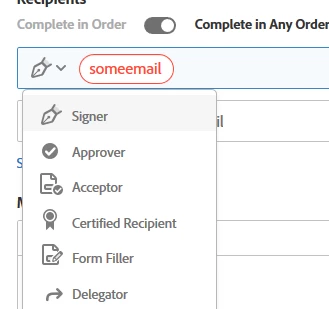
This is how it always worked and will work with Adobe Sign. If you set the role for the participants to the Signer role and do not specify a signature field, Adobe Sign will bang one in there for you, even if you have initial fields already.

Check if your plan support roles:

Compare Adobe Sign plans | Adobe Document Cloud

if it does.

access other roles by clicking the pen icon.

8 답변

CTNT
Participant
June 19, 2023

I have a similar issue. I have one generic document that I want to send to multiple people to enter their name, signature and date.

I have prepared it as a form. It has a name field, signature field (Field type is set to signature) and date field, and the participant role is set to anyone. I then 'request e-signature' add the multple email addresses, and get the error that I do not have a signature field assigned when I press send. Even if I change the participants role to 'signer' I get the same error. I defintely used to be able to do this before, but I cannot work out what I am doing wrong. 😞

mariahweyne
Inspiring
June 19, 2023

You need to specifically assign each participant a signature field. Can't leave it set to anyone.  Hope this helps.

CTNT
Participant
June 21, 2023

Ah thank you. Do you know if there is any way a generic document can be sent to multiple people and they just enter their name, signature & date?

Participant
May 25, 2023

you place the signature field, right click, edit, and show a field that says assign to: and choose the email of the person who has to sign there.

Participant
March 18, 2022

After you assign the full name field, click the little icon that looks like a pen in that drop down menu and it adds a "signature" block.  

Participant
February 25, 2022

This solved my problem. For some reason, the signature field was reverted to a different type between two projects. I clicked each field again, clicked the pen icon to indicate it was a signature field and it worked. ¯\_(ツ)_/¯

Participant
August 23, 2021

Took me a while to figure out, but I was having the same issue.  Adobe Sign defaults to "text" entry when you place the signature field.  It was as easy as changing to a signature field by clicking in the field after you place it and selecting the fountian pen icon.  


Participant
October 7, 2021

Thank you "not an expert"!  Your response resolved the error message I was getting.  Best and simplist answer for resolving the issue.


Many thanks for sharing!

FederalSentencingAlliance
Participant
August 11, 2021

I just went round and round with the same issue. My problem was that there was no signature panel field option on the final screen, just text, date, email, and print name. The problem that requires fixing from Adobe is that there is no signature field selection on that final page. One cannot select signature, and that snafu creates the error message that many are experiencing. This is what I did that seemed to work: First create an unnamed field on the document, by clicking on the signature block (don't name the field). Next go into advanced settings and click on the signature block to select it. It does not light up, but it just indents. Next click on save progress at the bottom of the advanced settings screen. Next go back and double click the blank field you created first. On my computer,  a separate Adobe instructions popped up on the left hand side of the unnamed field. That pop up permitted me to name the field as a signature field, so I did. The blank field then changed to a signatue field. When I sent the document after that I did not get any error message (so it apparently worked). Hope that running around in circles procedures helps someone else.  ADOBE YOU NEED TO CREATE AN AUTOMATIC SIGNATURE FIELD SELECTION FROM THE LAST PAGE  CHOICES, NOT TEXT, DATE, CHECK BOX, OR EMAIL.

Participant
November 26, 2019

I have the same question, and the answer provided does not solve the issue. I'm sending to 3 recipients, each of whom are identified as "Signer." I have assigned fields to all three signers, and all three fields are in different colors, and when the cursor hovers over the field, it indeed verifies that that field is assigned to one of the three signers. Yet I am still receiving this error message, and cannot find a way around it. What is the solution when each recipient is assigned a field, as recognized by Adobe? 

Meenakshi Negi
Community Manager
Community Manager
November 27, 2019

Hi GregVernon,


The error only appears when you add a recipient on the Send page and do not add the signature field for that recipient.

As you have mentioned above, you have added only 3 recipients. Did you add yourself as the recipient?

There is no other reason that you get that error.


Please share the exact workflow you do to send the document for signature. 

If possible, share the video of the workflow you do. 


Let us know if you need any help.


Regards,

Meenakshi

Participant
December 18, 2019

I have the same problem and am still confused. I have two recipients, I added their two names, specified two signature fields. I do not understand what you mean by "add yourself as a recipient." I do not want to add myself as either a signatory or "recipient" as I know when both have signed I will be notified (since it's coming from my Adobe account.) 

My exact workflow was as follows:

Open PDF

Choose "Fill & Sign"

Choose "request signatures"

Type the email addresses of two people

Add two email addresses as "signers" (chosen from the dropdown Adobe provided)

Choose "Specify where to sign"

Click each email address at the right, and assign a field. The dot color on each email (at the right) matched the color of the signature box.

Click "send"

Get error.

SimonATSCommunity Manager답변
Community Manager
October 24, 2017

This is how it always worked and will work with Adobe Sign. If you set the role for the participants to the Signer role and do not specify a signature field, Adobe Sign will bang one in there for you, even if you have initial fields already.

Check if your plan support roles:

Compare Adobe Sign plans | Adobe Document Cloud

if it does.

access other roles by clicking the pen icon.

Participant
September 13, 2021

Start