strivedfm
Participant
October 26, 2018
Answered

Unable to delete sign agreements and templates in my account

  • October 26, 2018
  • 7 replies
  • 13798 views

Hi,


I have paid for the monthly subscription to use Adobe Sign. I have created a few sign templates (now dated ones) and I can't seem to find a delete button or anywhere to delete such agreements/templates?


I have attached the screenshots below..... HELP PLEASE


Correct answer AkanchhaS8194121

Hi all,

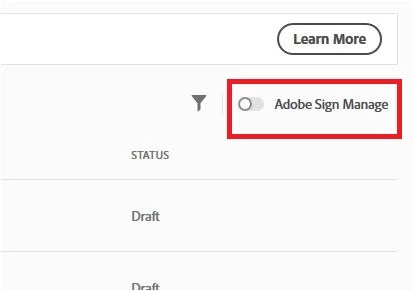
You may change the current view to Dashboard view by clicking on "For Signature" option. Click on "For Signature">select radio button "Adobe Sign Manage"

Here you will see the option to "Delete" when you open any template.

Hope this helps.

Regards,

Akanchha

7 replies

Participant
November 28, 2020

This is so not even right I don't have the words to describe my frustration.  I work in a field where I need all data wiped from the cloud in order to protect confidentiality.  I tried to delete all agreements the way you described, and three hours later, thanks to someone's "Simple" explanation, I at least managed to delete MOST of my agreements.  But there is still one (the most important one to delete of course!) that is somehow "stuck" in the system and will not delete.  Firstly:  The steps described above did nothing for me.  I had to (1) Sign in to Document Cloud, (2) Go to profile icon top left (3) Click on settings (4) Scroll to the bottom of settings to "E-signing settings" (5) Click "Edit Settings" (6) Scroll down to Privacy, (7) ENTER MY ACCOUNT EMAIL ADDRESS to find anything at all, (8) At which point I found my agreements (almost all of them) and deleted them.


This is the most ridiculous thing I have ever seen in my life.  It is criminal that it is this difficult to delete something from one's own account.

In the meantime, however, I signed out of document cloud, signed back in to make sure that all of the agreements are gone, and there is still one that persist.  It will not delete, but it is not listed when I go back and retry the steps above.  There is no way to delete it, therefore, bc the settings say that it does not exist.  I have tried my own email address and the email address of the recipient.  File will not delete.  PLEASE HELP!

Participant
November 28, 2020

Oops!  And in true form, there is also no way to edit my above post.  I made an error and went back to edit... nope.  No clear way to do that.  User icon is on top right corner, not top left for those who wish to try the steps I listed.

ICAB Incubator
Participating Frequently
October 12, 2020

Hi all, 
today I used Acrobat (DC version) for the first time to sign a document.
As this didn't went as intuitive as I hoped it would be I created two signed copies of the same "agreement".
Now I want to get rid of one of the the lower one in the list in the screenshot (attached).
Can someone educte me on how to do this because a google search on the topic didn't get me a long way.

The menus and commands are in dutch but I know how to navigate through Acrobat in English too as long as the path descriptions provided are detailed enough (I would need full path descriptions though).

Thanks for helping me out,

Marnix

Participant
August 13, 2020

I can't delete documents that need to be deleted. I can't find the page referenced as the "correct" answer.

Meenakshi Negi
Legend
December 24, 2019

Hi All,


Please try the steps provided in the following community thread link to delete the documents/ templates from the Adobe Sign account:

https://community.adobe.com/t5/adobe-sign/delete-archived-document/td-p/10466200


Hope the the information helps.

Let us know if you experience any issue.


Regards,

Meenakshi

roberte58155600
Participant
March 25, 2019

Legend
March 25, 2019

You can't delete from Recent, it's just a list of your recent work, not an actual file. Go to the actual location of the file, not the Recent list.

You can click Clear Recent; this won't delete any files but will forget what you recently worked on.

Participant
October 26, 2019

So in October 2019 there no "Adobe Sign Manage" thus no way to delete files...

Guy Boggan
Participant
October 31, 2019

Hey! 


I was having the same problem and there is a really simple and stupid solution.


From the document cloud main page, click on your avatar in the top right corner, then click Settings.


Then 'check' the box that says 'use adobe sign manager' or something like that.


And then click save and once you go back to the 'For signature' tab on the left it will look completely different and so much more useful, and you can delete templates for once!


WHY does adobe not have this feature active by default? so stupid


Any way I hope this helps!

Participant
November 3, 2019

Thank You!! Your right this should be on by default.

AkanchhaS8194121
AkanchhaS8194121Correct answer
Legend
December 17, 2018

Hi all,

You may change the current view to Dashboard view by clicking on "For Signature" option. Click on "For Signature">select radio button "Adobe Sign Manage"

Here you will see the option to "Delete" when you open any template.

Hope this helps.

Regards,

Akanchha

AkanchhaS8194121
Legend
October 31, 2018

Hi Strivedfm,

Sorry for the delay in response, and thanks for sharing the screenshots.

As mentioned above, that these are the new templates that you haven't been able to delete. So does it happen with the all files listed under the "Recent" tab or just few templates are not showing the delete option?

We suggest you to use a different web browser and sign in on document cloud Adobe Document Cloud

Regards,

Akanchha

Participant
December 13, 2018

I too cannot find a delete option for Templates? I'm a Google Chrome user so please do not ask me to switch from this. Just advise the simple solution please...?