


Participating Frequently
August 7, 2025

Adobe Express not uploading images

  • August 7, 2025
  • 31 replies
  • 1586 views

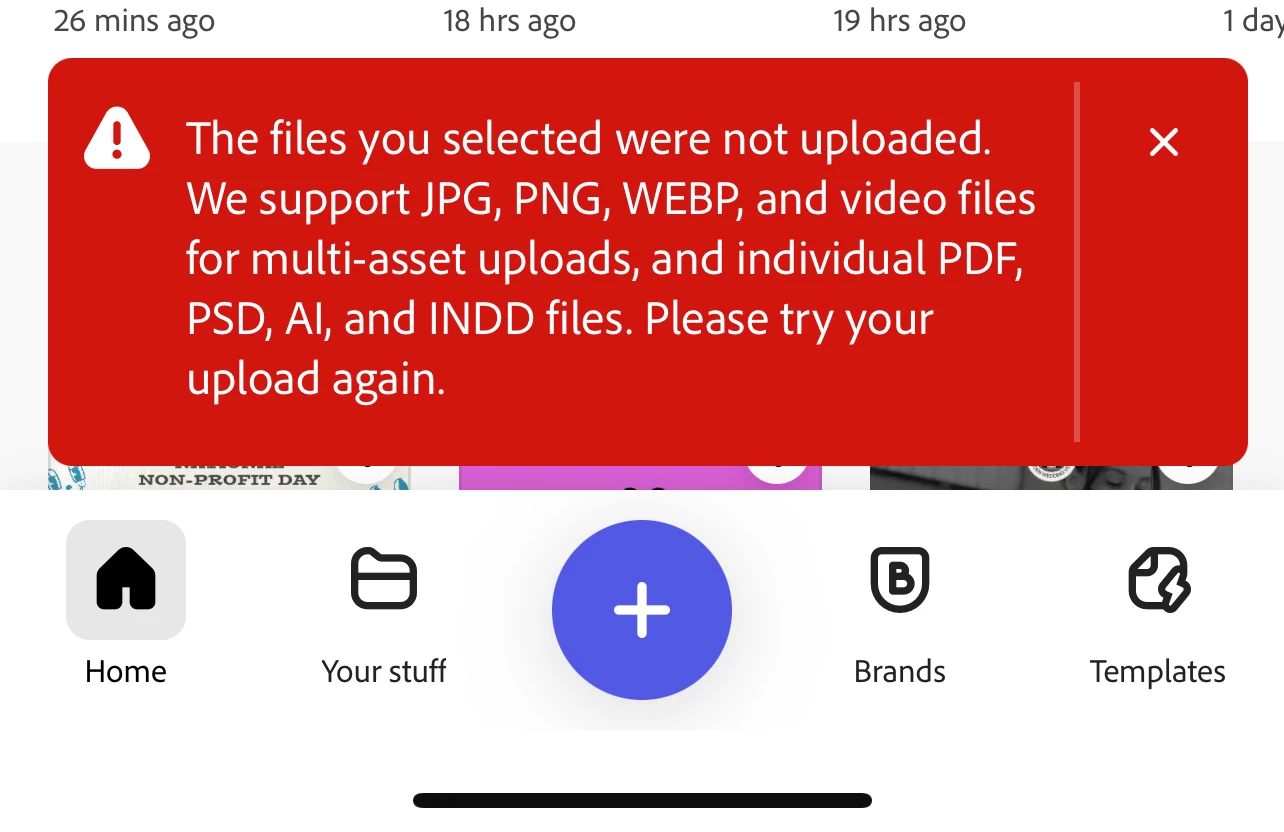
unable to upload any photos into express. I get this error no matter what type image I use. I've restarted my device, checked for updates, even took random photos with my phone. Videos appear to still work but photos are a no go. 
31 replies

Participating Frequently
August 22, 2025

@Abhi.G @ ADBE 


Thank you (at least I'm not going nuts or doing something silly!). Work-around is, er, working well, fortunately.


Your help is appreciated.


Megan

Community Manager
August 22, 2025

Hi @noralindelow ,


I want to make sure if you have tried this workaround here under this thread: https://community.adobe.com/t5/adobe-express-bugs/adobe-express-not-uploading-images/idc-p/15455738#M28160. (When choosing a photo from your Photo Library, there is an option that allows you to turn the conversion from HEIC on/off. Could you please check if this is set to "Automatic"? The way to find that is in the screenshot I am attaching (when uploading, there is an icon at the bottom right which will open an "Options" menu where you can set the format to "Automatic"), and if the options do not show up if you have given the app full access to all your photos. Could you try the following steps first:

- Go to Settings > Adobe Express
- Click on Photos and select Limited Access


Please let me know if it worked with you in the meantime.


ˆMM

Adobe Employee
August 21, 2025

Thanks for confirming. I was able to replicate on Firefox. Will investigate ASAP.
For now, your workaround (go into Adobe Express first) or another browser will have to used.


Abhi G

Participating Frequently
August 21, 2025

Sure - Windows 10, Firefox - both kept updated. Files normally .jpg, some .png


Trying to upload file thus: 


Get:

 (well the rainbow colours in the A are moving a bit, which doesn't show in a screenshot). And it just stays like that for... well, as long as I leave the browser tab open.

Participating Frequently
August 21, 2025

Further experimentation has proven that if I go into Adobe Express rather than opening the "background remover" directly, I can upload an image and then remove its background and replace it with a black one. So I can do what I need, just come at it in a different way from the one that has been working well for the past 5 months... 

Adobe Employee
August 21, 2025

@Megan_Medals 


Since you mentioned "computer", it may be a different issue than reported on this post (which is specific to iOS and .heic files). 
Could you share more details (browser, OS, file type, screeshots?)


Thanks

Abhi G

Participating Frequently
August 21, 2025

I am also experiencing this issue... I use the online Adobe Express background remover then add black backgrounds to images of medals for my website. Or did until last night when it suddenly refused to upload images from my computer to process. Even images that it has uploaded and handled before. I really would rather not go back to adding the backgrounds by hand, and while there are other background remover tools online, this is the best one I've found!

Participant
August 21, 2025

I have the same issue. Please fix this 🙂

Community Manager
August 21, 2025

Hi @noralindelow,


Thank you for letting us know, and apologies for the frustration this issue is causing. I’ve shared your case with our engineering team so they can investigate why image uploads aren’t working while videos still do. We’ll keep you updated as soon as we have news. In the meantime, we’re here to support you if you’d like us to walk through additional troubleshooting together.


^MM

daboWorksAuthor
Participating Frequently
August 21, 2025

this only added more steps to end up to the same problem..At this point I'll just work around it. Thanks for your help though.

Adobe Employee
August 19, 2025

Hi @Dabo318 


It seems that the options do not show up if you have given the app full access to all your photos. Could you try the following steps first:

- Go to Settings > Adobe Express
- Click on Photos and select Limited Access


Hope this helps


Abhi G