


New Participant
October 1, 2023

Inconsistent Font Sizes

  • October 1, 2023
  • 17 replies
  • 5011 views

I am a K-12 teacher and I use Adobe Express with my intro-level students. My school has paid for access to the full Adobe suite for years. One of the things I teach my intro students is how to choose the correct font size for printed projects. I have typesetter rulers and example posters around the room, and have been doing this job for many years. I know what a size 80 font is supposed to look like versus a size 24 font.


Ever since the new update, the font sizes in the new Adobe Express have just been really off. It's completely confused my students and frustrated me. It's not just my device/account; I know because it is happening on my student's devices/accounts as well. We are using the full web versions, not a mobile app. I'll include a couple photos below as examples:


I set up this file in Adobe Express as 11" wide and 8.5" tall, using Abril Fatface size 50. 
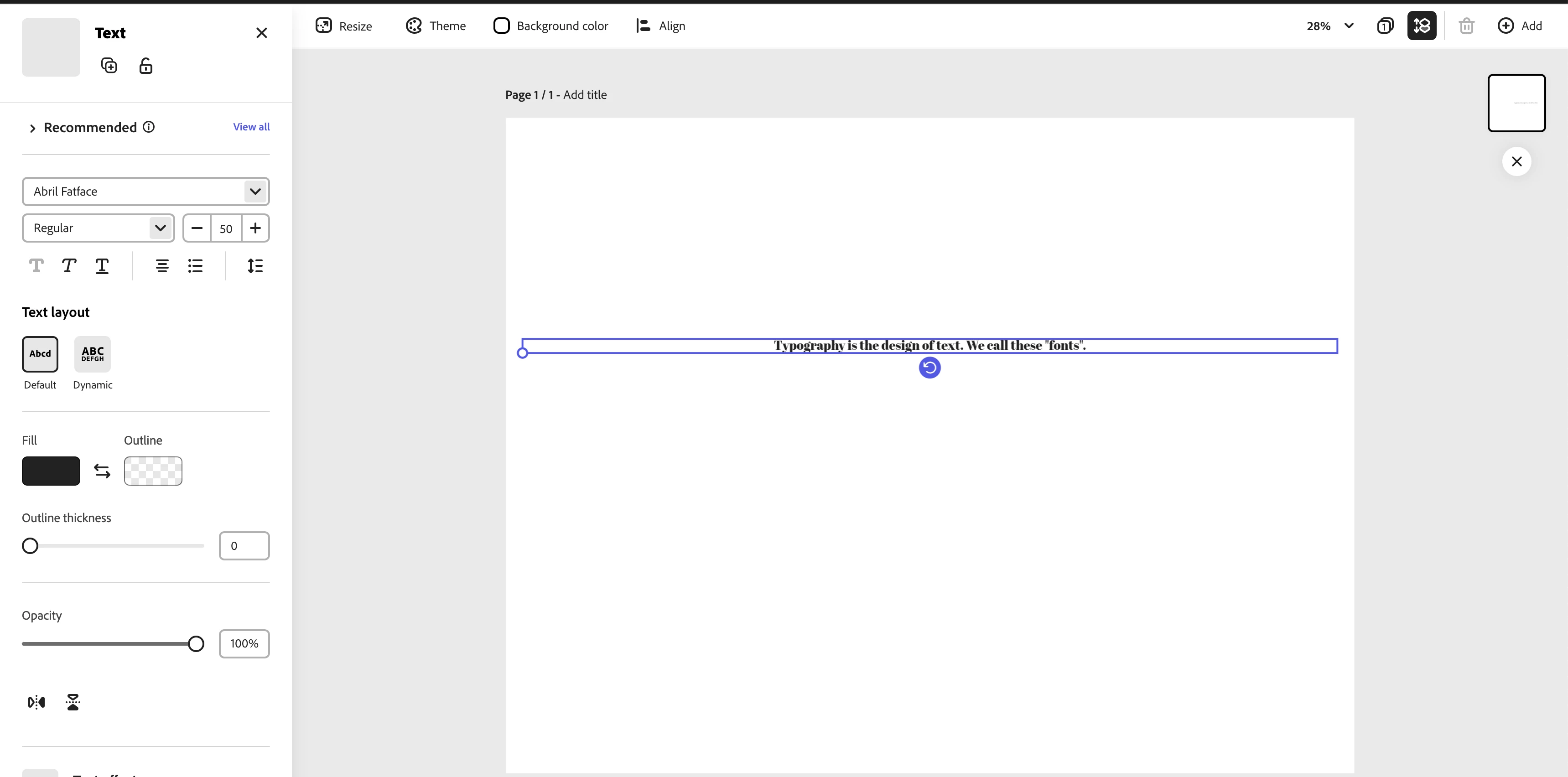
 

Based on my prior knowledge and experience, that does not look like a size 50 point size at all. Something is seriously wrong. To confirm this, I set up the same parameters in Google Docs: same page size, font, and font size, and it looks like this:
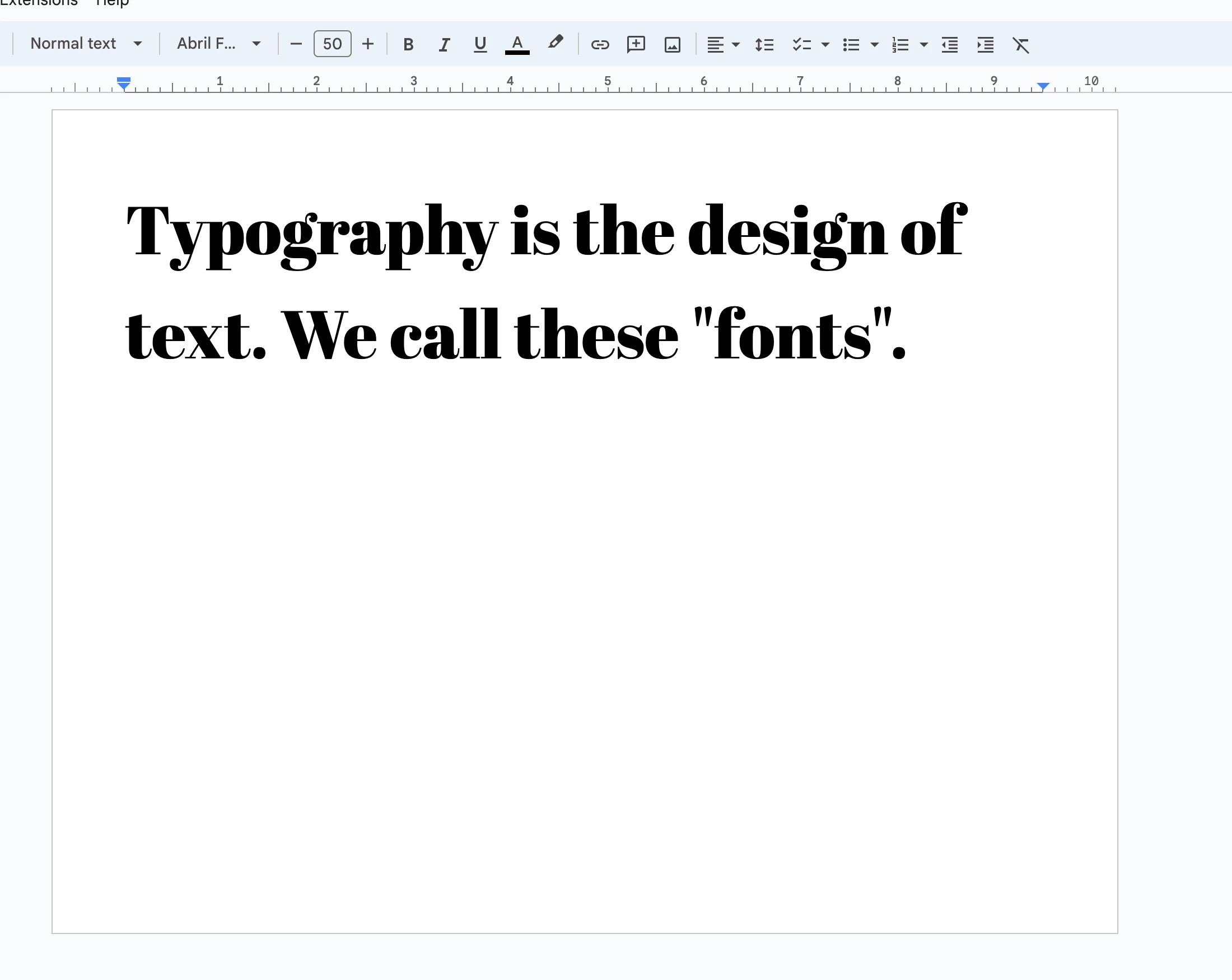
As you can see here, the font at size 50 is much larger. This is what I would expect from Abril Fatface at size 50. And just in case you still don't believe me, I repeated the same experiment in Adobe Illustrator. 
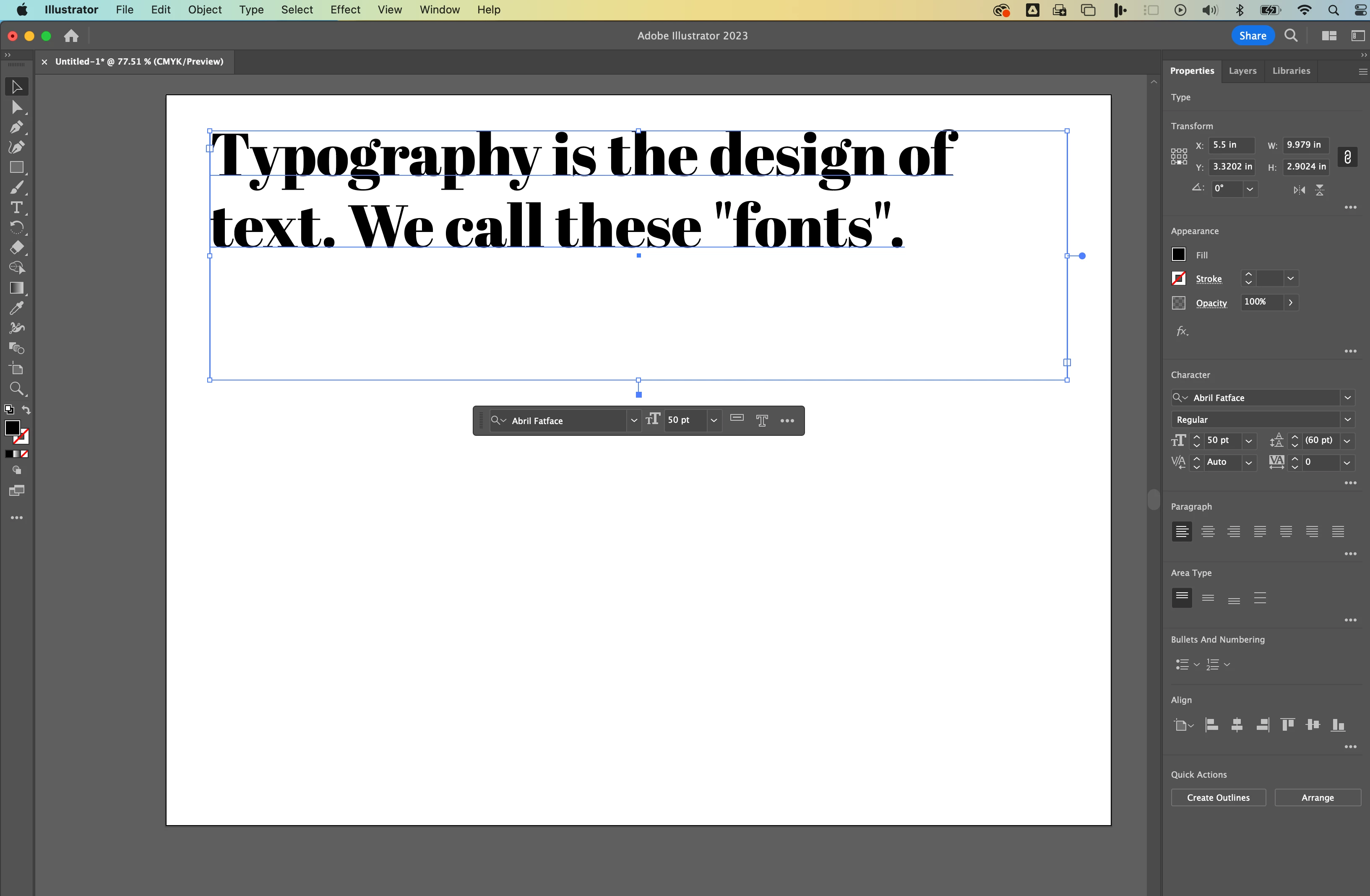
Abril Fatface at size 50 on an 11" by 8.5" document should be large enough to take up two rows in a text box. But, in Adobe Express it's very tiny. I tried to do a visual comparison and determined that Abril Fatface size 50 in Adobe Express is actually more like size 12 in Adobe Illustrator. 

This issue is happening with all fonts & typefaces, not just Abril Fatface. I just used that as an example since it was available in Adobe and Google Docs. 


Because of this bug, my students are getting really confused and I'm not able to really use Adobe Express correctly, which again my school district pays for. What is causing this? How do we fix it?


Extra Technical Details: My students use small macbooks. Some are new M1 machines and others are a bit older. I'm experiencing this issue on my 16" 2019 Macbook Pro, running Ventura 13.1. We are using the web version of Adobe Express on Google Chrome version 117.0.5938.92. I got the same issue on my home PC using Windows 11 and Google Chrome. I tried to test it out in Safari on my Macbook Pro, but Express was so slow/unable to load that I couldn't even attempt it. 

17 replies

Participating Frequently
June 30, 2025

This is why so many people are using Canva instead. Adobe apps are unnecessarily laborious - this isn't 2005. Bugs that should have been caught during beta testing. And the customer service is terrible. 

New Participant
June 30, 2025

This issue wasn't resolved 6 months ago unfortunately. There weren't any replies to the 2024 posts here. I actually stopped using Adobe Express because of the issue.

Corina Murgila
Adobe Employee
Adobe Employee
June 30, 2025

@Kris34105628kaar could you please share more details about the exact issue you're experiencing? A screen recording would be really helpful. The issue originally reported in this thread was resolved over six months ago. I’ll DM you my contact so we can follow up and better understand what you’re experiencing.

New Participant
June 30, 2025
I deleted my Adobe account after they raised the prices and two years went
by without a response to a problem that is serious for a design tool, and
for a company like Adobe, it shouldn't be so difficult to fix. I don't
understand how they passed a test without finding that error, and how so
many years go by without any answers. It's frustrating to pay for the
package and not be able to use the tools and not get a response to a
problem.
New Participant
June 28, 2025

It's now June 2025 and I am running into this issue while trying to modify a simple resume template.  Adobe, in what build is this fix scheduled for release?  I assume it is assigned to a sprint of some sort. Please provide a detail of the fix and when we can expect the release. A general "we are sorry for the inconvenience and are actively working on a fix"  is nolonger an acceptible response.  If the work is active, there should be no problem providing an ETA. 

Tarun Saini
Community Manager
Community Manager
June 30, 2025

Hi 

@Kris34105628kaar

,

Welcome to the community, and thank you for your patience! I've shared this information with our product team, and I'll keep you updated as soon as I hear back from them


Regards,

Tarun

New Participant
October 11, 2024

It looks like this issue was reported a year ago but I'm still having this issue. My document is already set to the "work around" dimensions. I have a two-page document and the same font size is showing up as different sizes on each of the pages. 

New Participant
September 3, 2024

"While our development team is actively working to resolve this issue, we understand the importance of providing you with a solution in the interim. As a temporary “workaround”, we recommend creating pages with pixel dimensions that align with the 1/72inch density. For instance, for an 11x8.5inch document, we suggest using the dimensions of 792x612." How will this affect the print resolution of the document? Will it still print at 300dpi? 

New Participant
August 22, 2024

Almost a year and still this issue hasn't been fixed. 

bhanx23
New Participant
August 2, 2024

Any update on this?

New Participant
August 2, 2024

I thought I had completely forgotten about paper size and fonts, putting an 11 point font on an A4 was very confusing, I see the publication date is October 2023 and to this day it is still a problem.


New Participant
July 8, 2024

It's the same in the iPod app. Trying to format fonts is a nightmare and that whole program is made for sizing fonts. Adobe, what the heck?