


Phantaseas
Participant
June 5, 2023
Answered

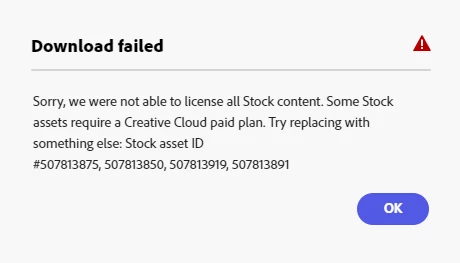
Can't download image due to license issues, but I have a paid subscription.

  • June 5, 2023
  • 5 replies
  • 36374 views

I keep getting this error when trying to download an imagine I've been working on. Thing is I have an active paid creative cloud plan (adobe express). I'm using a desktop. Is there a way to resolve this? I feel like it's an error. Unless there's something additional I'm supposed to buy?

Correct answer David__B

This issue is typically due to either
- Pop-up blocker: try temporarily disabling any you're using
- A used stock asset's licensing having changed, delete any blank layers in your file

5 replies

Participant
October 10, 2024

Hi, I've just come here with the same problem... I replaced a stock image in an Adobe Express template with an image that I own, and it's giving me this failed message. I've tried it in Edge, same problem, tried turning off the Chrome pop up blocker, still not working. I've even tried deleting the stock image altogether rather than just replacing it with mine and it's still not working. So frustrating! 

David__B
Adobe Employee
David__BCorrect answer
Adobe Employee
September 17, 2024

This issue is typically due to either
- Pop-up blocker: try temporarily disabling any you're using
- A used stock asset's licensing having changed, delete any blank layers in your file

Participant
August 26, 2023

I'm trying to download an artwork I created using Adobe Express. However, I keep getting this error message. I have paid versions of all Adobe applications, including the Stock library. I would like to know what might be happening as I'm a beginner on this journey. Can someone help me? Here's the error message:

Download Failed We couldn't license all of the Stock content. Some Stock assets require a paid Creative Cloud plan. Please try replacing it with another item: Stock Asset ID #501029954.


(Note: I have a paid Creative Cloud subscription.)

Participant
August 26, 2023

same here i just subscribed to the paid creative cloud, but im getting the same error that they are not able to liscence all stock content. need help 

Participant
August 24, 2023

If you're encountering errors while trying to download an image from Adobe Creative Cloud despite having an active paid plan, ensure you're logged in with the correct account associated with your subscription. Clear your browser cache and cookies, then attempt the download again. If the issue persists, contact Adobe's customer support for assistance to resolve the download error. Additional purchases might not be necessary for image downloads under your existing subscription.

Phantaseas
Participant
August 24, 2023

I'm using the correct login on everything. So where specifically do I contact adobe's customer support? 

Participant
June 5, 2023

@Phantaseas 

Hi, did you ever get this fixed? What did you need to do? I'm having the same issue. 


Whenever I try to use adobe express in the latest beta version of chrome, I'm unable to download any of the work I've created using adobe express. I have tried using two different premium accounts to see if it was related to the fact that I might not have been given proper access to adobe creative cloud at my new college yet, but, when I logged in to the account that worked last week, and tried to convert an mp4 to gif, then download it, it just says "processing" for about two seconds, then goes back to the download button. 


prior to may of this year, express worked perfectly fine, but now it doesn't. how can I fix the issue?

thejanebradbury
Community Expert
Community Expert
August 23, 2023

I've had quick look at the Stock asset, in case it was one of the limited ones, but it seems alright. If this is the first time you've had this problem since the update to the new Adobe Express last week I'd try

  • Signing out and back into your Adobe account.

If that doesn't work on its own then I'd try:

  • Signing out of your Adobe account;
  • Clearing cookies & cache;
  • Signing into your Adobe account.


It may be just that your browser needes to refresh to acknowledge your Premium status since the update. 
Phantaseas
Participant
August 23, 2023

Thanks for the suggestions! Unfortunately even after doing all of that, the issue persists. 😞

thejanebradbury
Community Expert
Community Expert
August 24, 2023

Oh, I'm sorry that didn't help. The next step would be to contact Adobe Support to check your account status. If you're a private custoemr using Creative Cloud visit https://helpx.adobe.com/support.html?rghtup=autoOpen making sure pop-ups are allowed and signed in with your Adobe ID. 


If your plan is via business or education you will need to speak with the Admin.