New Participant
February 6, 2025
Answered

Crediting audio and video from Adobe Express

  • February 6, 2025
  • 3 replies
  • 1035 views

What is the proper way to credit audio and video found in Adobe Express that I used to create a short film clip that I want to submit to a film festival?  My understanding is that Adobe Stock provides the video, not sure about the audio. 

    Correct answer thejanebradbury

    Hello @susans98593130 I'll try to help you. You'll know that when you add content from Adobe Stock into a project and you select that image or element on the canvas there is a panel on the left hand side full of options. 

    For images/video: click the i icon and the little info panel pops up. I often manage to highlight this with my mouse and use Ctrl+C then Ctrl+V to paste into a note somewhere if I need to keep the information.  
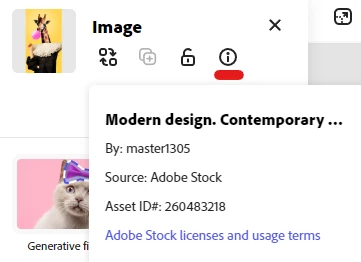
    For audio: click the audio track in the timeline, then click the 3 cots in the panel to open Source info. 
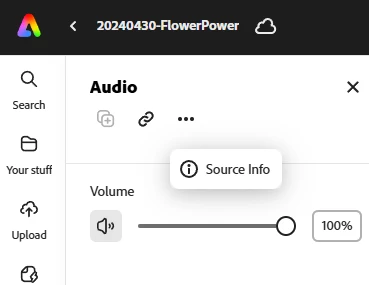
     

    Click Source info and you'll get an info pop up like this with the audio track details. 
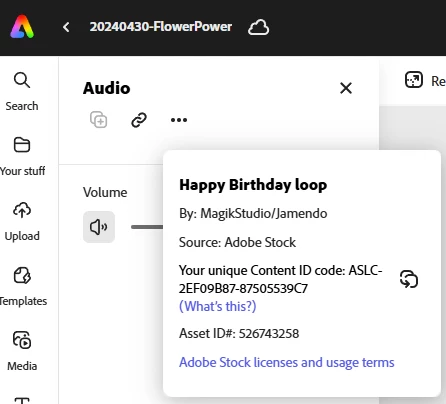
     

    You can then paste this info wherever appropriate e.g. a YouTube description if needed. I hope that helps! 

    3 replies

    Abambo
    Community Expert
    February 12, 2025

    The proper way to credit the author and Adobe stock is described here: https://stock.adobe.com/license-terms


    In short: You credit Adobe stock at the same place where you credit other assets, in the same way you credit other assets. Two things are necessary: the author as shown in the "by" line in @thejanebradbury's post and Adobe stock. 


    It is flexible in that way that you credit as you are used to credit similar assets given that you use both references (author and Adobe stock). It is clear that if you have licensed 5 assets for your project, that you can say something like "This work contains assets licensed on Adobe stock by the following authors ...." or similar. 

    ABAMBO | Hard- and Software Engineer | Photographer
    thejanebradbury
    thejanebradburyCorrect answer
    Community Expert
    February 7, 2025

    Hello @susans98593130 I'll try to help you. You'll know that when you add content from Adobe Stock into a project and you select that image or element on the canvas there is a panel on the left hand side full of options. 

    For images/video: click the i icon and the little info panel pops up. I often manage to highlight this with my mouse and use Ctrl+C then Ctrl+V to paste into a note somewhere if I need to keep the information.  

    For audio: click the audio track in the timeline, then click the 3 cots in the panel to open Source info. 


    Click Source info and you'll get an info pop up like this with the audio track details. 


    You can then paste this info wherever appropriate e.g. a YouTube description if needed. I hope that helps! 

    New Participant
    February 8, 2025

    Thanks much for this help - Sue

    thejanebradbury
    Community Expert
    February 8, 2025

    You're welcome 🙂

    kglad
    Community Expert
    February 6, 2025

    in the future, to find the best place to post your message, use the list here, https://community.adobe.com/

    p.s. i don't think the adobe website, and forums in particular, are easy to navigate, so don't spend a lot of time searching that forum list. do your best and we'll move the post (like this one has already been moved) if it helps you get responses.


    <"moved from using the community">
    New Participant
    February 6, 2025

    Huge thanks for moving this post kglad - I am a newbie here:)

    kglad
    Community Expert
    February 7, 2025

    no problem.  your post is in the adobe express forum where an expert will (hopefully) be able to help.


    https://community.adobe.com/t5/adobe-express-discussions/crediting-audio-and-video-from-adobe-express/m-p/15137625#M21529
