



4574G
New Participant
March 28, 2023
Answered

How do I make a hyperlink on my online store ad?

  • March 28, 2023
  • 3 replies
  • 3130 views

See my ad attached below.

Correct answer Amitej S

Hey @Yahel12@4574G @DoubleSupercool 

In the new version of Adobe, Express webapp add a hyperlink by performing the following steps:
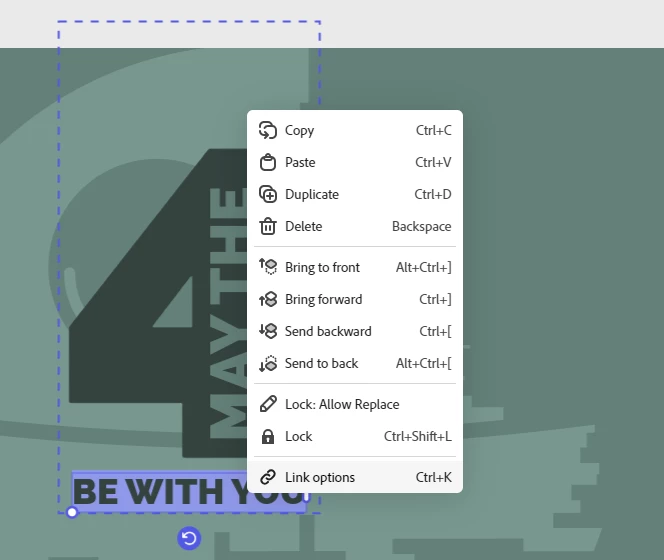
  1. Select your text
  2. Right-click or Ctrl+K
  3. Select Link Options
  4. Add the link


Do share you're feedback! 


Regards,

Amitej

3 replies

New Participant
April 25, 2024

Hi there, I tried this however after downloading the png, the link is no longer working on the image. Is there another setting i have to turn on? or edit or amend?


New Participant
August 19, 2024

That is the problem I have. Was it resolved for you? I am ending up with what looks like a decorated hyperlink but it is just text. It is in the pic below.

New Participant
November 25, 2024

I am having the same issue - adding links no problem however once publised they are not clickable


Participating Frequently
February 13, 2024

Magda – what program are you referring to?

Participating Frequently
February 14, 2024

It's spam. Ignore it.

Amitej S
Community Manager
Community Manager
March 28, 2023

Hi Glrooney,


Welcome to the Adobe Express Community!


It is not possible to add links to Posts or PDFs using Adobe Express. To add links to the published project, you can use another Adobe application, ideally Acrobat DC pro.

You can also look at this thread: https://community.adobe.com/t5/adobe-express-discussions/cc-express-post-adding-external-link/m-p/13049849#M2405


Best,

Amitej

4574G
4574GAuthor
New Participant
March 29, 2023

Thanks Amitej