


LuLos
Participant
July 31, 2025
Answered

How to show 'All layers' view in the Adobe Express Video timeline

  • July 31, 2025
  • 7 replies
  • 1771 views

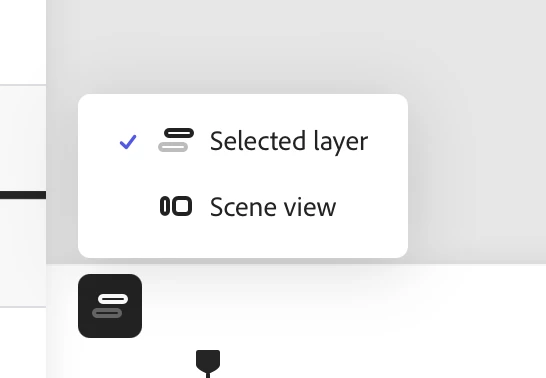
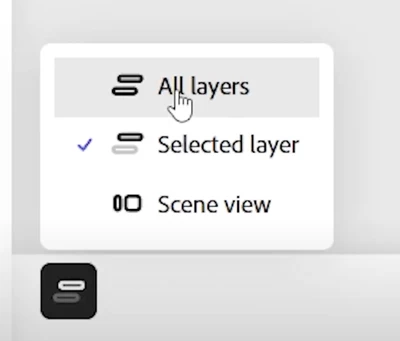
My timeline view only has two options: Switch views and Scene view. My co-worker has a third option: All layers. Why and how can I show that 'All layers' view? It would make it easier to adjust the objects in each scene.


<Title updated by Moderator>

Correct answer Amitej S

Hi Everyone!

The 'All Layers' view feature is back in Adobe Express Video Timeline.

This feature lets you see all layers in your project at once, making it easier to edit and manage your video content. 


Let us know how useful it is!


Thanks for your patience and support!


Amitej!

7 replies

Participant
September 18, 2025

My teammates have a feature allowing them to view all video layers simultaneously. I don't, even though we're on the same enterprise plan.

Why don't I have this feature? And how do I get this feature added? Is it something Adobe will roll out, or do I need to contact my local admin to get them to do some sort of update?

Bani Verma
Community Manager
Community Manager
September 18, 2025

Hi @amye75067108,


Please let us know which Adobe app you use to do this task. This will help us better assist you. 


Thanks,
^BS

Participant
September 18, 2025

Adobe Express. Sorry - I thought I posted this in the Adobe Express Community.

Participant
September 3, 2025

The option disappeared for me yesterday, like mid day.  "All layers" was there in the morning, and removed by the afternoon.  When i think about it, it happened after updating apps in Creative Cloud.  Not sure why they would do this as it is a pretty essential feature imo. And nowhere did they say it was "exerimental" or beta feature.  Kind of horrible. Hoping it comes back.

Participant
August 29, 2025

I am having a similar issue. The option to "View All Layers" no longer appears when I click Switch Views. I've tried the items suggested and no change. 

Participant
August 29, 2025

I've tried them as well with no luck. It seems like this is a bigger issue that lots of people are having. I hope they bring back the "all layers" option soon and listen to everyone's feedback. 

Participant
August 29, 2025

Hello, 


I was working on editing a video in Express last week and was able to see all of my layers & their timing stacked together on top of each other in the bottom navigation bar, and now it's gone. I desperately need to get this back. 


Just clicking on those little purple dots is incredibly unhelpful because I can't see timings and start stops in relation to one another like I need to. It makes editing practically impossible, especially with effects.  I haven't been able to figure out Premiere Pro no matter how hard I try. 


Does anyone know how to fix this?

Participant
August 29, 2025

Hello,

during yesterday, the option of showing all layers disappeared.

I can't enable it anymore.

any thought?


Community Manager
August 29, 2025

Hi @Marco248094636yu8,


Thank you for your message. We understand that working without the “All Layers” view is challenging. Our team is actively working on this feature, and we kindly ask for your patience while we continue to improve and roll it out.

We’ll provide updates as soon as they become available.

Thank you again for your understanding.


^MM

LuLos
LuLosAuthor
Participant
August 29, 2025

Thanks Tarun Saini and mahmoud_5524, for the quick response! 

We hope this feature comes back soon, as it's really time-consuming and honestly a bit frustrating to work without it.

Another suggestion: it would be great to have the ability to extend a layer across the entire timeline, not just within individual slides. For example, adding a logo to the bottom of the entire video.

Thanks again for working on this. Express keeps getting better every day, and it's a great tool to collaborate with non-designers in the company.


LuLo
LuLos
LuLosAuthor
Participant
August 28, 2025

My timeline view only has two options: Switch views and Scene view. My co-worker has a third option: All layers. Why and how can I show that 'All layers' view? It would make it easier to adjust the objects in each scene.


How to show 'All layers' view in the timeline


LuLo
LuLos
LuLosAuthor
Participant
August 28, 2025

Her view 

LuLo
Participant
July 31, 2025

I have been a professional Adobe Premiere editor for 15 years. I can use different editing software with ease, but Adobe Express video editing is the most unintuitive, unpredictable, and frustrating editing software I have ever experienced. I have been asked to create a video tutorial for an organisation who have just purchased a team license. They only want to be able to clip together simple interviews, add some b roll, some text overlays and music - to create very short social media clips. I thought that this would be an easy to create tutorial but every time I try to record one, I find myself unable to complete it because it is SO CONFUSING! The strange way you have to add b roll, which disappears and becomes a dot on the line above, and that's if you can avoid it becoming a scene by accident, and then you don't know what's happened and have to start all over again. Also, it doesn't seem to allow you to pull some b roll across an edit cut on the layer below, which is precisely waht you need it to do. So I'm having to export the interview and reimport it as one clip, just so I can do this. The trim sliders are very hard to get accurate sound edits. All in all I am saying to the client that this is not a good choice of edit software for their team. Where can I find an up to date tutorial that will solve these issues? They will be using the desktop version.

Community Manager
July 31, 2025

Hello @Kirstie0101. Thank you for your detailed feedback, we truly appreciate the time you took to share your experience. We understand how frustrating it can be when the workflow doesn’t match the editing flexibility you're used to. Adobe Express follows a simplified, scene-based approach where all video and audio clips live on a single main timeline, and additional elements like text, icons, or images are added as layers within individual scenes. For b-roll, a helpful workaround is to create short clips and insert them between interview segments rather than layering them on top. While this is different from traditional editing software, it can still support streamlined social content creation. To help you navigate this more easily, we recommend these resources: https://adobe.ly/4ffytG5, https://adobe.ly/4odsHbV, and this quick YouTube tutorial https://adobe.ly/4ogN0Ft;

To help us better understand the specific difficulties you're facing and to pass your feedback directly to our product team. We’d really appreciate it if you could share a short screen recording showing the parts of the workflow that feel confusing or limiting.


Thank you again for your time and your patience,

Chaimaa

Participant
August 7, 2025

I have started to get my head around how it works. 
the issue with b roll only being inserted in between scenes, or over one scene is still frustrating. It can be worked around but compared to other editing apps, such as CapCut, it seems unnecessarily limited to have the layering system set up like this. 
I think it could be improved.