Amitej S
Community Manager
Community Manager
October 14, 2025

Trouble loading Express app, downloading & accessing files and features | October 20-21, 2025

  • October 14, 2025
  • 29 replies
  • 2268 views

Hi Everyone!!

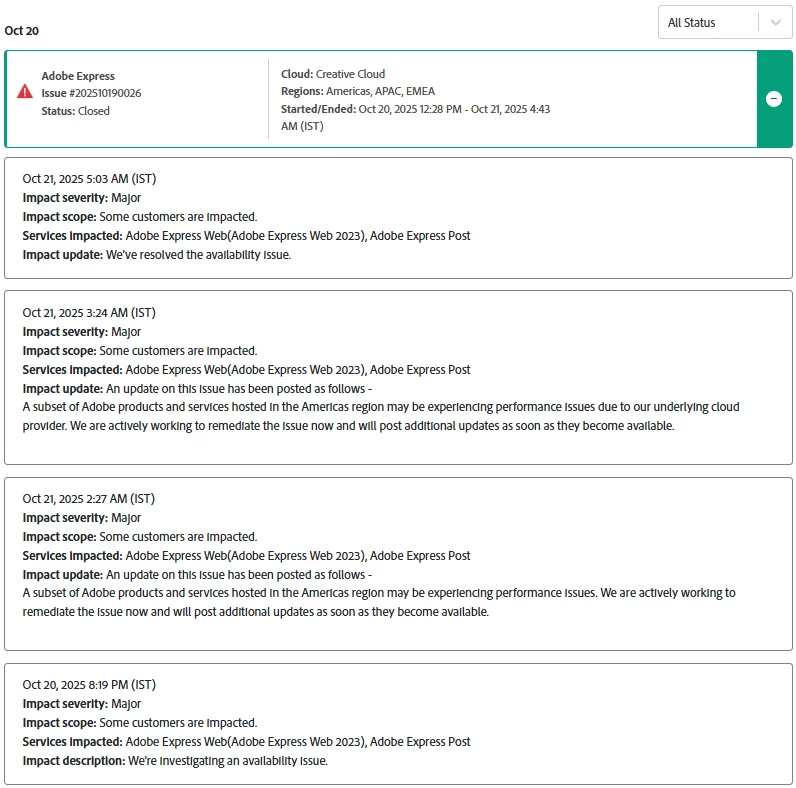
Several users experienced issues with Adobe Express and related Adobe services on October 20, 2025. This included difficulties loading the app, accessing or downloading files, encountering 404/504 errors, crashes, and Quick Action failures. Workflows connected to Adobe Stock and Adobe Fonts were also affected.


This issue was the result of an ongoing incident with our underlying cloud infrastructure provider. Our teams also actively worked to mitigate the impact and restore normal functionality as soon as possible.


We apologize for the frustration and appreciate your patience.


PS: This issue is now resolved for all users.
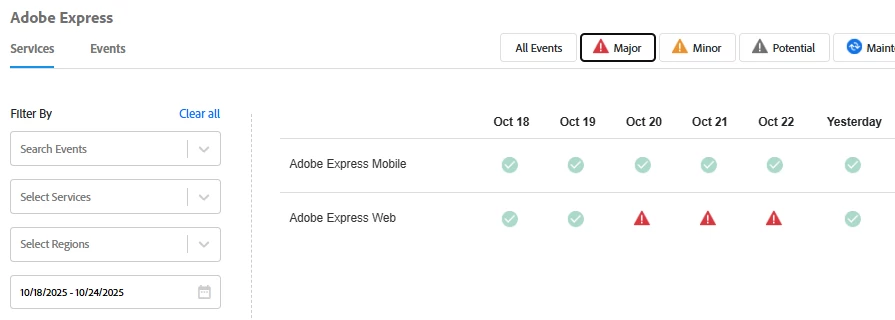


Here are some resources that provide more details on the outage. Feel free to explore them:


    29 replies

    Adobe Employee
    October 20, 2025

    Hi @Lavish_Gleam6576 


    Thanks for reporting this. As noted on status.adobe.com, Adobe Express is one of the apps affected by a wider outage.
    Sorry for the incovenience. In the meantime, please keep monitoring status.adobe.com for updates.


    Thanks,
    Abhi G

    Participant
    October 20, 2025

    Participant
    October 20, 2025

    I'm all about progressing and updating the program experience - but some of the hurdles I'm facing today are making things very hard to accomplish. All of my brands - fonts, color palattes, backgrounds, everything - are all coming up missing. Files took a very long time to open, guessing its because of the update.


    Anyone else have this issue? Ideas on how to get my brands back?

    Thanks!


    (Windows 11, installed web-based app)

    Participant
    October 20, 2025

    We're having the same issue and keep getting an error message when trying to create a new one.

    David__B
    Adobe Employee
    Adobe Employee
    October 20, 2025

    Hi @bryaniphone and @Kaylee36776215v4ih


    Sorry to hear about your difficulties. Are you working on a mobile device or in a browser? 
    Could you test in a few different browsers to see if that makes any difference, as well as and try signing out and then back in again? @Kaylee36776215v4ih I was also curious what error message you are receiving?


    Thanks,
    Dave

    Known Participant
    October 20, 2025

    I am using Adobe Express to publish a post. My social media accounts (IG, FB and Pinterest) are connected, but the post keep showing "Publishing" and the post was never published.

    Pls help.


    Tarun Saini
    Community Manager
    Community Manager
    October 20, 2025

    Hi @Mandytaxi,


    Thanks for reaching out. We're sorry to hear about this. 

    To help us get to the bottom of this, could you please share a few more details?

    1. Which social media platforms are affected (e.g., Instagram, LinkedIn, Facebook)?
    2. Are you using the web version or the mobile app?
    3. When scheduling, are you using the “Schedule” or “Publish now” option?
    4. Have you noticed if the issue happens with specific file types?

    In the meantime, try the steps mentioned below-


    1. Try disconnecting and reconnecting your social media accounts within Adobe Express.
    2. Clear your browser cache or try a different browser.


    Let us know how it goes.


    Regards,

    Tarun

    Known Participant
    October 20, 2025

    @Tarun Saini , to answer your questions.


    1. Which social media platforms are affected (e.g., Instagram, LinkedIn, Facebook)? - IG, FB and Pinterest.
    2. Are you using the web version or the mobile app? - web, desktop
    3. When scheduling, are you using the “Schedule” or “Publish now” option? - Publish now.
    4. Have you noticed if the issue happens with specific file types? - It is a JPEG files. 


    I have used Adobe Express previously to schedule posts and didn't have any issue before. But today, after reconnecting Adobe Express to my social media accounts  (IG, FB and Pinterest), the post is not getting published.


    I just tried to use "schedule" and it works, however, publish now isn't working.

    Participating Frequently
    October 20, 2025

    And is also happening here this morning. Adobe, can you fix / recommend asap? Need to get to this product.

    Participating Frequently
    October 20, 2025

    Error has switched from a 504 to a 502, what's the story Adobe? Am based in the UK, on Firefox browser, CC Pro account, up to date version:


    Participating Frequently
    October 20, 2025

    Ah! Is back, thank you Adobe 🙂

    Participant
    October 20, 2025

    Why are my scheduled social posts not being published today? Worked ok yesterday.

    Tarun Saini
    Community Manager
    Community Manager
    October 20, 2025

    Hi @default2pb94o634sqh,


    Thanks for reaching out. We're sorry to hear about this. I'd like to inform you that our product team has confirmed that there is currently an outage affecting this. We’re actively working to resolve this as quickly as possible.


    We truly appreciate your patience and apologise for the inconvenience.


    Regards,

    Tarun


    Participant
    October 20, 2025

    I can no longer access any of our previous projects in Adobe Express.  Every one of them gives me an error 404 page.   We use Adobe Express to communicate newletters to our membership, with important updates for our members.  


    I'm trying to access from Chrome on my laptop, https://express.adobe.com/ url.  I'm not using the app or mobile Adobe Express.    An example of a project that won't open  is https://new.express.adobe.com/webpage/BLhkvwE79Nr1Q.  


    Can someone help restore these projects for us?  We are a small group and these projects have worked very well for us in the past.  To lose these and have to start again on a new platforn would be devastating to our group.

    Participant
    October 20, 2025

    I suddenly couldn't save my files and get a 404 when trying to open existing files. Several little bugs happened prior to it.


    iOS version Adobe express

    Participant
    October 20, 2025

    Hi there,


    Thanks for reaching out and sharing your experience. We understand how frustrating it must be to encounter a 404 error when trying to access your previous Adobe Express projects.


    Our product team has confirmed that there is currently an outage affecting project access. We’re actively working to resolve this as quickly as possible.


    We truly appreciate your patience and apologize for the inconvenience.


    Regards,

    Tarun


    Adobe Express newest version (I guess)

    iPad 11th gen, iOS Version 18.6.2; & IPhone 15 Pro same version identical issues

    Simply start working any new project and the error appears, refresh as it says and it will happen in less than a minute later again and again. I was not able to pull up any of my previous files including any new ones created. 

    Video and screen shot included

    I can't figure out how to shrink the video from 337mb to 49mb that seems rather ridiculous. So please refer to my description, it's not like its really technical or anything. It just keeps saying cant save over and over on both IPad and iphone newest versions of everything. Really annoying. 

    Participant
    October 19, 2025

    Adobe Express will not let me download any of my creations, I can click that button all that I want but it wont work! I've tried it on older pieces i made to see if it was just the one but no, I cant even download ones that I've previously downloaded... what's the point of using it if I can't download my creations...

    Tarun Saini
    Community Manager
    Community Manager
    October 20, 2025

    Hi @ellie_0486,


    Thanks for reaching out! We're sorry to hear about this. Could you please let us know what happens when you're trying to download the document? Are you getting any error messages? If so, can you please share a screenshot of the error?


    Is this happening with all documents or with a specific one? Which platform are you working on? Is it on a desktop or mobile?


    We're here to help, just need some info.


    Regards,

    Tarun

    Participant
    October 14, 2025

    I'm creating a new carousel post, but when I search for templates, I'm not getting any -.-

    I've attached the video of the problem.

    Community Manager
    October 14, 2025

    Hi @Darshan35977882esjq. Thanks for reaching out! Sorry to hear you're having trouble with the search feature. A few things you can try include clearing your browser's cache and cookies, switching to a different browser or using incognito mode, and making sure both your browser and Adobe Express are up to date. Also, temporarily disable any browser extensions like ad blockers that might interfere. In the meantime, I’ll escalate this issue to the product team and keep you updated as soon as I hear back.

    Let us know if you notice any patterns or changes!


    Best,

    Chaimaa