




Updates for the new Adobe Express as of August'23

Latest Release: Fixes & Enhancements
Your feedback matters, and we've been listening. We understand the concerns highlighted in your reviews, and we will continue to work towards improving your experience. We're happy to announce recent updates to the new Adobe Express.
Latest Updates
Move ALL folders and files
You can now transition all folders & files to the new Adobe Express without moving files one by one or having to recreate folders. See the steps below.
- From Home, navigate to Your Stuff.
- Select "Access files" on the blue tile - this will take you to the folder organizer where your old files & folders live.
- Select the "Move all folders and files" option from the right corner.
- Select "Move for desktop" on notification.
To move an individual file, hover over the file and select "Move file" then select "Convert for desktop" on notification.
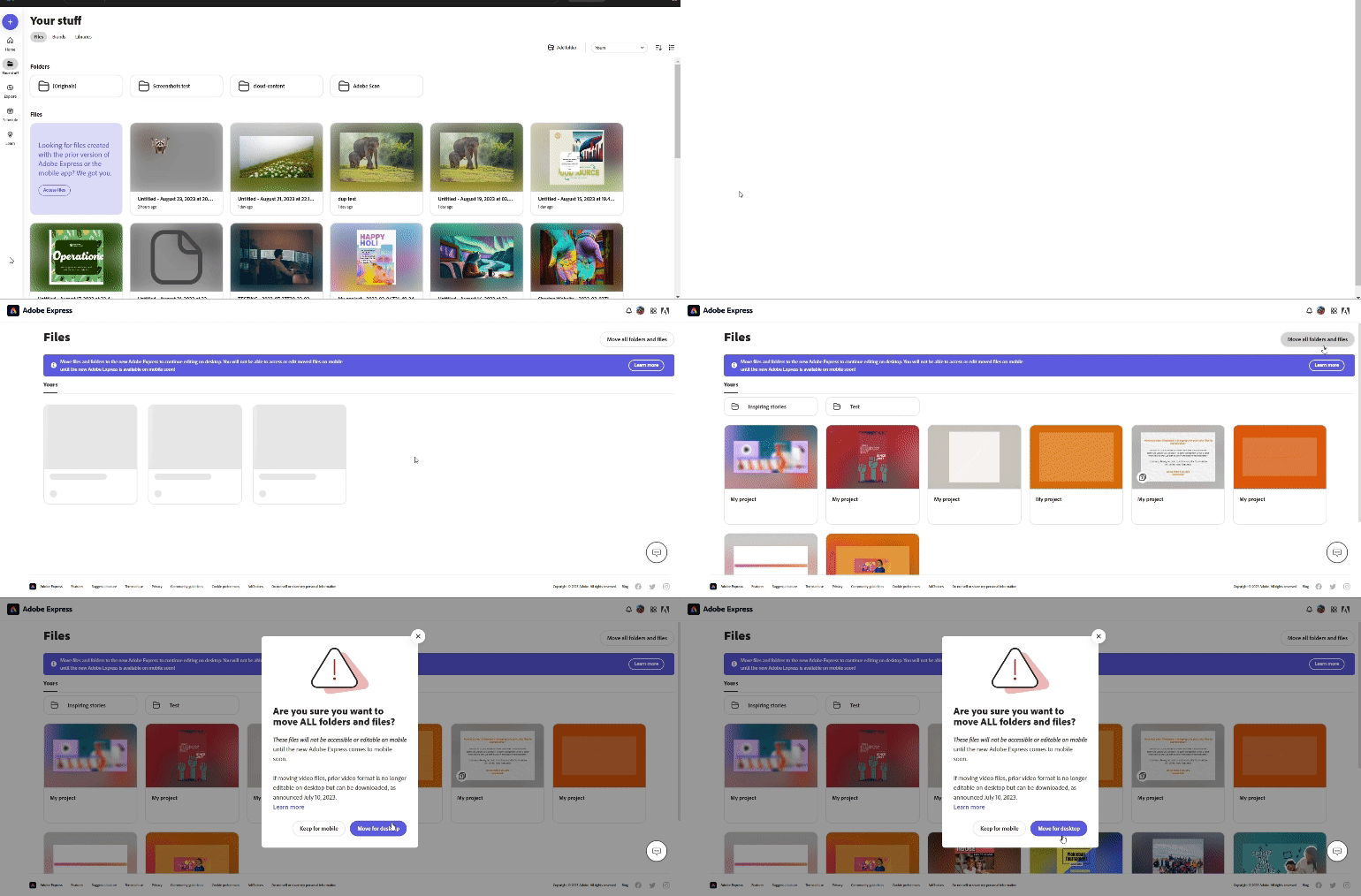
Note: The files & folders will be moved and no longer available to open or edit in the mobile app. Cross-platform editing will return when the all-new version of Adobe Express comes to mobile.
Webpage conversion
Did your webpage not convert properly to the new Adobe Express? Here are the steps to reconvert webpage files.
- Go to Your Stuff, then select & delete webpage files that didn't convert properly. Do not delete files in the [Originals] folder.
- Navigate to the [Originals] folder and select the original webpage file you want to reconvert.
- Select "Open converted file" from the "File already converted" message.
The reconverted files will be saved in the [Originals] folder.
Known Issues & Workarounds
s
Can't find files after migration.
Please contact Adobe Virtual Assistant so we can help you find your files.
Organized folders are missing.
To restore the old folder structure, visit https://new.express.adobe.com/restore-folders from a new browser.
If files & folders have already been migrated, the 'Folders' hierarchy will remain as it was in the previous version.
Missing collage/layout, circular text, and lightroom integration.
Coming soon! We are actively working to restore these features.
There's a workaround you can try for the Circular Text feature. You can make the curved text on your mobile device & then bring it to the webapp project. Remember, once you switch to Adobe Express webapp, you will not be able to edit the curved text anymore as it will be an independent asset.
Unable to download a video created in an older version of Adobe Express.
Older videos, especially from Spark, are taking longer to download. To ensure your videos download completely, please do not refresh the webpage until the download is complete.
Useful links
- FAQ: Get answers to common questions about Adobe Express.
- Known Issues: Stay up-to-date with Adobe Express's known issues and workarounds.
- Report abuse: Report offensive content or abuse within Adobe Express.
- System requirements: Find the minimum technical specifications to use Adobe Express.
- Discord: Join the Adobe Express Discord server to connect with others, get creative feedback, and share resources!
- UserVoice: How can we improve Adobe Express? Share your thoughts and ideas in UserVoice.

 AdChoices