


January 13, 2018
Question

Adobe Media Encoder won't upload long videos to YouTube

  • January 13, 2018
  • 8 replies
  • 7509 views

Hi everyone,

I've been having problems with uploading videos on YouTube. I followed the solution on other post AME 2018 won't stay logged in to Youtube to not use the old preset from AME 2017 but to no avail.

Earlier today I tried creating preset in AME and not Premier Pro and I encode 1 min "test" video and I was happy that it was successfully uploaded, so I proceeded to encode the remaining files in my queue.

But when I woke up I was disappointed that the other videos that is 45mins-1.5hrs was not uploaded. The error is the same with this post: Publish Error when Exporting video to YouTube

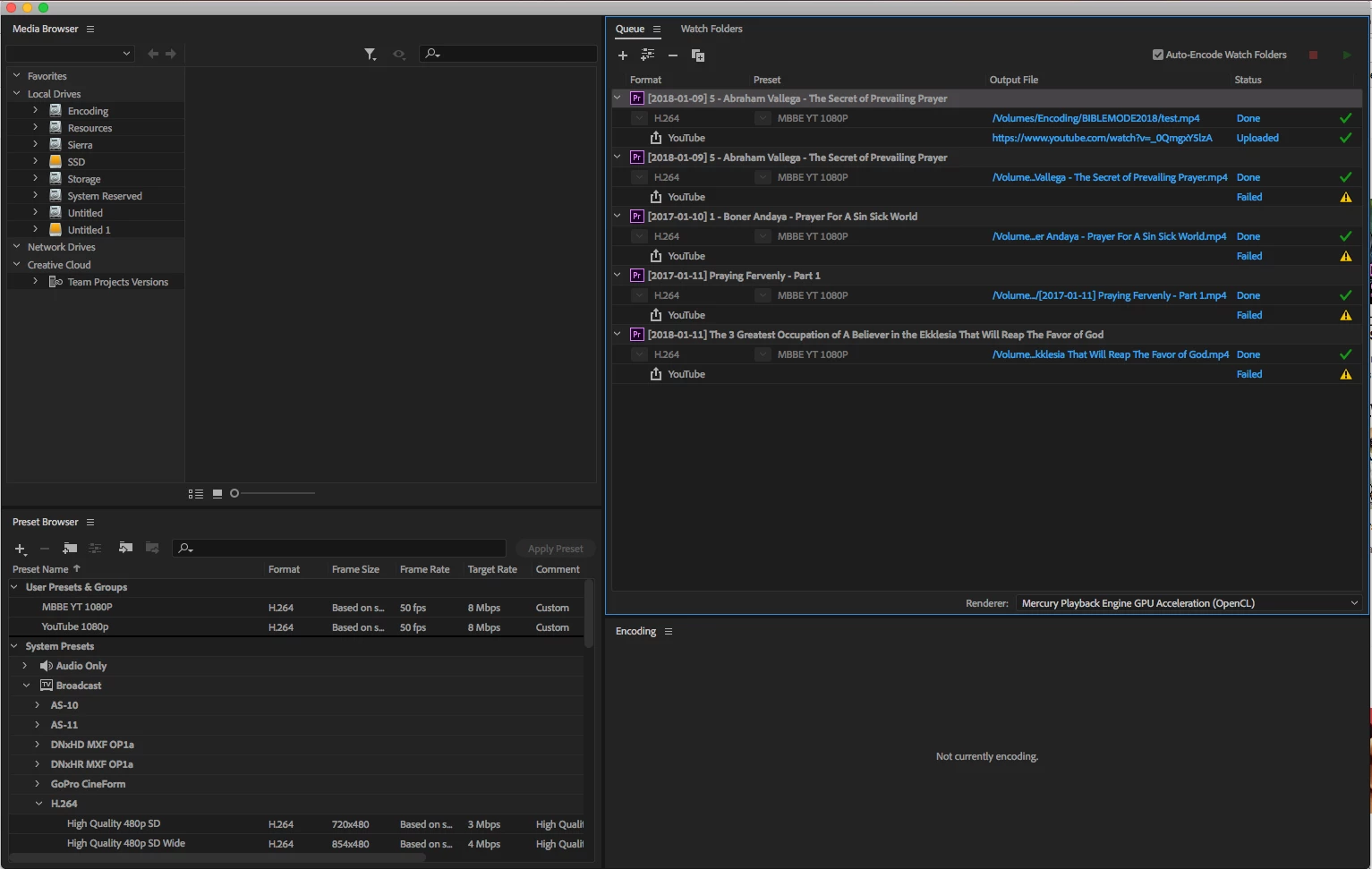
Publish Error when Exporting video to YouTube  I just want to point out in the image bellow that the first "test" video is 1min video of the second video from the queue, and I am wonder why was the first one got uploaded successfully and the second one was not, both have the same preset, the only difference between them is the video length/size.

Here's the error message:

01/13/2018 04:47:48 PM : YouTube - {

"error": {

  "errors": [

   {

    "domain": "global",

    "reason": "authError",

    "message": "Invalid Credentials",

    "locationType": "header",

    "location": "Authorization"

   }

  ],

  "code": 401,

  "message": "Invalid Credentials"

}

}

So I am wonder if there's a problem with rending long videos or is there a work around with this solutions.
Thanks

    This topic has been closed for replies.

    8 replies

    Participant
    June 8, 2019

    I'm having same issue too. I don't think I can use premire pro unitl they fix it.

    Kevin-Monahan
    Community Manager
    Community Manager
    November 28, 2018

    AloofKid,

    Try creating new presets: Re: Publish Error when Exporting video to YouTube

    Thanks

    Kevin

    Kevin Monahan - Sr. Community & Engagement Strategist – Pro Video and Audio
    January 4, 2019

    Kevin-Monahan  wrote

    AloofKid,

    Try creating new presets: Re: Publish Error when Exporting video to YouTube 

    Thanks

    Kevin

    That solution won't work if you are encoding a video for more than 45mins. It's seems like there is an authentication time out or session time out. I've tried creating a new preset on a FRESHLY REFORMAT MAC with a FRESHLY INSTALLED AME and PP. Even tried with the CC 2019 but I still get the same results.

    Here for example, I encoded earlier a full length preaching of 1hr and 8mins with a preset "MBBE 1080p (YT)" but it doesn't get uploaded to YouTube.

    Here's the Encoding log:

    01/04/2019 12:45:24 AM : Queue Started

    - Source File: /var/folders/nj/21d_q1ln6hz0rzp_z9_yktmr0000gn/T/MBBE Preaching Video (CC 2018).prproj

    - Output File: /Volumes/Encoding/2019-01-01 Blessend and Fruitful Tree at 43.mp4

    - Preset Used: MBBE 1080p (YT)

    - Video: 1920x1080 (1.0), 50 fps, Progressive, 01:08:57:48

    - Audio: AAC, 192 kbps, 48 kHz, Stereo

    - Bitrate: VBR, 2 pass, Target 8.00 Mbps, Max 12.00 Mbps

    - The source was deinterlaced

    - Encoding Time: 04:34:17

    01/04/2019 05:19:41 AM : File Successfully Encoded

    - Source File: /var/folders/nj/21d_q1ln6hz0rzp_z9_yktmr0000gn/T/MBBE Preaching Video (CC 2018)_1.prproj

    - Output File: /Volumes/Encoding/2019-01-01 Blessend and Fruitful Tree at 43.mp3

    - Preset Used: MBBE 128 kbps

    - Video:

    - Audio: MP3, 128 kbps, 48000 Hz, Mono

    - Bitrate:

    - Encoding Time: 00:05:44

    01/04/2019 09:44:03 AM : File Successfully Encoded

    01/04/2019 09:44:34 AM : Queue Stopped

    Here's the YouTube Error Log

    01/04/2019 05:19:41 AM : YouTube - {

    "error": {

      "errors": [

       {

        "domain": "global",

        "reason": "authError",

        "message": "Invalid Credentials",

        "locationType": "header",

        "location": "Authorization"

       }

      ],

      "code": 401,

      "message": "Invalid Credentials"

    }

    }

    Check the Encoding time, it's 4hrs and 34mins. It exceeded the authentication timeout limit.

    Now I'll use the SAME PRESET and SAME VIDEO but this time I'll encode the first 5mins of the 1hr and 8mins to make sure that the encoding time will not exceed the authentication timeout.

    01/04/2019 01:17:19 PM : Queue Started

    - Source File: /Volumes/Encoding/Adobe/Premiere Pro/12.0/MBBE Preaching Video (CC 2018).prproj

    - Output File: /Volumes/Encoding/[To Upload]/2019-01-01 Blessend and Fruitful Tree at 43.mp4

    - Preset Used: MBBE 1080p (YT)

    - Video: 1920x1080 (1.0), 50 fps, Progressive, 00:05:00:00

    - Audio: AAC, 192 kbps, 48 kHz, Stereo

    - Bitrate: VBR, 2 pass, Target 8.00 Mbps, Max 12.00 Mbps

    - The source was deinterlaced

    - Encoding Time: 00:17:46

    01/04/2019 01:35:06 PM : File Successfully Encoded

    01/04/2019 01:35:06 PM : Queue Stopped

    01/04/2019 01:42:28 PM : YouTube - https://www.youtube.com/watch?v=6RRjRUSfex4

    01/04/2019 01:42:29 PM : Queue Stopped

    01/04/2019 01:42:29 PM : YouTube - https://www.youtube.com/watch?v=6RRjRUSfex4

    01/04/2019 01:42:29 PM : Queue Stopped

    As you can see here the encoding time is only 17mins less than the authentication timeout and the video was successfully uploaded to YouTube.

    Your answer might help others who encodes video with less than 30-40mins encoding time. But for us who edit and encodes more than an hour of videos that solution won't work for us.

    BTW, please don't "Mark as correct" your own post, let me decide if a post/reply is an answer to our problem.

    As of now even with the CC 2019 release, there is no solution to our problem.

    Thanks

    lizap98247519
    Participant
    June 2, 2019

    Any update? I am having the same issue with a 70 minute video.

    October 23, 2018

    Updated to v13.0/CC 2019 still getting errors the same 401 error or Invalid credentials.

    It's frustrating after almost a year and a major version update the this error hasn't been fixed yet. I've email and sent an email directly to Adobe support but they don't even reply.

    Anyone solved this issue yet?

    To summarize, I've done the new preset thing and even reformatted my Mac just to make sure I am not getting any preset from the the CC2017 and still getting error code on videos that has encoding time of more than 30mins. Anything lower that that seems to get uploaded to YouTube successfully more than that error 401.

    July 12, 2018

    Hi everyone,

    Just want to give an update, earlier in this thread I mention that videos that was encoded more than 30mins gets a "code:401" on and won't get uploaded. Earlier today I encode 3 videos and most of them was encoded for more than 30mins, 2 of them was successfully uploaded to youtube but the 3rd video that was encoded for more than an hour the upload failed:

    Encoding Time of Video #1: 00:31:33 <-- Successfully uploaded to YouTube

    Encoding Time of Video #2: 00:39:35 <-- Successfully uploaded to YouTube

    Encoding Time of Video #3: 01:25:13 <-- Code: 401 "Invalid Credentials"

    Here's the encoding log and error logs.

    Log File Created: 07/12/2018 06:56:41 AM

    -----------------------------------------

    07/12/2018 06:56:41 AM : Queue Started

    07/12/2018 06:59:47 AM : Queue Paused

    07/12/2018 06:59:51 AM : Queue Stopped

    - Source File: /var/folders/7m/fsgf8fhs6s79hw8h79lrn2qh0000gn/T/MBBE Preaching Video Edit.prproj

    - Output File: /Volumes/Encoding/[2018-07-03] Delight Thyself Also in the Lord.mp4

    - Preset Used: MBBE 1080p

    - Video: 1920x1080 (1.0), 50 fps, Progressive, Software Only, 00:22:14:22

    - Audio: AAC, 128 kbps, 48 kHz, Stereo

    - Bitrate: VBR, 2 pass, Target 8.00 Mbps, Max 10.00 Mbps

    - The source was deinterlaced

    - Encoding Time: 00:03:09

    07/12/2018 06:59:51 AM : Encoding Failed

    -------------------------------------

    The Operation was interrupted by user

    -------------------------------------

    07/12/2018 07:05:00 AM : Queue Started

    - Source File: /var/folders/7m/fsgf8fhs6s79hw8h79lrn2qh0000gn/T/MBBE Preaching Video Edit.prproj

    - Output File: /Volumes/Encoding/[2018-07-03] Delight Thyself Also in the Lord.mp4

    - Preset Used: MBBE YouTube 1080P

    - Video: 1920x1080 (1.0), 25 fps, Progressive, Software Only, 00:22:14:11

    - Audio: AAC, 128 kbps, 48 kHz, Stereo

    - Bitrate: VBR, 2 pass, Target 8.00 Mbps, Max 12.00 Mbps

    - The source was deinterlaced

    - Encoding Time: 00:31:33

    07/12/2018 07:36:33 AM : File Successfully Encoded

    - Source File: /var/folders/7m/fsgf8fhs6s79hw8h79lrn2qh0000gn/T/MBBE Preaching Video Edit_1.prproj

    - Output File: /Volumes/Encoding/[2018-07-03] Delight Thyself Also in the Lord.mp3

    - Preset Used: MBBE 128kbps

    - Video:

    - Audio: MP3, 128 kbps, 48000 Hz, Mono

    - Bitrate:

    - Encoding Time: 00:00:38

    07/12/2018 07:37:12 AM : File Successfully Encoded

    - Source File: /var/folders/7m/fsgf8fhs6s79hw8h79lrn2qh0000gn/T/MBBE Preaching Video Edit_2.prproj

    - Output File: /Volumes/Encoding/[2018-07-05] Praying for the Pastor and Evangelist - Part 1.mp3

    - Preset Used: MP3 128 kbps

    - Video:

    - Audio: MP3, 128 kbps, 48000 Hz, Stereo

    - Bitrate:

    - Encoding Time: 00:00:45

    07/12/2018 07:37:58 AM : File Successfully Encoded

    07/12/2018 07:46:08 AM : YouTube - https://www.youtube.com/watch?v=bQ2PohTfjXM

    07/12/2018 07:46:08 AM : YouTube - https://www.youtube.com/watch?v=bQ2PohTfjXM

    - Source File: /var/folders/7m/fsgf8fhs6s79hw8h79lrn2qh0000gn/T/MBBE Preaching Video Edit_3.prproj

    - Output File: /Volumes/Encoding/[2018-07-05] Praying for the Pastor and Evangelist - Part 1.mp4

    - Preset Used: MBBE YouTube 1080P

    - Video: 1920x1080 (1.0), 25 fps, Progressive, Software Only, 00:25:39:02

    - Audio: AAC, 128 kbps, 48 kHz, Stereo

    - Bitrate: VBR, 2 pass, Target 8.00 Mbps, Max 12.00 Mbps

    - The source was deinterlaced

    - Encoding Time: 00:39:35

    07/12/2018 08:17:33 AM : File Successfully Encoded

    07/12/2018 08:28:53 AM : YouTube - https://www.youtube.com/watch?v=JLwuLspGej0

    07/12/2018 08:28:53 AM : YouTube - https://www.youtube.com/watch?v=JLwuLspGej0

    - Source File: /var/folders/7m/fsgf8fhs6s79hw8h79lrn2qh0000gn/T/MBBE Preaching Video Edit_4.prproj

    - Output File: /Volumes/Encoding/[2018-07-05] The Working of His Mighty Power.mp4

    - Preset Used: MBBE YouTube 1080P

    - Video: 1920x1080 (1.0), 25 fps, Progressive, Software Only, 00:56:07:07

    - Audio: AAC, 128 kbps, 48 kHz, Stereo

    - Bitrate: VBR, 2 pass, Target 8.00 Mbps, Max 12.00 Mbps

    - The source was deinterlaced

    - Encoding Time: 01:20:13

    07/12/2018 09:37:47 AM : File Successfully Encoded

    - Source File: /var/folders/7m/fsgf8fhs6s79hw8h79lrn2qh0000gn/T/MBBE Preaching Video Edit_5.prproj

    - Output File: /Volumes/Encoding/[2018-07-05] The Working of His Mighty Power.mp3

    - Preset Used: MBBE 128kbps

    - Video:

    - Audio: MP3, 128 kbps, 48000 Hz, Mono

    - Bitrate:

    - Encoding Time: 00:01:34

    07/12/2018 09:39:21 AM : File Successfully Encoded

    07/12/2018 09:37:47 AM : YouTube - {

    "error": {

      "errors": [

       {

        "domain": "global",

        "reason": "authError",

        "message": "Invalid Credentials",

        "locationType": "header",

        "location": "Authorization"

       }

      ],

      "code": 401,

      "message": "Invalid Credentials"

    }

    }

    I wish that the Adobe engineers could look in to this, as they are advertising this very feature of the AME.

    Thanks guys

    May 21, 2018

    Updated to 12.1.1 still getting the 401 error.

    Anyone has solved this?

    Participating Frequently
    April 1, 2018

    Any reply or resolution to this issue? I just purchased CC suite for this very feature (uploading preaching videos as soon as they're done encoding so I don't have to keep tabs every hour) and I find it's not working. It worked perfectly on my last version of Premiere (2015).

    It's especially frustrating on a day like today - Easter Sunday - when I come back to my machine after working on other things expecting to find a completed upload buy find it errored out instead.

    My first video that failed was about 15m long. I chopped it to about 30s and it worked just fine; uploaded immediately with no errors.

    May 20, 2018

    claya40749411  wrote

    Any reply or resolution to this issue? I just purchased CC suite for this very feature (uploading preaching videos as soon as they're done encoding so I don't have to keep tabs every hour) and I find it's not working. It worked perfectly on my last version of Premiere (2015).

    It's especially frustrating on a day like today - Easter Sunday - when I come back to my machine after working on other things expecting to find a completed upload buy find it errored out instead.

    My first video that failed was about 15m long. I chopped it to about 30s and it worked just fine; uploaded immediately with no errors.

    Sorry for the late reply, unfortunately the issue HAS NOT been fixed on the lates 12.1.1 update.

    Still getting Code 401 error even after I've done the same exact same steps I've done on the post above.

    How about you? Any videos that is more than 30mins of length or to encode won't upload to YouTube, I also upload preaching videos =]

    Participating Frequently
    May 23, 2018

    Unfortunately there has been no resolution for me either. Sometimes one of my projects will upload correctly (though it will still throw a 501 error when attempting to add the video to a playlist in its uploading process) while others in the same export sequence will fail with the generic 501 error. Adobe's lack of support on this is pretty disappointing.

    February 5, 2018

    Updated to 12.0.1 still got the same error:

    02/05/2018 05:43:59 AM : YouTube - {

    "error": {

      "errors": [

       {

        "domain": "global",

        "reason": "authError",

        "message": "Invalid Credentials",

        "locationType": "header",

        "location": "Authorization"

       }

      ],

      "code": 401,

      "message": "Invalid Credentials"

    }

    }

    January 18, 2018

    It's me again,

    I just want to give an update, I am currently encoding 3 preaching videos.

    All of them has the same encoding presets but the first one failed to upload on YouTube again, I am thinking because of the duration of the video. Here are the video lengths in MM:SS

    1st Video: 39:42 (YouTube upload failed)

    2nd Video: 12:36 (Successful)

    3rd Video: 15:46 (Successful)

    Do you think it has something to do with video duration that if it is longer than 30mins it won't upload on YouTube?

    Thanks

    January 21, 2018

    Anyone can point me to the right direction? Where I could submit this bug to the devs not just the forums?

    Thanks

    Peru Bob
    Community Expert
    Community Expert
    January 21, 2018

    AloofKid  wrote

    Where I could submit this bug to the devs not just the forums?

    Here:

    Feature Request/Bug Report Form