


New Participant
August 7, 2021
Question

Media Encoder 2020 stuck connecting to project

  • August 7, 2021
  • 10 replies
  • 20790 views

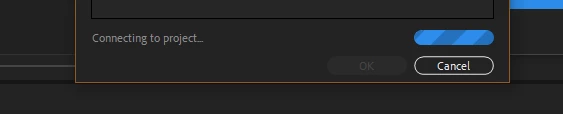
when i try to export a video in Media Encoder 2020 it gets stuck on "connecting to project" this happends to me when exporting from after effects and when importing an after effects file into media encoder. i tried using multiple projects and they all get stuck on "connecting to project". i used to be able to export videos with media encoder without any problems but now not anymore

(i posted a picture down below of the  "connecting to project"


im using Media Encoder 2020 and After Effects 2020


10 replies

New Participant
March 3, 2025

How is this still a problem 4 years on? Why hasn't this problem been addressed? This issue is still present in the 25.1 version of Media Encoder.

Adobe Employee
March 3, 2025

What are the versions of the other applications?

Please provide more information. See https://community.adobe.com/t5/adobe-media-encoder-bugs/how-do-i-write-a-bug-report/idi-p/13094801 what we need in order to look into your issue.

New Participant
March 6, 2025

Issue - When importing an After Effects project from the media browser window within Media Encoder, the progress status doesn't change. The progress bar is stuck on "Connecting to project..." 

Adobe Media Encoder version number - Version 25.1 (Build 65)

Adobe After Effects version number - Version 25.1.0 (Build 68)

Operating system - MacOS 15.3.1 (24D70)

Steps to reproduce - Open Media Encoder > Open an After Effects project within Media Browser window

Expected result - You should be able to navigate through the project and it's compositions, select the compostion you want to export then export in the format(s) you wish to export.

Actual result - The progress bar is stuck on "Connecting to project..."  and the project does not open


I have tried to reopen Media Encoder, clear any media cache and I have also restarted my Mac and i've also relocated the project and it's assets serveral times. The issue unfortunatley still persists.

New Participant
October 6, 2022

Same problem here and yet no solution?!?

Adobe Employee
April 11, 2023

Please provide more information about your issue so that we can help you. What app versions? OS? What did you try to do? What happened?

New Participant
May 31, 2022

It just started yesterday out of nowhere. Renders would crash half way in Media Encoder, and now I have to restart the pc a few times to get Dynamic Link Connection to work.

Behaviour is completely erratic. Sometimes jobs won't be added to the queue, sometimes I can't change the preset and I get  stuck at "connecting to Dynamic Link". Sometimes I would get a windows saying AfterFX crashed, but After effects is still working correctly.
I deleted the folders as suggested on the link above, didn't help.
windows 11, latest Media encoder and latest After Effects.

Adobe Employee
February 20, 2023

Which versions of AME and AfterEffects are you using?

If you run into crahsers, please fill in the information in the crash dialog. This helps us when we look into the issue.

New Participant
May 18, 2022

I found a way to resolve it by opening the Activity Monitor and force quitting both Adobe Media Encoder and aerender (that was not working for me), and then it all just works when reopening AME.

I think you still need to stop the previous render and start again.

Good Luck!!

Inspiring
May 25, 2022

This did the trick for me as well! Thanks!!!

Fergus H
Community Manager
Community Manager
March 2, 2022

Hello, 

I'm the product manager for Adobe Media Encoder. I would suggest two things:
1. Make sure you are using the latest version Media Encoder and After Effects. 

2. If you get into this state, reboot. 


There was a known issue with AME and AE that could cause the issue you're describing. It was fixed in December of last year. However, there are still some issues with DynamicLink (a technology that connects our applications) that can cause the problem you're describing. If you experience this when you're on the latest version - and we know what operating system and version you're on - we can provide some more information to fix the issue. But definitely get on the latest version first. 


Hope this helps!

Fergus

New Participant
March 3, 2022

the issue is still present with the most updated software, I'm checking software updates everyday hoping this issue is fixed and still nothing, I'm using AE on an M1 Max MacBook Pro with Monterey OS.

New Participant
March 2, 2022

This is furstrating! and the workaround adobe is proposing is not solving the problem, instead on working i'm spending tiome troublshooting an issue for a buggy software im paying for! shame on you adobe! 

New Participant
February 24, 2022

Same problem here, following..

New Participant
February 24, 2022

Hey, did you find any solution for that? I am having the same issue since 02 days.

CaptnCapsLock
Known Participant
January 3, 2022

I'm having the same issue, and it seems like the only thing I can do about it so far is to clear the render queue, and resend the projects (if you're sending them from After Effects) and refill the queue, and restart the render. 

The other response hasn't done any good on my end.

Community Manager
August 8, 2021

Hi there,

I understand this is not ideal. I found an article related to this issue. Check it out: https://helpx.adobe.com/after-effects/kb/after-effects-composition-export-error.html


Let me know if it helps.


Regards,

Shivangi

New Participant
April 10, 2023

doesnt work..