Preran
Community Manager
Community Manager
February 22, 2019
Question

Error: can't verify my subscription status (Windows) in XD

  • February 22, 2019
  • 42 replies
  • 185405 views

Try the following solutions in the order in which they are listed: 


If that doesn't help, then try the below steps.


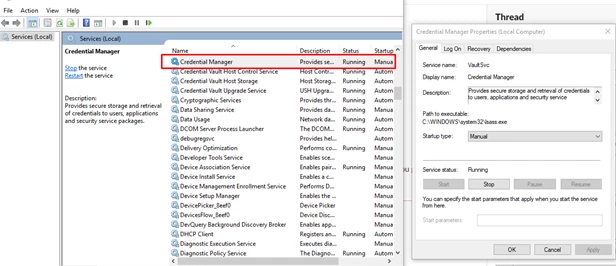
  • Start the Credential Manager Service: 


  • Disconnect VPN and retry 
  • Switch to a different network and retry 


Or,

You may try the below steps-


  1. Click Start Button and Type "Windows Update"
  2. Now either click "Check for Updates' or click on one of the options "Important" or "Optional". This will open a window, "
  3. Select Updates to Install".
  4. In Optional Updates, Find update KBXXXXXX (Depending on the latest update) and check it. You can uncheck all other updates from Important and Optional list as that will make the process faster.
  5. Click Ok, Wait for installation to complete.
  6. Now Download EasyFix.msi from this link (Search Easy Fix as article is quite long)
  7. Easy Fix will add the required registries, Now you must restart the system and check the workflow.


If these solutions do not help, please share your OS and XD version of your machine with Harshika Verma so that she can investigate more about your issue.


Thanks, 

Preran 

42 replies

Participating Frequently
May 6, 2020

I am trying to access adobe xd on macOS Catalina, but every time I try to do that the following error message appears "We can’t verify your subscription status." I've tried signing out and in and I've tried the solution on the troubleshooting guide but nothing works. 

Rishabh_Tiwari
Community Manager
Community Manager
May 6, 2020

Hi there,


We're so sorry to hear about the trouble. Could you please try the steps suggested in this similar discussion: https://community.adobe.com/t5/adobe-xd/install-solved-can-t-verify-my-subscription-status-windows/td-p/10618585?page=1


Let us know if this works or if you need any further assistance.


Regards

Rishabh

Participating Frequently
May 6, 2020

Unfortunately, after trying:

-Signing in and out
-Locking and unlocking my keychain access
-Uninstalling and reinstalling adobe xd
-Restarting my Mac

Nothing worked… NOTE: that I’ve created my adobe id, installed adobe xd and signed into to the adobe creative cloud using a vpn, I then turned off my vpn and opened adobe xd

New Participant
April 5, 2020

Restarting the credental manager did it.  Thanks.  I was about to give up on the software. 

HARSHIKA_VERMA
Community Manager
Community Manager
April 12, 2020

Sorry for the frustration and thanks for trying the steps. Nice to hear you are able to resolve the issue. Please feel free to reach out to us in the future for any assistance. We'd be happy to help..


Thanks,

Harshika

New Participant
January 7, 2020

None of these fixes have worked for me, having the same issue.

HARSHIKA_VERMA
Community Manager
Community Manager
January 27, 2020

Hi Apokalum,


Sorry for the delay in response. Would you mind confirming if you're still experiencing this issue or it has been resolved?

We will try our best to help.


Thanks,

Harshika

javiert70063932
New Participant
January 4, 2020

Hola a todos.

Desde hace unas semanas no puedo acceder a Adobe XD y me sale la pantalla de la imagen.

Los demás programas y aplicaciones de Adobe Creative Cloud funcionan perfectamente, solo ocurre con XD.

Mi sistema operativo es Windows 10.

¿Alguien puede darme alguna indicación para solucionarlo?

Muchas gracias!

javiert70063932
New Participant
January 5, 2020

Hola de nuevo.

He investigado y he encontrado la solución en los foros en inglés.

En Windows 10 abrimos el Administrador de Credenciales y eliminamos las credenciales de Adobe App.

Al abrir de nuevo el programa, funcionará perfectamente.

Gracias.

New Participant
October 25, 2019

Thank you. It worked perfectly for me. 

HARSHIKA_VERMA
Community Manager
Community Manager
October 25, 2019

We are glad to hear that the mentioned solution helped you. Please feel free to reach out to us in the future for any query related to Adobe XD.


Thanks,

Harshika

niralivasoya
New Participant
October 3, 2019

Hi Preran.!

I came across this post as I was researching the same issue with XD, i have tried all the solutions but still facing the same issue. Please help me to solve this out.


Thanks

HARSHIKA_VERMA
Community Manager
Community Manager
October 3, 2019

Hi Niralivasoya,


We are sorry to hear that you are facing trouble using Adobe XD and thank you for trying the steps mentioned. Could you please try creating a new user account of your system using this link: https://www.youtube.com/watch?v=j3UwhgNXsvM? and let us know if that helps.


Thanks,

Harshika

New Participant
October 28, 2020

OK, I have been struggling with this for days and figured I would post my solution even though it's not ideal.  First of all, I have tried all possible permutations of fixes regarding credential manager - removing all, stopping and restarting the service, etc.  I have also been through a couple of complete uninstalls including using the creative cloud cleanup tool.  Here is what I did to fix my problem with one particular individual:


- If you are quick, you can position your cursor over the "edit" menu while hitting enter to "try again" on the message.  It might take a few tries, but I was able to get the menu open before the message box popped up again

- Go to Edit -> Preferences-> Security (Enhanced).  I turned off two options - "Enable protected mode at startup" and "enable enhanced security".


I don't like leaving these security options off, but this did fix the problem for my user and was hoping this information could benefit the community with figuring out why these options are causing an issue - if this is in fact a repeatable fix for others.


New Participant
April 1, 2019

I recently re-installed windows 10 enterprise in my machine and have downloaded adobe xd and when I try to open XD, it shows that it cant verify my subscription status. "We can’t reach the Adobe servers. This may be because you’re not connected to the internet. Check your connection and try again below. If you’re still having issues, please see our connectivity troubleshooting guide. ". I re-installed windows and XD and my internet connection is working fine but it still shows this error. Please help me solve this problem.... I have a website to deliver in a week....

Atul_Saini
Community Manager
Community Manager
April 1, 2019

Hi Rayan,

Sorry that you are unable to launch Adobe XD and encountered this error message.

Could you please share the version of Adobe XD: Go to Help > About XD and Exact version of Creative Cloud sync: Open Creative Cloud desktop app, go to Preferences > Creative Cloud > Files? Other than that we would need the following logs.

  • AdobeXD.log: %localappdata%\Packages\Adobe.CC.XD_adky2gkssdxte\LocalState\
  • ACPLocalLogs:%localappdata%\Packages\Adobe.CC.XD_adky2gkssdxte\LocalState\ACPLocalLogs

Note: For the logs above paste" %localappdata%\Packages\Adobe.CC.XD_adky2gkssdxte\LocalState\ " in the address bar of windows explorer, you would get to the Local State folder where you can find the above logs.

You may upload these logs to CC or Dropbox as a zip file and share the link with me in a private message. Please let me know in case you face trouble grabbing any of the logs.

Thanks,

Atul_Saini

Atul_Saini
Community Manager
Community Manager
April 24, 2019

Hi Rayan,

In case you are still having trouble with this issue, please try the steps mentioned here: - User and license information issues | CC 2019  and share the results.

Thanks,

Atul_Saini

devam
New Participant
March 29, 2019

We can’t verify your subscription status.

this kind of error show in Adobe XD. I uninstall serval time my Adobe XD please fix this issue ASAP!

my adobe ID is:<Removed by moderator>

Contact number:<Removed by moderator>

Atul_Saini
Community Manager
Community Manager
March 29, 2019

Hi Devam,

Sorry that you encountered this error, we would need some additional information from your end and we'd appreciate your cooperation with this.

I would request you to share the following logs.

1. Check for NGLClient_AdobeXD117.0.12.11.log on this location: - %localappdata%\Packages\Adobe.CC.XD_xxxxxxxx\AC\Temp\

2. Run the log collector tool How to use the Creative Cloud Log Collector tool and send logs via email or a downloadable link (dropbox)

3. Collect the crash dump using this link: - How to generate crash dumps on a Windows machine upload the file to CC or Dropbox and share the link with me in a private message.

Thanks in advance for your efforts.

Atul_Saini

devam
New Participant
March 29, 2019

Devam Soni

Web Designer

<Personal information removed by moderator>

New Participant
March 16, 2019

Hello,

I installed Adobe CC on Windows 10 (yesterday it was updated)

then I installed adobe XD CC

When I was trying to open it, I get a window that says this "We can't verify your subscription status"

I try this stop your system clock from syncing with the internet time. tried to reinstall, then update windows and adobe cc and xd cc too

Can anyone help me?

Here is a screenshot in attachment


Atul_Saini
Community Manager
Community Manager
March 18, 2019

Hi Milandrazic,

Sorry that you are unable to use Adobe XD and getting this error message, could you please share the version of Adobe XD and OS version?

Thanks,

Atul_Saini

Participating Frequently
March 20, 2019

i have same problems too when i updated into last version adobe xd cc then came up that words "we can't verify your subscription status adobe"

georgek51807646
New Participant
March 5, 2019

I am unable to use XD CC because of the following error. I followed all troubleshooting tips to no avail. This is only happening with the XD CC app. All other CC apps are working normally.

Atul_Saini
Community Manager
Community Manager
March 5, 2019

Moving this discussion to Adobe Creative Cloud​ forum.

Stan Sokolowski
Participating Frequently
March 10, 2019

Same thing happening to me. I've just uninstalled every Adobe product along with Creative Cloud App, used CC cleaner tool and installed everything anew. The problem persists only for Adobe XD, every other product works fine.