TimKurkoski • Adobe Employee, Jun 26, 2023Jun 26, 2023
Hi! Thanks again for your feedback. This bug has been fixed in After Effects Beta 23.6 build 34. Please update to the latest version and let us know right away if you continue to see the issue.
/t5/after-effects-beta-bugs/v23-6-0-29-no-longer-be-able-to-open-3d-objects/idc-p/13884511#M437Jun 22, 2023
Jun 22, 2023
Copy link to clipboard
Copied
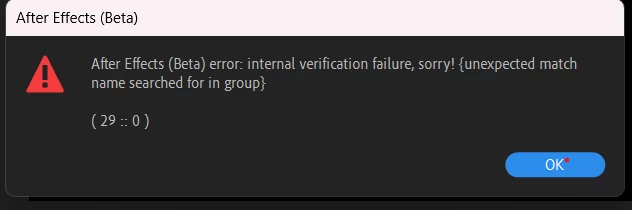
Esse problema aparece de maneira persistente quando imprtamos algum objeto 3D dentro do AE, essa possibilidade de trabalhar com objetos 3D diretamente dentro do AE é ótima, mas ao mesmo tempo, nessa versão Beta, está impossível de exportar qualquer projeto que tenha um objeto 3D, sempre da esse erro, e ao tentar exportar da outro erro, também relacionado ao objeto 3D.
Thanks for reporting this. We're aware of this issue. A change made in build x29 is causing projects saved with 3D models in a comp to generate this error, and subsequently to not render the 3D model.
This is partially fixed in today's build x31, in that new projects with 3D models can be saved and reopened. But opening projects from builds prior to x29 is still broken. A fix for that is in the works for, hopefully, build x33.
Please test the new builds, once available, and let us know whether the problem is fixed for you. I'll update this thread as soon as we have confirmed the fix in public builds.
/t5/after-effects-beta-bugs/v23-6-0-29-no-longer-be-able-to-open-3d-objects/idc-p/13895051#M441Jun 26, 2023
Jun 26, 2023
Copy link to clipboard
Copied
Hi! Thanks again for your feedback. This bug has been fixed in After Effects Beta 23.6 build 34. Please update to the latest version and let us know right away if you continue to see the issue.
Hello @TimKurkoski after this update v24.0.0.11, I can no longer be able to open my files with 3d objects in it. I tried to make a new composition from scratch but there was also a problem rading 3d objects.
I am also having this issue and a bit stressed about it because I have a deadline next week that I NEED this project file to be functioning for.
Unsuccessful attempts to fix this:
- Clear all caches including the new 3D cache. - Collect Dependencies - Replace affected 3D models within AE with new 3D models - Replace the affected 3D models indirectly by renaming them in File Explorer - Swapping 3D render engine to C4D and back to M3D - Removing all adjustment layers - Precomping 3D layers
Are you unable to import any 3D model into After Effects Beta? Or only specific models?
Can you share the project and models that are giving you problems? Please DM me a link to the files.
A reminder that new features in After Effects Beta are under active development. Changes in features and rendering quality can and do change in new builds. I recommend you seek established workflows in non-beta software if you are trying to meet a deadline.