

Christine Goldby
Known Participant
December 9, 2021
Question

Introducing the Properties Panel in After Effects (Beta)

  • December 9, 2021
  • 39 replies
  • 174440 views

In our ongoing aim to make your After Effects experience better, we are excited to introduce the new Properties Panel to the beta today (22.2.0x29).


As always, we look forward to hearing your feedback here in the forum. Your responses help us know when features are ready to ship or if they need more polishing. Please speak up and help us build the product you need!


Properties Panel

Create motion graphics quicker and with greater ease inside the new Properties Panel. Cut down on your twirl-time by quickly accessing the properties you need the most. New designers coming from Photoshop and Illustrator should feel right at home with controls available where you are used to finding them.


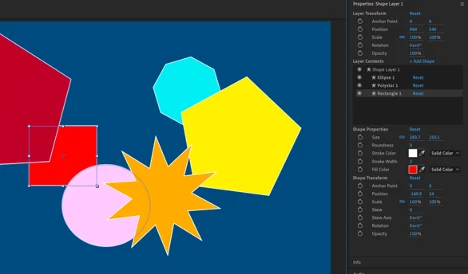
This first build brings an easier way of working with Shape layers. Select a shape either in the composition window or timeline, and you will find its properties shown in the panel for easy access. If you change a value in the panel, it will change in the timeline as well. Select multiple shapes on a layer to change their values at the same time.


Alongside the Shape properties, we’ve also added basic layer transforms for Anchor Point, Position, Scale, Rotation and Opacity. The values can be modified for multiple layers at once when selected together.


How to Use Properties Panel
Select a Shape layer in the timeline, or in the composition window double-click to select a specific shape within that layer. The Properties Panel, which will be at the upper right side of the panel stack, will display the properties for your selection. You may need to extend the bottom edge of the panel down to see all the controls, or you can scroll down instead.


  • Layer Transform controls at the top of the panel control the layer as a whole.
  • Layer Contents lists any selected Shape layer(s) plus all the Shapes included within them.
  • Shape Properties gives you quick access to the properties you need most frequently.
  • Shape Transform gives the Anchor Point, Position, Scale, Rotation and Opacity controls specific to the selected shape.


Tips

  • Double-click on any shape in the composition window to show its controls in the Properties Panel.
  • Double-click on any property in the Properties Panel to reveal it within the timeline.
  • The panel can be moved to wherever you find it most useful. Let us know where you end up using it most often!


For a longer introduction check out the attached video below.


Have fun with it!


Known Issues and Workarounds

  • If you have multiple fills/strokes within a single shape, the fill/stroke does not show up in the Properties Panel. You can still edit these items within the timeline window.
  • If you have multiple paths within a single shape, only the initial path shows in the Properties Panel. You can still edit the other paths within the timeline window.
  • Shape Modifiers applied to Shapes do not show in the Properties Panel.
  • Layers/Shapes cannot be renamed or reordered within the Layer Contents window.
  • If you have a lot of Shapes on one layer, the Layer Contents window may not auto-scroll to your selected Shape. You can use the scrollbar to get to it.
  • When scrubbing the Rotation angle, revolutions are not properly counted (rotating past 360 will start over at 0). You can type in values directly.
  • If you have multiple keyframes on a property, deleting one or more from the Properties Panel does not work correctly. Move to the timeline to delete instead.
  • Deleting a Shape Layer from either the timeline or Properties Panel throws an AE error. Just click OK and keep working.
  • Keyframing a gradient fill/stroke from the Properties Panel throws an AE error. Click OK, and go to the timeline to set your keyframes.
  • Resetting values in the Properties Panel will reset the values within the timeline, but the value still appears the same in the Properties Panel.


39 replies

Community Manager
May 1, 2025

Hi All! We've recently fixed an issue that caused lag when dragging keyframes and layers while the Properties Panel is open. Please download the latest beta and give it a try; let us know how it goes!

New Participant
December 12, 2023

Hi

I have a very annoying bug that I would like to be addressed with the property panel. Here is a scenario that keeps happening:


When I am working with a shape layer, sometimes I like to work in full view inside the compisition window, once I shift the tools between rotation using the hotkeys (W) and let's say the selection tool (V), After Effects abruptly leaves the full view in order to make the property panel visible to me, and I have to manualy switch back to the full view using the (`) everytime I shuffle between the tools. 

I was searching for the reason why After Effects behaves this, I figured that it only happens when I am working with a shape layer, hence the property panel needs itself to be displayed (self entitled propery panel looking for attention).


How do I switch this bug off? in better words, how can I have an interrupted full view display when I am working with shape layers after the introduction of the property panel?


Thank you,

Mohamad

JohnColombo17100380
Community Manager
Community Manager
December 12, 2023

Hi @Mohamad33019384c890,

Thanks for asking about this behavior. You should be able to switch off this behavior by disabling the "Auto-Open Panels" checkbox in the toolbar while either the Shape or Pen tools are active. Let us know if that doesn't improve the behavior for you.


Cheers,

- John, After Effects Engineering Team 

francoestrubia
Participating Frequently
August 10, 2023

Any way to hide it forever? I really don't need this kind of half baked shortcuts (that's the great thing about ae, every user has their workflow). Now every change I made, the damn panel is poping up and desconfigure my workspace layoud. I need to restore the workspace every minute.

Another Workaround: if you type something and want to make your text black or white, go to the Character panel! There are two shorcuts since ae 4.1

Zack Einhorn
Community Manager
Community Manager
August 14, 2023

Hi @francoestrubia! You can hide the panel by disabling "Auto-Open Panel" in the toolbar for Text and Shape tools.

New Participant
June 7, 2023

I'm finding the properties window appearing everytime rather annoying, is there a way to disable it?

JohnColombo17100380
Community Manager
Community Manager
June 7, 2023

@maxw93641147 As mentioned above, you can control this behavior by disabling "Auto-Open Panel" in the toolbar for the Text and Shape tools. That will prevent the panel from appearing when you activate those tools.


Cheers,

- John, After Effects Engineering Team 

New Participant
May 23, 2023

I don't want it. Is there a way to turn it off? I don't want a pop up everytime I double click on a shape/text layer. I have my workspace set up the way I like and this is messing with it.

sskaz
Inspiring
May 23, 2023

Select the Text tool and then uncheck the “Auto-Open Panel” checkbox in the Tools palette. Repeat with the Shape and Pen tools.

New Participant
May 24, 2023

Thank you so much!

Bruno Quintin
Inspiring
February 17, 2023

The properties disappear if I ungroup a shape layer. Properties are not displayed if they are not in a group. Why do I have to ungroup ? Because there is no cadena on groups. If I need a simple shape, I want to avoid entering the group when I want to move the layer.

Zack Einhorn
Community Manager
Community Manager
February 22, 2023

Thanks for brining that up Bruno! We are aware of that beahvior and fixing it is on our task list. I've increased its priority.

Bruno Quintin
Inspiring
February 24, 2023

I wanted to add that properties also disappear if there's more than one shape or stroke, or fill in a group.

But, I discovered something super cool! This panel is perfect for editing multiple shape layers that are made up of one group with a shape, stroke, and fill. It's incredibly easier to modify all the properties of the layers at once than using the Timeline panel. Even though the properties panel doesn't accept click-and-drag selection, I can still select all the groups by selecting the first and last ones while holding down the alt key. How awesome is that?!

Shebbe
Adobe Expert
February 16, 2023

Hi Adobe team,


I think the Properties Panel is looking great so far. One slightly awkward thing I noticed is that renaming shapes or the layer works from the panel, but the renaming box is on the composition panel instead just like regular renaming. 
Wouldn't it be better if the text on the panel became editable so you don't have to move your vision away and back again.


Zack Einhorn
Community Manager
Community Manager
February 16, 2023

Thanks for brining that up! We totally agree and it's on our list of things to do next!

Zack Einhorn
Community Manager
Community Manager
February 7, 2023

Hi everyone! In the latest betas, there are additional shape layer properties visible in the Properties Panel to help reduce twirling in the Timeline:

  • Line Cap
  • Line Join
  • Path Properties

Let us know what you think! We always appreciate your feedback.

Inspiring
February 9, 2023

Hi Zack, is the properties panel going to be added to the v23 release at some time? It was introduced in beta in 2021... 

Thanks!

Zack Einhorn
Community Manager
Community Manager
February 15, 2023

Hi holtz! We are currently polishing the Properties Panel for a future relase. Features usually remain in Beta until the Ae team and you, the Beta users, feel that feature is ready for wider release. What do you think? How has your experience been using the Properties panel?

Lars Jandel
Inspiring
December 6, 2022

Wish: Option to lock the Properties Panel plus in result also being able to use multiple instances:

This might have been mentioned before. Same as we already have with the Effect Controls Panel, it would be great being able to lock the Properties Panel in order to do later changes on that layer even when selecting another layer or even another comp. Of course, same with Effects, the user should be enabled to open additional Properties Panels, when the current one is locked. Thanks!

Participating Frequently
November 24, 2022

Where is the Properties Panel in R23? Can´t find it and i cannot choose it form the Windows Panel.

R Neil Haugen
Brainiac
November 24, 2022

R23?