

Thiago Guimarães
Participating Frequently
June 18, 2024

After Effects Freezes after some time with error: "Direct2D Drawbot Error. HRESULT:-2005270523"

I can't say for sure, but after two or three more recent versions of AE Beta I started to get a random error, after working for a few minutes the whole computer crashes and then this Direct2D Drawbot Error box. HRESULT:-2005270523 appears, but I can't close it, it keeps reopening endlessly and then I have to force close the program.


I've been using AE Beta since they redid the interface, it's just become another program! It's very fluid and enjoyable. I'm not using to use the retail version because he not received the interface update., but I can say that the problem is in the beta, because when i use the reail version there is no issue i don't have any errors or freezes.


Here's a picture of the error I get when I close.
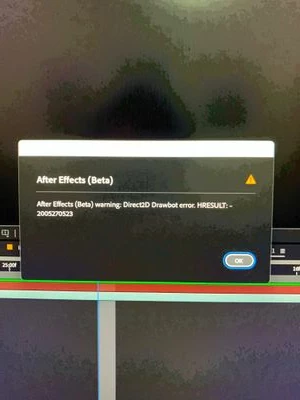


AE Beta V24.6.0 b23

Windows 11, i7 9750H, GTX 1660TI 6GB, 32gb de RAM, 512gb SSD.

Driver Nvidea Studio  555.99.


159 Antworten

JohnColombo17100380
Community Manager
Community Manager
November 19, 2024

Thanks all for your patience, I've been out sick for most of the month.


@Thiago Guimarães The interface update has made its way to release in version 25.0.1. Do you also experience the Direct2D error in that version? And is it persisting in the latest 25.2 Beta version?

@PolkaFever After Effects now uses the same Direct2D component as Premiere, so it certainly could be related. I'm going to see if I can also reproduce the error as you've described. Has this been occurring in all versions of Premiere or only in recent updates?


@Manic Motion Thank you for the screenshot! I noticed that Explode Shape Layers doesn't appear to be loaded (the panel is blank). Does the error continue to occur if you remove ESL from your workspace?


@James28357849j9m4 Thanks for letting us know you are hitting this as well. Do you also encounter it in the release version of 25.0.1 or only in the Beta version?


Thanks again all,

- John, After Effects Engineering Team 

al78770967
Participating Frequently
November 16, 2024

I have recently updated to After Effects v 25.0.1.  I now get an error when I try to change fonts. After Effecs warning: Direct2D Drawbot error.  

Processor AMD Ryzen 7 3700X 8-Core Processor 3.59 GHz
Installed RAM 32.0 GB
System type 64-bit operating system, x64-based processor
Edition Windows 10 Pro
Version 22H2
OS build 19045.5131

Nvidia GeForce RTX 2070 Super

GeForce Game Ready Driver Version 566.14


kglad
Community Expert
Community Expert
November 16, 2024

in the future, to find the best place to post your message, use the list here, https://community.adobe.com/

p.s. i don't think the adobe website, and forums in particular, are easy to navigate, so don't spend a lot of time searching that forum list. do your best and we'll move the post (like this one has already been moved) if it helps you get responses.


<"moved from using the community bugs">
Participant
November 11, 2024

 Same issue 3 times now 

Participant
November 1, 2024

I'm encountering a problem where I'm getting an error message whenever I attempt to change the font for a line of text. This began after updating to the most recent version of After Effects v25.0.1


I'm not doing anything different than usual. This is happening with all text boxes whenever I try to change the font.


I've updated AE, Windows, Nvidia drivers, tried switching between Studio and Game drivers, and cleared the memory and disc cache. None of that worked. 


I need this resolved ASAP for work 

Community Manager
November 1, 2024

Hello @Sean24038633p33u,

Sorry you are experiencing this issue, and thank you for taking the time to post to the forums.

We did recently move to using this new drawbot with 25.0/25.0.1. Your issue could possibly be related to an overlay being drawn as that is where we saw errors that we fixed during the migration process.

Could you respond with the following to help us further track down the issue?
1. Screen capture of the error dialog
2. Recording of AE where you reproduce the issue of the error dialog displaying
3. Your system specs:OS version, GPU + drivers version, and CPU - most important for this bug would likely be the GPU

All the best,
Jessica
AE Engineering

All the best,Jessica McMillan - AE Engineering
Participant
December 13, 2024

From last few days i am facing this error continously on After Effect after version update 

Thiago Guimarães
Participating Frequently
September 11, 2024

Hey man! try to use the Beta Version without plugins. For me works well, after try to use one by one, maybe you will find wich one cause the error. today i'm using the plugins that i'm use daily normaly.

Participating Frequently
September 10, 2024

Hey !


I had the same here. Here's a screencap of my workspace.


PolkaFever
Inspiring
June 25, 2024

Maybe not relevant, but I also have similar problems, but I am currently using Premiere Pro Beta. I get the same error message:
"Direct2D Drawbot error. HRESULT: -2147023496".

Tried opening without plugins and extentions, but PPro beta always freezes when I Match Frame something in a sequence and scrub a clip in the source panel.
@JohnColombo17100380 : Are these cases related in some way? 

Thiago Guimarães
Participating Frequently
June 18, 2024

Sure! I'll try to provide as much information possible from my usage; perhaps it can help identify which plugin is causing the error or if there's a specific function that triggers it.


I use a few plugins in my workflow, including:

Third-party Panels: Animation Composer, LabelME, DecomposeText, FX Console.
Effects Plugins: BCC, Mocha, Sapphire, from Boris FX.


Looking at the plugins, two things catch my attention: LabelME has not worked since the last two or three versions, and I always receive a write error, leaving it as just a black panel.


Animation Composer might have something to do with it, as it works by adding an expression directly to the layer. Apparently, when I use a text expression, it seems to increase the chance of the error occurring, though I can't say for sure.


Today I will work on recording my screen so we can try to figure out what might be causing this.


LabelME is a plugin that organizes and facilitates the selection of layer labels.

JohnColombo17100380
Community Manager
Community Manager
June 18, 2024

Hi @Thiago Guimarães,

Thank you very much for reporting this issue. The error you are experiencing is something we are currently investigating as part of the UI improvements.


Are you using any third-party panels or plug-ins in your workspace or projects? We have been finding that some third-party UI elements are triggering this error in the Beta version. A full-screen recording or screenshot would be helpful as we try to narrow down where the error is coming from.


Thank you for any additional information you can provide,

- John, After Effects Engineering Team