Known Participant
April 14, 2025

Colorspace clipping using add blend modes in OCIO v25.2.2

  • April 14, 2025
  • 返信数 19.
  • 3558 ビュー

Hi,

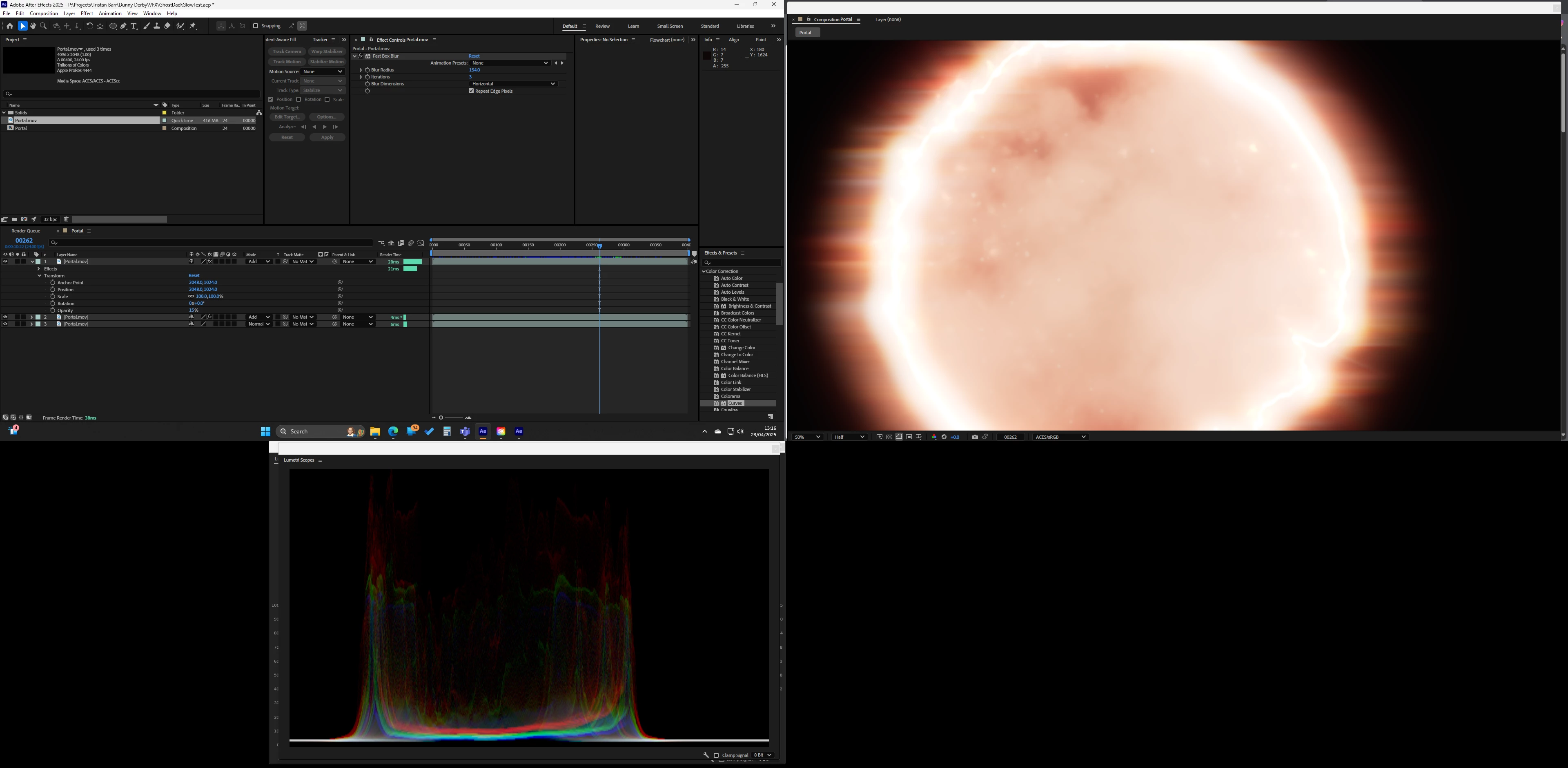
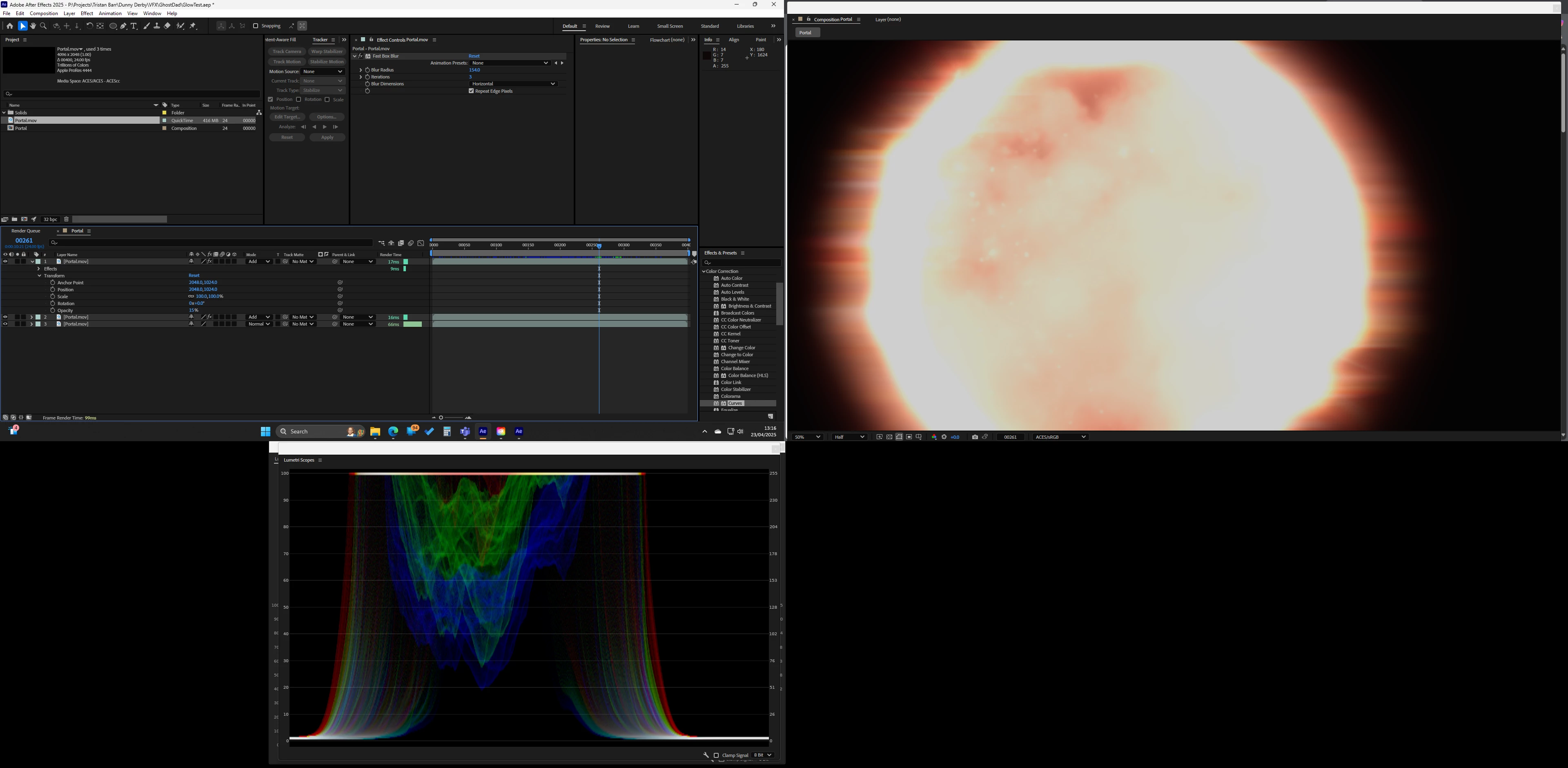
Just upgraded to 25.2.2 and I am having a strange issue with adding layers its like it randomly clips or switches color space from one frame to the next. Only started happening after upgrading AE and NVIDIA.

The screenshots are from the same project just different frames, as you will see it also affects the scopes. Only effect used is 'Fast Box Blur'

Switching to 'Software Only' fixes the issue
返信数 19

NRowe作成者
Known Participant
August 1, 2025

Any one know if this has been fixed in 25.3.2?

I terrified to upgrade incase its got worse! 25.3.1 is just about useable 

jordanc75789874
Known Participant
July 25, 2025

What does that mean just out of interest? 

jordanc75789874
Known Participant
July 18, 2025
Known Participant
June 5, 2025

Hello Adobe, I also would like to know if we can expect an update / fix soon as I am really depending on a reliable color workflow. By the way, I found out by accident, if I export a video in sRGB and import it again, when I comp this reimported sRGB Video, the whites are way too high and totally blown out, way more than normal sRGB footage. Perhaps this helps resolve the issue. Also, color correction tools to manage overbrights would be very much appreciated in ACES, with the tools we have, it is very difficult to tame some hi-key colors and whites. Thanks!

NRowe作成者
Known Participant
June 5, 2025

Any updates on this, is a fix coming anytime soon?

Known Participant
May 5, 2025

Thank you Nishu!

NRowe作成者
Known Participant
April 28, 2025

Thanks Nishu

Good to know its not just me!

NRowe作成者
Known Participant
April 23, 2025

Thanks Nishu,

My system Spec


Processor 12th Gen Intel(R) Core(TM) i9-12900K 3.20 GHz
Installed RAM 64.0 GB (63.7 GB usable)
Edition Windows 11 Home
Version 24H2


GeForce RTX 3080
NVIDIA Studio 576.02


I will DM you the AE file and asset


Thanks again,

Neil

jordanc75789874
Known Participant
April 14, 2025

I am getting an issue when using add blend mode in aces, it makes the comp clip at 1, seem to be present in the beta too.


1. 25.2.0

2.Windows 11

3. Project file included

4. It clips the image, the expected result if a aces linear work flow


jordanc75789874
Known Participant
July 18, 2025

3 updates later - this is still a bug


what are you doing????

NRowe作成者
Known Participant
April 23, 2025

Here is a better representation on the scopes with the signal clamped. Its clearly clipping on 1, this happens randomly as I scrub the timeline.

nishu_kush
Community Manager
Community Manager
April 23, 2025

Thanks for reaching out.

Do you mind sharing your system specifications and details of the media? If possible, please share a sample media and After Effects project file for testing. Feel free to share via DM if you do not want to share publicly.

Looking forward to your response.


Thanks,
Nishu