
Participant
August 2, 2017
Question

AE crashes after closing specific Project: <BEE_WorkQueue> <5> BEE_WorkQueue_PreCloseProject end

  • August 2, 2017
  • 6 replies
  • 9998 views

Facing a problem with a specific AE-project. Everytime I try to close or import that project !After Effect crashes and shows following error.
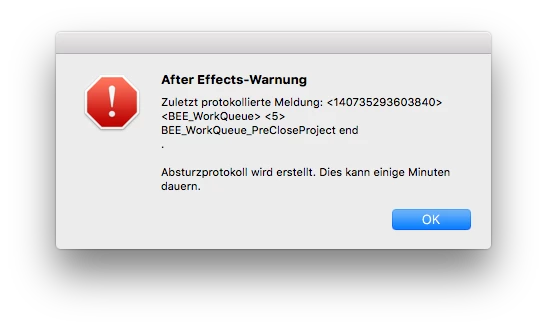
Is it possible to fix that file?

6 replies

FactorFiles
Inspiring
April 16, 2025

I don't know OP's project had this, but I've discovered that this error can be caused by having a Composition Camera within a composition that is using the "Path from Nulls" script using 3D null layers.


The only solution is to open the project in Safe mode, and delete the camera from the composition.

More info here: https://community.adobe.com/t5/after-effects-discussions/after-effects-cc-2018-bug-corrupted-the-aep-project-and-all-the-auto-saves-after-i-used-quot-create/m-p/10611527

Whiskas
Participant
July 11, 2024

Try opening a blank project and clearing all your cache & memory. Worked in my case.. 

alexeys30160552
Participant
August 26, 2018

<SOLUTION>

Make sure is your original AAE folders content complete.

I solve this error by copy/past Plugins and Presets folders from Time Machine created right after installation AAE.

Caution, it action delete all yours installed plugins and presets from AAE.

In begin, backup yours Plugins and Presets folder.

Regards!

Participant
October 9, 2022

I tried everything, even deleted the programs and all plugins and a fresh reinstall, it still crashes whenever I open preferences, nothing else causes it to crash but preferences and preview 😞

Participant
July 18, 2018

I have a similar problem but my project won't open at all now. I just keep getting this error message.

also there was only 1 auto-save file when I went to look for a backup thats before a did about 3 hours of work. I have it set to auto-save a lot more frequently than that so I'm unsure why there was only 1 auto-save file when I have it save every hour. Is my up to date file lost?

Kevin-Monahan
Community Manager
Community Manager
August 15, 2017

Hi TimBamBim,

Sorry for this issue. Did you ever find a solution? Please let us know if you have or if you still need help.

Thanks,

Kevin

Kevin Monahan - Sr. Community and Engagement Strategist – Adobe Pro Video and Audio
TimBamBimAuthor
Participant
August 16, 2017

Hey foughtthelaw, hey Kevin-Monahan,

It seems that this issue is related to the Essential Graphics panel. When I deleted all fields and options from Essential Graphics everything works fine. Could it be a Bug in AE?

Opening that project is no problem, only when closing it or importing the project into another one AE crashes. It doesn't have an effect if the file is stored local or on a server, crashes every time

Thanks,
Tim

Szalam
Community Expert
Community Expert
August 17, 2017

It sounds like a bug. File the report here so that it can be officially tracked.

foughtthelaw
Inspiring
August 2, 2017

does the project open at all? is it possible to save it under a different file name and try importing then? is the project saved on a server? if so have you tried storing it locally to see if you get the same results?