nishu_kush
Community Manager
Community Manager
May 10, 2023
Question

After Effects 23.4.0 is now available for download!

  • May 10, 2023
  • 22 replies
  • 15847 views

We are excited to announce that the May update of Adobe After Effects, Version 23.4, is now available for download. With several new features, this release includes the Properties Panel to ease your workflow.


What's New?

Properties panel for Text and Shape layers
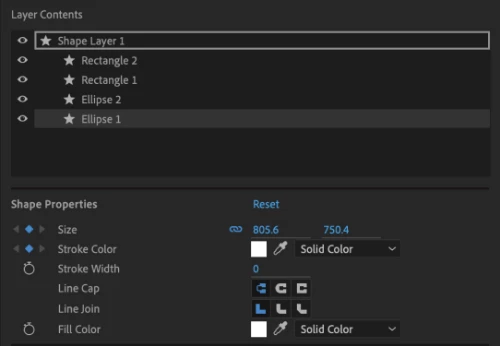
Creating motion graphics is easier and faster with the Properties panel. Use this to quickly access the important properties of selected Text and Shape layers in the timeline without twirling open multiple layer hierarchies or opening a different panel. It improves the accessibility of layer properties that speed up your workflows.


Read more about the Properties panel in After Effects.


Effect Manager
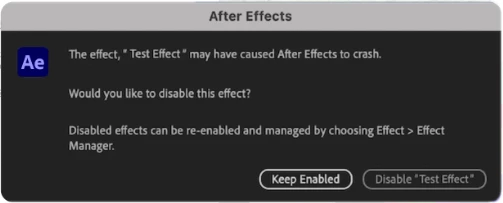
After Effects now attempts to identify effects potentially interfering with your project workflow and forcing the application to crash.
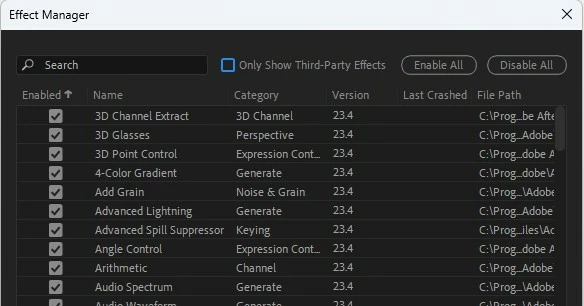
 
You can use the Effect Manager notification on the next startup to keep it enabled and proceed as-is or disable the identified effects before proceeding with your work. This can save you a lot of time, as you won't have to continually deal with the issues caused by problematic effects.
 
You can also use the Manage Effects under the Effects menu to view a list of all your installed effects and disable any effects on the next startup.


Startup & Repair in Preferences

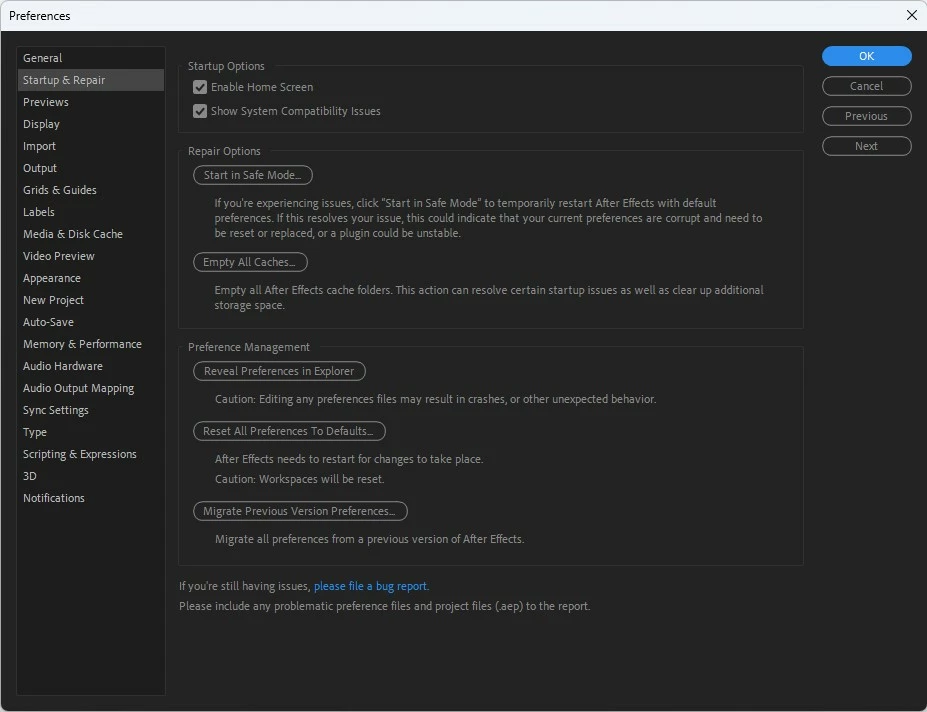
Use the Startup & Repair panel under Preferences to troubleshoot your set preferences in After Effects without changing or removing them or starting over from scratch. 


Start in Safe Mode - Launch After Effects once using only the default After Effects preferences and disabled third-party plugins. It helps you identify if any of your current set preferences are corrupt and need a reset.


Empty All Caches - Empty all After Effects cache folders. This action can resolve certain startup issues as well as clear up additional storage space. 


Reset All Preferences To Defaults - Reset all preferences to defaults permanently. 


Reveal Preferences in Finder - Navigate directly to the locally saved After Effects preferences file. 


Migrate Previous Version Preferences - Migrate all preferences from previous After Effects versions to the current one.

Learn more about the Startup and Repair feature in After Effects Preferences.


Improved file sorting in the Project panel 
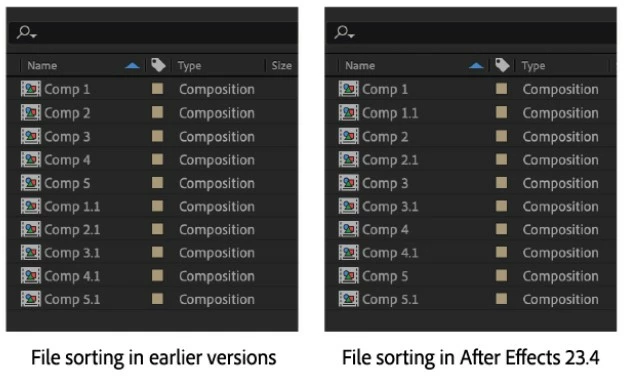
Sort filenames in the project panel using a more natural method that works better for names with numbers.


3D Gizmo position snapping

You can now snap layers in 3D space while dragging the constrained X, Y, and Z position handles of the 3D Gizmo. This includes the XY, XZ, and YZ combo handles of the 3D position gizmo. 

With this new improvement for 3D workflows in After Effects, you can use snapping, both constrained and non-constrained while working with 3D model layers.


Revamped Track Matte pick whip icon
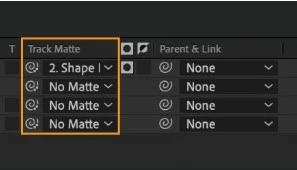
The new Track Matte pick whip icon is designed for you to easily differentiate it from the Parent & Link one. The new icon combines the pick whip shape with a hint of transparency grid and is effortlessly identifiable while working on your workflows.


Learn more about Track Matte in After Effects. 


Support for new formats

After Effects now offers support for the footage shot on Sony VENICE 2 V2.00 and on iPhones in Cinematic mode.

Take a look at all the supported formats.


What's Fixed?

  • Fixed an issue that caused some options from the camera submenu to be greyed out.
  • Fixed an issue that caused a ‘zero denominator in ratio addition.’ error when dragging the anchor point of a shape layer in 3D space.
  • Fixed an issue that caused After Effects to hang when collecting files that contain a Cinema 4D file in composition.
  • Fixed an issue where After Effects could crash when using a Wacom Tablet with Paint and Brush tools.
  • Fixed an issue where 12-bit color DNxHR HQX video in MXF files was being decoded as 8-bit.
  • Fixed an issue where Media Browser favorites were not being saved.
  • Fixed an issue with migrating preferences that caused After Effects to become unresponsive.
  • Fixed an issue with the render engine that caused After Effects to crash when choosing a folder from Watch Folder in the file menu.
  • Fixed an issue with Puppet Tool that caused After Effects to crash when changing the engine from Advanced to Legacy
  • Fixed an issue that caused MXF assets with Alpha Channel to not be transparent.
  • Fixed rendering notifications for non-English OS languages.
  • Fixed an issue where footage containing audio using 16kHz, 64kHz, 88.2kHz, or 176.4kHz Sample Rates would not play or export correctly.

How to update After Effects to version 23.4?

Open the Creative Cloud desktop application and click the Updates tab on the top left. Find After Effects in the list and click Update.



I don't see the update in my Creative Cloud desktop application. What should I do?

Click Help > Check for Updates from the Creative Cloud desktop application to refresh it.


NOTE: Updates are rolled out in phases. Please check back after a few hours if you don't see the new version in your CC desktop app.

22 replies

Participant
May 29, 2023

crash crash crash. 
I can't get past the splash screen, 

Splash screen says "initializing MediaCore" and that's it. gone. 
I'm running the latest NVIDIA driver (Studio 531.61) on my Windows 11 Raider laptop.
Tried rebooting, uninstalling and re-installing, safe mode, dump all settings, reloading the graphics driver, apparently everything. 

Went back and installed 23.3 - same problem. 

Have lost of crash files now, and when I try to upload them with e "attach files here' button on this thread I get "file type not supported" so I added .txt to the file name. (do you guys do that on purpose?)

mrBeep
Known Participant
May 30, 2023

Participant
May 23, 2023

Whatever ya'll did, AE is now crashing on my alienware desktop with a 3090, my Imac 2021, and my 2018 Imac pro atleast 5 times a day, sometimes more. Please fix whatever happened. And no I am not going to disable Universe that has been working great.

Participating Frequently
May 23, 2023

Well done, you have broken AE in a brand new and impressive way - it now won't start without instantly crashing. 


Tried going back a version and it's also broken. It was working OK (about as well as AE does anyway) before this update.


Got deadlines today.


USELESS.

Participant
May 22, 2023

After Effects Starting Issue unable to resolve in Safe Mode, Manage Preferences or Manage Plugins! Kindly Suggest how to resolve this with any kind of option is not working....

Inspiring
May 17, 2023

Which Nvidia driver should we be using for this release? The latest or the rolled back one suggested for the previous version?

nishu_kush
Community Manager
Community Manager
May 18, 2023

I discussed this with the engineers recently, and they suggested the latest version from Nvidia works better.

Let us know how it goes.


Thanks,

Nishu

Participating Frequently
May 16, 2023

HI! With this update all the shapes I create are transparent!!!! Although it says Solid color in new Properties window

Please fix ASAP!

nishu_kush
Community Manager
Community Manager
May 18, 2023

Hi Teoderik,


Could you share a full-screen screenshot? That would give a better idea of what's going on.

We're here to help.


Thanks,

Nishu

Participating Frequently
May 15, 2023

Every project takes forever to load now and I can't even select a layer without huge lag! What the heck did you guys do to my After Effects!? I have deadlines to meet!!!

nishu_kush
Community Manager
Community Manager
May 18, 2023

Hi Magic Plants,


Sorry about that.

Is it happening with the new project or just the old ones are affected? Can you try the basics - Clearing the media cache and resetting the preferences (go to After Effects Preferences > Startup & Repair)?

Let us know how it goes.


Thanks,

Nishu

Participating Frequently
September 15, 2023

I got it to work after an update, I believe it was a personal problem with my PC, not the software.

Juerg5CF2
Known Participant
May 15, 2023

"Fixed an issue that caused After Effects to hang when collecting files that contain a Cinema 4D file in composition."

This has not been solved, I am still having the same old problem I outlined here.

Funny enough, right when I updated to 23.4, the first time I opened a PP project consisting of  dynamically linked AE comp with a C4D file in it, everything seemed to work fine and apps could be closed. But when I re-opened PP again, the dynamic link was broken, the media pending message appeared and could not be re-established by all means. 


I then tried you new features "empty all caches" and "reset all preferences to defaults" and now I am back to the same old problem, AE freezes every time upon closing. There is one exception. If I change the apps closing order and start with PP first, all windows can be closed without freezing. Still, the dynamic link is broken and cannot be fixed the next time I open PP. This seems to be a new phenomen and was different with the previous 23.x releases.


The last version this worked flawlessly was 23.0 with an older C4D version. I am desperately waiting now for 3 months for a solution and really need this feature working as advertised. Also, I am co-working with my customers who expect me to be on the same version, so rolling back is not an option.


And the annoying ERR_FILE_NOT_FOUND window still appears upon opening of C4D.


Please, Adobe, it should not be too hard to fix something that once was working just fine. 

nishu_kush
Community Manager
Community Manager
May 18, 2023

Hi Juerg5CF2,


Really sorry for the inconvenience.

There are two different bugs.

One where After Effects crashes while collecting files if there is Cinema 3D file in the project panel. This issue has been fixed in the current version.

The other issue that you're having is where After Effects freezes on closing in Pr > Ae > C4D workflow. A fix to this issue is still in development.

I hope it clarifies the confusion. I'd love to investigate the behavior where the Dynamic link breaks.

Please spare me some time to do some research.

Appreciate your patience.


Thanks,

Nishu


mrjacobweber
Known Participant
May 15, 2023

Definitely a step in the right direction, but am I correct in that we still have to twirl down to adjust Layer Styles and added items, such as Trim Paths and Repeaters? Immediate access to those, upon clicking on the layer, would make this much more helpful. 

nishu_kush
Community Manager
Community Manager
May 18, 2023

That's a great suggestion. Please create a post about it in the Ideas section in the community. This way others can vote.


Best,

Nishu

Participant
May 14, 2023

Hi Nishu, please fix AE Version 23.4 because text property is messed up, every P letter in text is in different font, i am so frustrated because I have a big projects to finish


Participating Frequently
May 16, 2023

This update is incredible! before we had to use the timeline to make adjustments to line joins and caps, but now we ahev an entire panel, would love to see an option to taper and wave using the properties panel.