nishu_kush
Community Manager
Community Manager
August 14, 2025
Question

After Effects 25.4 is now available to download!

  • August 14, 2025
  • 12 replies
  • 5552 views

Welcome to After Effects 25.4


After Effects 25.4 is here!
This release brings new features, bug fixes, and workflow improvements to enhance your creative experience. A highlight is Quickly Offset Your Layers and Keyframes, making it easier than ever to adjust timing in your projects.
Update now to enjoy smoother, faster, and more intuitive animation in After Effects.


New in 25.4


Here are the new features coming with version 25.4
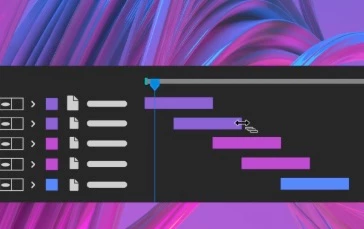
 

Quickly offset your layers and keyframes

Create animations by staggering layers or keyframes across multiple layers over time with a simple keyboard shortcut.
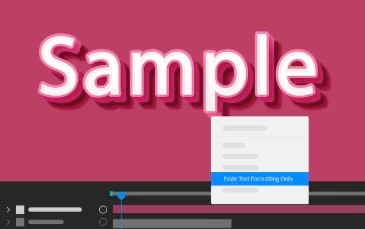
Copy and paste only the text formatting

Apply only the text formatting to an entire Text layer or a specific word using the Paste Text Formatting Only command.

Support for CICP Metadata

Import and export HDR content with CICP Metadata to ensure accurate color management and consistency across different devices and platforms.

Learn about Effects before applying them

Use the Info buttons next to each effect in the Effects & Presets panel for easy reference while you work.


Fixed issues in 25.4

 
  • Using Edit > Edit Original on files rendered from After Effects with project links now correctly opens the associated original project.
  • Sending a 3D model from Substance Painter to After Effects no longer triggers an error on macOS devices.
  • The 3D View no longer influences the rotation of 2D layers when using the Rotation tool.
  • Writing EXR files to network storage is now significantly faster, with improvements depending on network speed and NAS architecture.
  • All 3D models separated by a bin-breaking layer are now visible in the Draft 3D mode.
  • Quitting After Effects while the “Import File” Finder dialog is open on macOS no longer causes a crash.
  • Sending multiple compositions to the AME queue no longer causes text to appear blurry or “vibrate” in rendered output.
  • Importing specific JPEG files from network locations no longer causes After Effects to crash due to file handling issues.
  • Refocusing After Effects after resizing an image on disk that is part of the current project no longer causes a crash.
  • Scale, Rotation, and Orientation values now update in real time in the Properties panel when adjusting layers in the composition viewer.
  • Projects using the Adobe Clean font on Windows no longer trigger warnings during mogrt import and conversion.
  • OCIO Transform effects now retain their previous settings when projects are reopened.
12 replies

Participant
November 4, 2025

When will Frame.io V4 integration be updated within AE? 

jefubbudu
Inspiring
November 5, 2025

My guy, they had mocha for 3D and affine tracking integrated as an official addon and it didn't survive 2 versions. Good luck getting them to support a whole extra networking and collaboration system.

Participant
September 30, 2025

Awesome! Can’t wait to try 25.4 — curious to see what new features and performance improvements it brings. Has anyone tested it yet? How’s the workflow compared to the previous version?

nishu_kush
Community Manager
Community Manager
October 2, 2025

Hi Noah,


A newer version (25.5) is now available. Give that a try. Create a new post if you face any issues.


Thanks,
Nishu

Participant
November 15, 2025

i have 2022 AE version installed. will my files still work with the 2025 version installed, or do i need to keep the two versions of after effects on my machine. I am reluctant to install 2025 until i know it's either ok or if it won't replace my old version when i install and lost work etc. i am having issues with importing 3d obj files with an error message and i think this might be a 2023 feature. is this the case too. many thanks for your help.


September 18, 2025
nishu_kush
Community Manager
Community Manager
September 19, 2025

That's my bad! Thanks for pointing it out, Mike. I've changed it.


Thanks,
Nishu

jefubbudu
Inspiring
September 6, 2025

Okay i'm hopping back in for a moment. Can anyone tell me if they worked on:


A new multilayer EXR handler

AGX support

Fixed rotobrush

True multithreaded rendering of single frames

GPU support on at least 75% of effects (at least the common ones)

AV1 support

Faster rendering than CS6 on the same hardware for heavy compositing workflows

a better LUT workflow that uses standard cube files or similar

Reduced overhead and minimum spec till about 4gb of ram is the minimum again?


Without these, AE remains basically unusable.

Participant
September 5, 2025

This version is unusable! 

Participating Frequently
September 5, 2025

AE 25.4 has a big problem with reading EXR Alpha channels. I had to roll back to 25.3 version.

Known Participant
August 27, 2025

I've downgraded to the 25.3.2 because the latest version completely messed up my Maya sequences. My AO pass suddenly had parts of my beauty pass for instance. No it doesn't have the same name, yes Ive deleted all my cache files and tried everything I know with 20 years of experience. This version messes up how it reads the image sequences.

Participating Frequently
September 5, 2025

I had noticed such behaivior as well. Some frames looked like they were missing. On some frames Alpha channel on EXR sequences switched by itself. This version is a total mess.

Participating Frequently
August 25, 2025

I've just downgraded to 25.3.2( Build 2) as the latest version has given me issues with rgb roto mattes - random frames will not be missing, but will have missing roto shapes. I tested it on another machine and no issues there with the older version of AE. Another user on a flame also had no issues and I've checked multiple versions of roto/ different sequences -- this is a bug in AE 25.4

Participant
August 19, 2025

"Quickly offset your layers and keyframes" This feature is awesome!!!

Participant
August 18, 2025

it doesnt open for me it keeps crashing 

0xc0000142 error please help