
Participant
May 19, 2022
Question

After Effects Can't Continue: Internal Structure Inconsistency

  • May 19, 2022
  • 4 replies
  • 19766 views

Hi, I'm getting the following error when I try to load AE:

After Effect's can't continue: internal structure inconsistency (g) (25 :: 2)
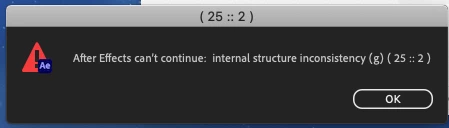
Running AE 2022. I've uninstalled and reinstalled the software and updated my OS; currently running MacOS Catalina 10.15.7 

Processor: 3.1 GHz Quad-Core Intel Core i7

Memory: 16 GB 1600 MHz DDR3

Graphics: NVIDIA GeForce GT 650M 512 MB

Please help, thank you!

4 replies

Participant
June 19, 2024

In my case (Mac M2), I closed all other Adobe apps, changed to opening After Effects without Rosetta and it worked. Then, I changed back to Open with Rosetta and is still running.

Participant
July 3, 2024

you saved me thank you so much

Participant
October 4, 2023

Hello @nishu_kush We want to have an urgent response from Adobe regarding this after effects problem which is really starting to annoy us creators. Explain to us in detail what's going on and give us an answer guys !

nishu_kush
Community Manager
Community Manager
October 11, 2023
ToolfarmJP
Community Expert
Community Expert
May 31, 2022

I assume the cause is shortage of GPU VRAM. You need at least 2GB to run After Effects.


https://helpx.adobe.com/after-effects/system-requirements.html


Participant
May 31, 2022

Hi, I resolved the issue by contacting customer service- installing an older version of AE.

Participating Frequently
July 11, 2022

Hi daniels64503844 & louism22996612,


Please share your system specifications (CPU, GPU, RAM, OS version) so that we can investigate the issue further.

Looking forward to your response.


Thanks,

Nishu


Exact same issue but on WINDOWS OS:

OS Name Microsoft Windows 11 Pro
Version 10.0.22000 Build 22000
System Type x64-based PC
Processor 12th Gen Intel(R) Core(TM) i5-12500H, 2500 Mhz, 12 Core(s), 16 Logical Processor(s)
BIOS Version/Date LENOVO J2CN40WW, 15/04/2022
Installed Physical Memory (RAM) 16,0 GB

Name Intel(R) Iris(R) Xe Graphics
Adapter RAM 1,00 GB (1.073.741.824 bytes)
Driver Version 30.0.101.1029
INF File oem10.inf (iADLPD_w10_DS section)
Name NVIDIA GeForce RTX 3060 Laptop GPU  8GB Ram
Adapter RAM (1.048.576) bytes
Driver Version 31.0.15.1659
INF File oem66.inf (Section292 section)


What to Do ? 


nishu_kush
Community Manager
Community Manager
May 20, 2022

Hi louism22996612,


Sorry for your issue.

When do get this error - post-launch or while the splash screen is loading Are there any updates available for your OS? Did you install any third-party plug-ins? Please try resetting the preferences: https://community.adobe.com/t5/after-effects-discussions/faq-how-to-reset-trash-preferences-in-after-effects/td-p/10634342

Let us know.


Thanks,

Nishu

Participant
May 31, 2022

Hi!

I have the exact same problem. Eveytime I try to open the app (AE 22.4) I get this two messages. Already tried to reset the preferences but it did not work, I also tried deleting and reinstalling the app, restarting Creative Cloud, my Mac, and nothing has worked. I also dont have any third party plug-ins.


Operating System MacOS Catalina 10.15.7 (latest Version)

Processor: 2,9 GHz Quad-Core Intel Core i5

Memory: 16 GB 1600 MHz DDR3

Graphics: NVIDIA GeForce GTX 660M 512 MB


Please help!

Participant
May 31, 2022
Bildschirmfoto_2022-05-31_um_12-57-57.png