Legend
May 22, 2020
Answered

After Effects is changing the Frame Rate on Imports from Premiere Pro.... should I change back?

  • May 22, 2020
  • 6 replies
  • 23084 views

Hello, I'll bet this is an easy one, but it's driving me nuts.


The original clips are 23.976 progressive advance.  (23.976 frame project)


The clips are in the Premiere Pro timeline, then I export them into After Effects.


In A/E the Composition settings are 23.976.

The clips however, in After Effects have been auto changed to 29.97.

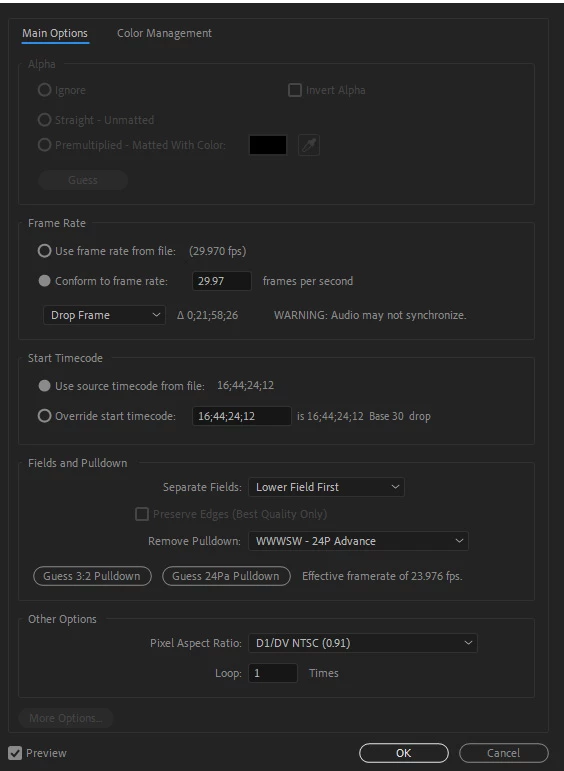
The "main options" in the Interpret Footage section also read:  "Lower Fields First" and Remove Pulldown:  wwwsw-24p Advance  (photo below)


When I do a "press play bar" to preview the clips, it's very slow to render.  I think it's re changing the frame rate again to match the comp settings?


Wondering why A/E changed it to 29.97 to begin with?


Should I just change all the clips from 29 to 23.976 manually or is there a group change selection?


and if so, should I remove the "lower field first" and change it to NONE.... and remove that pull down setting?


Thanks for your advice 

Best,

Letty 


This topic has been closed for replies.
Correct answer Rick Gerard

I THINK I'M IN TROUBLE!

The reason the original clips frame rate didn't match the ppro sequence, is....

my ORIGINAL clips all say 29.97  !!!    But they were shot in 24p advanced????? 

and the project panel also says 23.976   example:
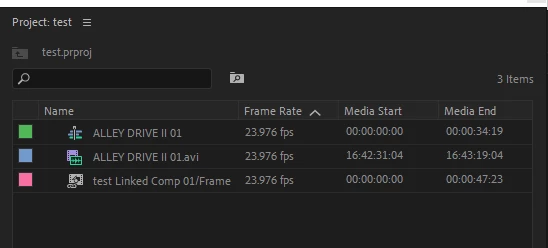
 

Why does the project panel show the AVI  as 23.976 ???  When it's really 29.97?  I've been fooled all this time?


I captured all the clips myself, from the camera to the computer and made sure they were captured at 23.976.

Am I totally screwed?   


I used media info to confirm the properties of the original  clips.   100's and 100's of clips shot in 23.976 now reading 29.97.


If the footage was some how changed to 29.97 will it still have the "film look" like in 23.976 movies?


I've made test discs and it seems to have the same "look" but I was burning them in 23.976 frame rate. Did the computer change the clips back to 23.976?  


Sorry to dump this on you again....   Because of the project panel, and how the film was made, I was 100% certain the original clips were 23.976.  That's why nothing is matching and I was so confused.


What do you think I should do now??  Just keep things the way they are, and only change the comp settings in AE to 29.97 so they now match the ppro seq settings?


And I should change my ppro seq settings to be 29.97  and BURN to disc in 29.97 ? OR Burn the 29.97 clips to 23.976 and the computer will delete the added frames?  is that non drop or drop???  ahhhh!!!! LOL  


Is my whole world now 29.97 ?? no more 23.976 ?  What happened to my life's work???


THANK YOU FOR GETTING BACK TO ME!!  I'M FREAKING OUT. 
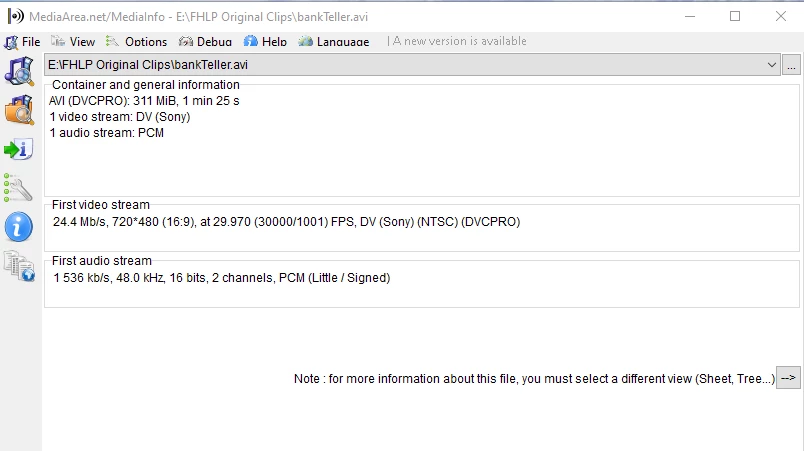


All my clips are reading this....   BUT....   it was shot in 4:3 native.   This reading says 16:9 ??  COULD it be possible my clips are in a container ?  and they have been converted or something?


If you shot with an older DVC Pro camera and you set the frame rate to 24P advanced then your footage was shot interlaced with 3:2 Pulldown at 29..97 FPS because that is how we got 24 fps movies transferred to videotape from the very first time film was broadcast on television. Premiere Pro read the framerate and interlacing metadata correctly if your footage looks 4:3 and that is how you shot it.


The "film look" is 99.97% color grading and about .03% frame rate when you are talking about interlaced footage. Your DVC PRO camera didn't shoot at 1/48 second exposure time, it shot at about 1/60. How do I know for sure and how do I believe that frame rate has so little to do with the film look? Because I owned a 35MM Arri BL for years, and I shot commercials for some of the biggest advertising agencies in the country for years, and they spent the extra money to shoot on 35mm film because they loved the look that they got from color negative film stock, and my film looked better than a lot of my competitors because I guy named Clive Tobin build an adaptor for the motor on my camera so that it would run at 29.97 fps so I did not have to do 3:2 pulldown when transferring my film to tape and it looked better.


It looks to me like everything is correctly interpreted. Your original 24P advanced footage was interlaced, lower field first, wwwpw at 29.97 fps so that the frame rate would look as close as possible to the frame rate of film transferred to tape. The progressive output for that kind of project is 23.976 FPS Progressive. That is as close as you can get to having the original interlaced frames turned into progressive frames. The only possible problem you may have is that the footage is supposed to be 4:3 and it has been stretched to 16:9, but you have not mentioned that and the first screenshot you posted shows the PAR as D1/DV NTSC (0.91) which is correct for 4:3 video.


You can blame all of this confusion on the engineers in the US deciding that they needed to add 1 scan line to the TV so they could have color so they slowed down the frame rate to put the extra resolution (horizontal line) in the picture and maintain the same bandwidth. The PAL folks knew that color was coming so even though they had the same bandwidth, they got a higher resolution image and color without slowing down the frame rate.. They handled the problem of 24 fps motion picture film by just slowing down the projector (film chain or film to tape transfer) 1 frame per second and living with a slightly more baratone audio track. It doesn't look like anything at all is wrong with your project.


6 replies

Participant
December 26, 2022

After Effects 2023
Edit > Prefrences > Import Show Below Image Change As Per You!

Participant
December 26, 2022

After Effects 2023
Edit > Prefrences > Import Show Below Image Change As Per You!

Community Expert
May 26, 2020

After Effects and Premiere Pro both interpret the frame rate of the footage correctly most of the time. The only errors I have seen since we have gone to direct digital recording come from variable frame rate footage from mobile devices and screen capture programs. If you are doing any kind of motion tracking, motion stabilization, or warp stabilizing it is important that the comp frame rate match the frame rate of the footage. 


As long as the interpreted frame rate of the footage is correct the playback speed will be correct. It does not make any difference at all what the composition frame rate has been set is. If the comp and footage frame rates do not match you may end up with blended or duplicated frames but those are usually not noticeable when the video is played back.


If the sequence frame rate in Premiere does not match the footage frame rate then the comps created by Dynamic link will match the Sequence frame rate and the footage frame rate will match the footage frame rate in Premiere Pro but there is nothing that will warn you or tell you that the footage frame rate and comp frame rate do not match unless you do something like Camera Tracking. 


Check everything out and let us know what you find. I would be willing to bet that the footage frame rate does not match the sequence frame rate in Premiere Pro. The footage frame rate is far more likely to be correct than the frame rate of a comp or a sequence.

Letty2019Author
Legend
May 27, 2020

Hello....


My clips are 23.976 and in PPro (in the project box) they also read 23.976.

When I drop the clips into the PPro timeline, they auto switch to 29.97.

I ask Ann about this last year and she said it's normal.  PPro likes to work in 29.97 but you export to disk in 23.976 that is what you will get.  (is that all correct?) 


So I use dynamic link and send the sequence from PPro to AE and it reads 29.97 in AE and I have the comp settings at 23.976.


Question:  Should I change the master comp setting to 29.97 and then AE sends it back to PPro and it will work fine?    did you mention the comp and the clip settings must be the same in AE?  or change each clips from 29.97 to 23.976 to match the comp setting?  But then, when it goes back to PPro, it will have to change it again or ? 😞


I've done months of work.  All the compositions are set to 23.976  and all the clips in AE timeline read 29.97.


Also if I change the master comp setting to 29.97, will it screw up all my work?  I've done months of work including camera tracking and rotoscoping. 


Most of the comps will play when I press the space bar in AE, but when I have complicated comps like 2 videos w/different frame rates and multi jpg images installed, the play back is very very slow and has to render the timeline every time I boot it up. When I make edits its very time consuming waiting for each frame to render for playback.  I have fast modern computer, 32gb ram and the footage is SD. 


Thanks for more of your advice!

Letty

Letty2019Author
Legend
June 1, 2020

FRAME RATES FOR COMPS AND PPRO SEQUENCES

The frame rate for your sequence as shown above is 23.976. This is one of the three standard frame rates in all NTSC countries that have 60Hz power. You should always use these frame rates if your intended audience is ever going to see your work on any television. I will explain why later. There are only a few theaters left in the world that have film projectors. The standard frame rate for film projection is 24 fps. In the highly unlikely chance that you are transferring your video production to film the standard frame rate for your sequence (Premiere) or your comp (After Effects) would be 24 fps. This is the ALMOST the ONLY time it makes sense to set your frame rate to 24 fps.


Europe and a few other parts of the world operate on PAL 50Hz power. The standard frame rate for all broadcast video and even film projection is 25fps. That should be the frame rate of almost all of your standard video production.


FRAME RATES FOR FOOTAGE

The frame rate for your footage is 29.97 fps. This fractional frame rate standard was established when Color Television was introduced. Before color TV the frame rate for all broadcast tv was 30 frames per second interlaced. Almost no one uses interlaced footage any more because all of the equipment we use to create and playback video is fast enough to draw every row of pixels in one cycle (60Hz). When color TV was developed in NTSC land, they had to slow down the frame rate just a little so they could include the color information in that .03 part of the frame. 


The frame rate used in the camera has nothing at all to do with the playback speed. If you playback a video or movie at the same frame rate used to shoot the movie, playback will be in real-time. If you want to change the speed of the movie you need to run the video at a different speed. You do not do that by changing the frame rate of the comp or sequence, you do that by changing the frame rate of the source video. 


Most video cameras shoot at 29.97 fps in NTSC land or 25 fps in PAL land. Almost all video cameras are capable of shooting at two or three other standard frame rates. 23.97 and 59.94 for NTSC and 50 for PAL. Mobile devices usually shoot at variable frame rates somewhere close to those video standards. Professional cameras are capable of shooting at almost any frame rate from 1 or 2 fps up to 120fps or more. High-Speed cameras are capable of up to 20,000 fps. Once again, unless you specifically tell your system to playback footage at a different frame rate than was used to shoot the footage, the playback will be in real-time.


Different frame rates give a different look to the final video. The higher the frame rate the lower the motion blur. Put your hand out in front of your face as far away as you can, focus on something on the other side of the room and move your hand left and right. The motion blur your brain applies to your hand is about the same as the motion blur you get at 24 fps when using a 1/48 second exposure time or a 180º shutter. That is why 24 to 25 fps was picked as the standard frame rate for motion picture production. This gave a smooth appearance to the action and, because of the size of the standard 35MM film frame, there was also enough room on a frame of film to provide decent audio.


INTERPRETING FOOTAGE

Both After Effects (your third screenshot) and Premiere Pro (your second screenshot) are properly interpreting the footage. The original footage was shot at 29.97 fps. That means the playback speed will be accurate. There are no errors here. Unless you want to force your original footage to playback faster or slower than real-time, do not mess with these settings.


DYNAMIC LINK

When Premiere Pro creates a new After Effects comp from selected footage that comp is created at the frame rate used by the sequence. It is the only thing that makes sense to do. You want to replace every frame in the sequence with the new frames from AE. The footage that is imported into AE is also brought in without changing the frame rate of the footage. It has to be. If it was not, the playback speed would change.


When you put your 29.97 fps footage in a 23.976 fps sequence in Premiere Pro you end up with some blended frames. It is hard to see the blended frames when the video is playing back, but they are there. The same things happen in After Effects. Your comp has 29.97 fps footage in a 23.976 comp so the frames are blended. 


When you go back to Premiere Pro and look at the linked comp, the frame rate of the comp is also correctly reported as 23.976. You did something to the frames in After Effects so now every single frame you modified in AE is in Premiere Pro and there are no Blended new frames. 


There will be no timing problems with your workflow, and if you are happy with the blended frames in Premiere Pro when you don't match the sequence frame rate to the source footage frame rate then nothing is lost.


If you are doing visual effects and you want absolutely the highest quality from every frame you should be matching the Premiere Pro sequence frame rate with the footage frame rate. That is the more professional way to work. I always do my VFX work in comps that match the frame rate of the footage because I want every original pixel available. I almost always use 29.97 fps for my projects unless they are destined for theatrical distribution. 


I hope this helps. If it is any consolation, about 80% of the people I work with that have never shot with a film camera do not correctly understand frame rates, motion blur, critical panning speeds, or how to shoot footage so it is easier to do visual effects. Everybody I know that learned their craft using film cameras understand because there was no metadata telling us what frame rate was used to shoot the footage.


Phenominal answer...


Sorry, last one... you wrote:


There will be no timing problems with your workflow, and if you are happy with the blended frames in Premiere Pro when you don't match the sequence frame rate to the source footage frame rate then nothing is lost.


I'm not thrilled about having 'blended frames' ....  WHY does PPro change  my 23.976 to 29.97 in the PPro sequence timeline??   That seems to be the problem.  Is that normal?  Because of that action, everything is screwed up and I'm stuck with blended frames?


I've already been working for over a year on dozens of sequences,  am I stuck with blended frames? Why did I listen to Ann when she said "PPro changes the sequences to 29.97 because that is how it works best."     It's in one of the posts a year ago.    Why does PPro do that?  Change the frame like that?  I think that is the crux of my problems. 


I guess I should CHANGE the AE comp settings to 29.97  so when it goes back to PPRo the entire sequence will be 29.97 ??  Because now, I have mixed frame rates in the PPro sequences, the regular 29.97 and the AE imports at 23.976.


Please advise, I'm on the ledge. Seriously.


Thank you,

Letty

Letty2019Author
Legend
May 26, 2020

Wow, what happened with this board?  I used to get help really quick.  Did everybody quit?  😞


Letty2019Author
Legend
May 25, 2020

I notice AE converts my PPRO project clips to 29.97  but my master comp settings in AE are 23.976.


I have 2 video clips in my AE Comp, 1st clip is reading 29.97, second clip (is a 30 fps) but I changed it to 23.976 to match the comp master settings.


very confused.   The rendering on this comp takes forver...  but my other comps render just fine.

Letty2019Author
Legend
May 25, 2020

Bueller?  Bueller?