

Community Manager
December 14, 2021
Pregunta

After Effects v 22.1.1 is now available!

  • December 14, 2021
  • 39 respuestas
  • 11774 visualizaciones

Hi everyone,


After Effects v 22.1.1 is now available for download from the Creative Cloud desktop application. This update includes multiple bug fixes & performance improvements. It also includes new features like Universal Text Engine & C4D R25 update. This update is recommended for all users.


To update the app, open the Creative Cloud desktop application and click the Updates tab on the top left. Find After Effects in the list and click Update.


After Effects v 22.1.1 new features
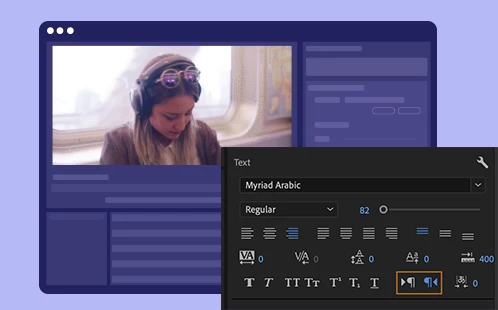
Universal text engine

After Effects now has a Universal text engine that enables you to seamlessly create and combine text using any language, or script in a single type layer.



C4D R25 update

The latest version of After Effects now supports the Cinema 4D R25 features.


Beta features
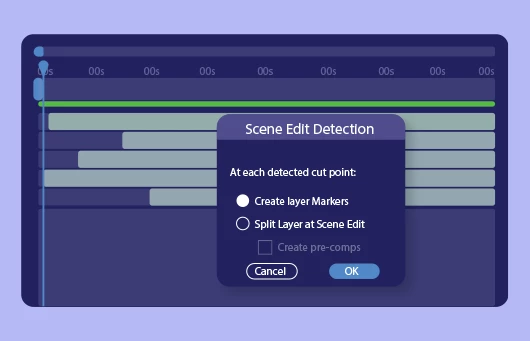
Scene Edit Detection

Powered by Adobe Sensei, automatically detect scene changes in an edited clip and place scenes as layers for a faster project setup. Scene Edit Detection makes it much quicker and easier to reuse part of an edited video clip.
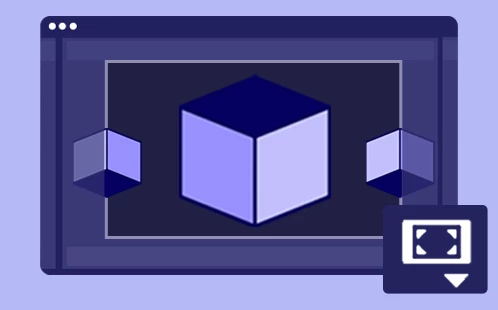


Extended Viewport

The Extended Viewport extends real-time 3D draft previews beyond the composition's frame boundaries. View 3D content located outside of the frame's edge, then bring it into the scene with ease. Switch back to standard frame view when you need to see your composition’s final look.
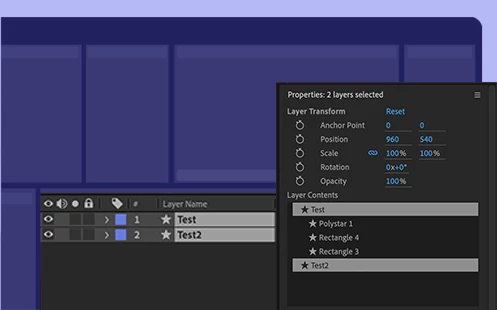
 

Properties panel

Create motion graphics easier and faster with the new Properties Panel. Cut down on your twirl-time by quickly accessing the properties you need the most. It brings an easier way of working with Shape layers, plus basic layer transforms.


List of bugs fixed in version 22.1.1 

  • Fixed an issue that caused After Effects to crash on quit after using Maxon Cinema 4D exporter.
  • Fixed an issue with CryptoMatte plugin that caused After Effects to crash if EXR sequence was larger than the composition.
  • Fixed an issue that caused After Effects to crash when starting audio only preview while using Draft 3D.
  • Fixed an issue with sync settings that caused After Effects to crash on quit after downloading the preferences.
  • Fixed an issue where re-linking a multi-layer PSD file would produce an invalid buffer error if one of the layers was deleted.
  • Fixed an issue where PNG files with an embedded ICC profile were not being rendered correctly when the Linearize Working Space option was enabled for the project.
  • Fixed an issue where the Preserve RGB option in the Interpret Footage options was not preserved when opening projects saved in After Effects 17.7 or earlier.
  • Fixed an issue with Text layers that prevented copy pasting South Asian and Middle Eastern text into a text layer that previously housed Roman or Greek characters.
  • Fixed an issue where Adjustment Layers would not be copied correctly from After Effects to Premiere Pro.
  • Fixed an issue where Cache Frames When Idle may start when a plugins UI was active in the foreground which could cause the plugin to respond slowly or hang.
  • Fixed an issue that caused After Effects to crash when using Hand tool when the Fractal effect has been applied to a layer and has focus.
  • Fixed an issue with Composition toolbar that prevented new composition from inheriting the 3D renderer used in previous composition.
  • Fixed an issue with Ground Plane that caused 3D grid lines to have inconsistent thickness.
  • Fixed an issue with Draft 3D that caused blank or offset comp content when resizing panel or changing magnification in auto-resolution mode.
  • Fixed an issue that caused rendering of After Effect projects that use C4D renderer or Cineware to fail with Dynamic Link.


Useful resources

System requirements
New Features
Fixed Issues
Known issues


Este tema ha sido cerrado para respuestas.

39 respuestas

Participant
December 18, 2021

I cannot use export to media encoder queue option. Nothing happens when I do that. I had to render within AE and import the rendered file into Media encoder. Any solution?


Participant
December 18, 2021

When I create a new Cinema 4D file from After Effects, it opens Cinema 4D R25 and it says no license available. I uninstalled Cinema 4D R25 and reinstalled After Effects. It didn't fix the issue. R25 was installed when After Effects was. And I couldn't find 'Cinema 4D Lite.exe' file anywhere. I remember R21 had that in its folder. I'm on After Effects 22.1.1

Roei Tzoref
Legend
December 17, 2021

Hi Kevin 🙂 how are you? please note that the december 2021 update (version 22.1.1) with the new Universal Text engine DID NOT FIX the text animators issue, so text animators still work left to right, with right to left text. and what's worse is that in the new update - there's no way around that anymore (no latin text hack to write left to right with animators left to right)

I have already filed a bug report DVAAE-4220657 about this in october when I first saw this in the beta, seems it hasn't been addressed. 

so as you can see, for one line, you may try to reverse the keyframes, and place them on End instead of Start (that can cause other issues) but with two lines there's no way around that. 

this is a very big problem for RTL users. this update in relation to type is actually a step back in terms of usability. 


Participant
December 17, 2021

Kevin he is right

Please help us fix it asap.

Participant
December 16, 2021

Hello,

Since the last update I am unable to open after effects.

This is the error i get every time:


Hope you can help out.


Klaas

BenjaminShirley
Participating Frequently
December 15, 2021

This new version compatible with Mac Mini M1 running Monterey?


Inspiring
December 15, 2021

Nope latest Big Sur, waiting to upgrade to Monterey

Inspiring
December 15, 2021

Since this install. I am unable to export PNGs!


PNGIO support error


jdash3d
Participant
December 22, 2021
jdash3d
Participant
December 22, 2021

Sorry, hit "reply" on wrong thread! Meant the one above!

lukasdreher
Participant
December 15, 2021

Will you be addressing the dreadful, terrible experience you're giving the community in regards to Snapping in AE before FY23?

Kevin-Monahan
Community Manager
Community Manager
December 15, 2021

Hi Lukas,

Sorry for the bad experience. You can contact the After Effects product team directly about this bug on User Voice.


Thanks,
Kevin

Kevin Monahan - Sr. Community and Engagement Strategist – Adobe Pro Video and Audio
antinnit
Known Participant
December 14, 2021

Is C4D owned by Adobe and thats why its part of After Effects now? I always seem to have to uninstall, is there anyway I can have this not autoinstall with every update pls? Thanks.

Kevin-Monahan
Community Manager
Community Manager
December 15, 2021

Hi antinnit,

Thanks for your message. No, C4D isn't owned by Adobe. You can check out this document for full instructions on how you can retain previous versions of After Effects. Please let us know if you need assistance with that.


Thanks,
Kevin


Kevin Monahan - Sr. Community and Engagement Strategist – Adobe Pro Video and Audio
eickholt
Participant
December 14, 2021

C4D error. Please advise.

Kevin-Monahan
Community Manager
Community Manager
December 15, 2021

Hi eickholt,

Sorry for the frustration. Can you verify that you are running After Effects 22.1.1? Please check and report back. If you are not sure how to check, please refer to this FAQ.


Thanks,

Kevin

Kevin Monahan - Sr. Community and Engagement Strategist – Adobe Pro Video and Audio
eickholt
Participant
December 15, 2021

Kevin, Yes I am. What I ended up doing is uninstalling and reinstalling AE 22.1.1 through the CC app. That fixed the problem. thanks!