
Participant
August 2, 2017
Question

Can`t see anything in my composition window?

  • August 2, 2017
  • 4 replies
  • 18585 views

Hi.

I recently bought a new computer on work, and installed adobe CC on it.

The problem I have: composition preview in after effects doesn't work. The whole area is either white, or grey. I can still do everything, make new layers, place a text, but I cant actually see what I'm doing.. I hope the picture below will give you a better idea of what this problem looks like.

I've tried reinstall program, but that did not help either. I've also tried to downgrade to older version of after effect. At first, it work, but after closing program, and open program again, same problem. Also tried to totally remove CC, and reinstal everything again. It seemed to have worked, untill I restarted my laptop.

Also tried clear caches, reset preferences, update gpu driver, even uninstall Sonic Suite, and all other fixes I found online, but that did not help either.

So far, the only fix that I've come across with, is removing After Effects, delete all user preferences and instaling older version, and just don't close it until I finish what I had to do.Now I don't really see this as a fix, more of a temporary solution because I do need projects to finish in the meantime and I don't really look forward to delete and reinstal after effects several times a day..
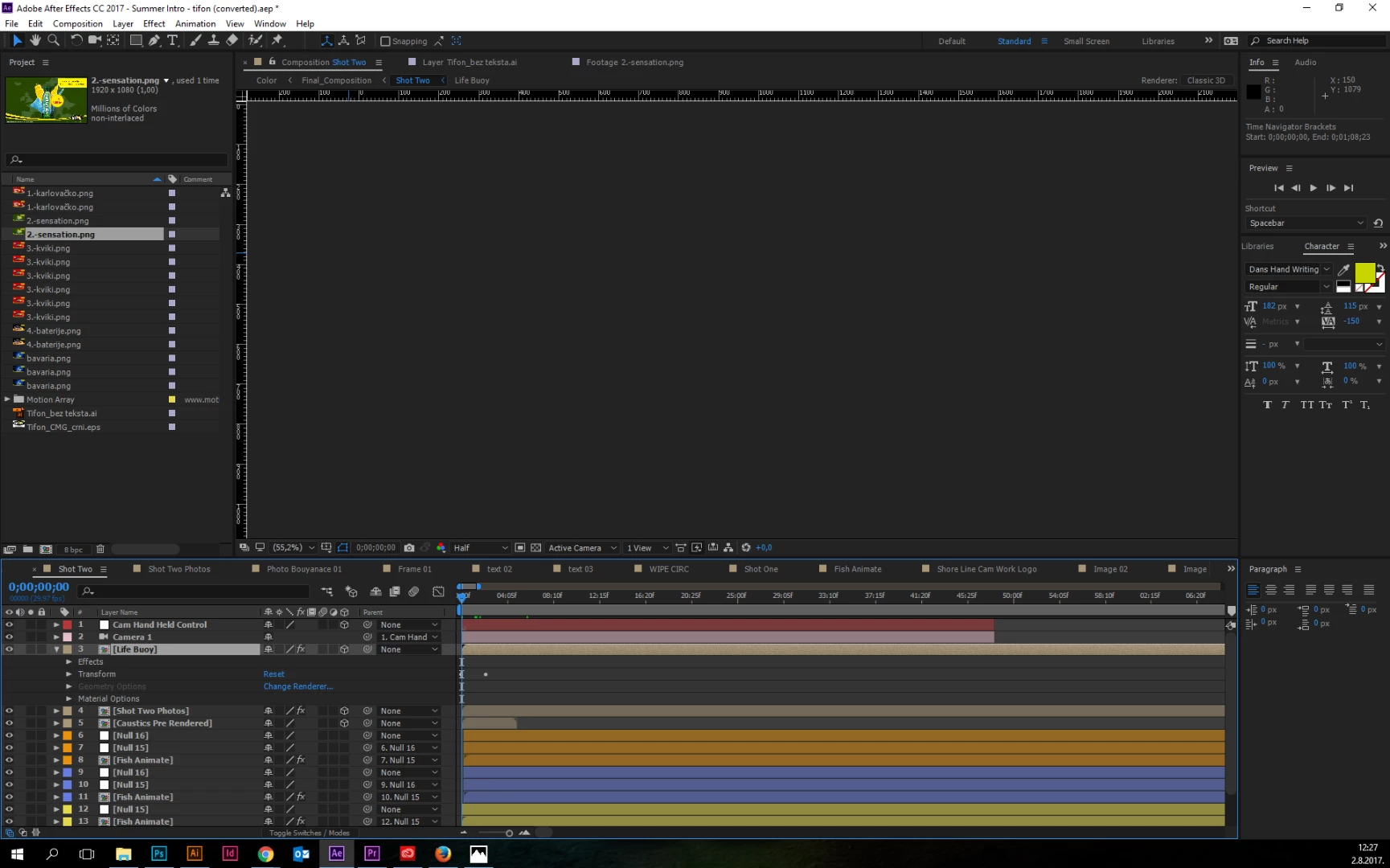
I'd really appreciate any advice   Thanks!

This topic has been closed for replies.

4 replies

jacobs61065132
Participant
October 24, 2017

Hi, I think I solved the problem, open the program the default gpu or cpu as shown. The gpu maybe only coded for rendering... Kevin-Monahan​ if you could please send word to your coworkers forum/manager's email and a tech department to maybe fix this bug, it may allow for accelerated use and improved performance in the future.

Participant
October 24, 2017

It worked, thanks you!

Participant
February 5, 2018

Having the same problem with the latest upgrade

Kevin-Monahan
Community Manager
Community Manager
August 15, 2017

Hi eeeeeed,

Sorry for this issue. Did you ever find a solution? Please let us know if you have or if you still need help.

Thanks,

Kevin

Kevin Monahan - Sr. Community & Engagement Strategist – Pro Video and Audio
Participant
October 23, 2017

Hello,

I'm having the same issue, the whole preview area is just grey. Tried to uninstall and reinstall, or install previous AE versions but still the same. Help please Kevin-Monahan

Inspiring
August 2, 2017

Make sure if you are using the mercury playback engine with a video card that it is one recommended by Adobe:

After Effects System Requirements

You may also need to install the latest drivers for your NVDIA GPU:

Rendering with OpenGL in After Effects CC

Jose Panadero
Community Expert
Community Expert
August 2, 2017

Enter into File > Project Settings and check if you are using Mercury Hardware acceleration. Try to choose Mercury Software. And check if you are using the latest driver for your graphics card manufacturer.