
Participant
March 4, 2020
Answered

Composition screen frozen and not displaying timeline

  • March 4, 2020
  • 6 replies
  • 18848 views

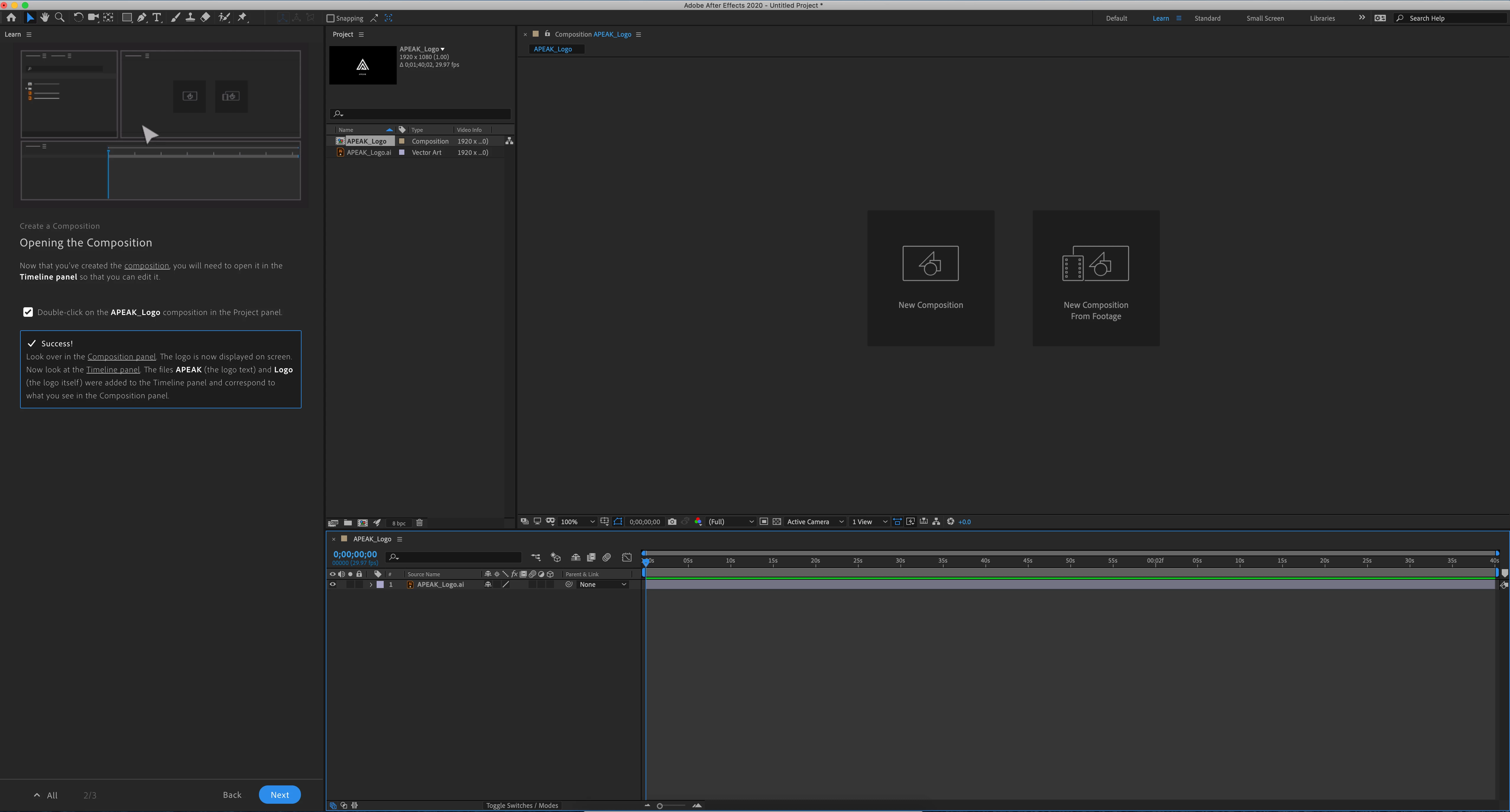
Very odd and stuck from many people on our video team with this one. Preview is flat out not working in the Composition panel.


The screen shot attached shows the beginning screen when you start the AF, loaded with the trainging demo program from Adode. Composition panel should be showing an APEAK logo. When I load any project, there is no longer anything shown in preview. We have tried closing the panel, chaning workspace, restarting the program, uninstalling AF, and uninstalling Adobe cloud completely. 


This is on a brand new Mac Pro with a Radeon Pro II GPU. 


Yet the projects all work fine on my laptop. Hope someone can help quickly something that is amazing dumb and simple fix. Prove me an idiot please. 
This topic has been closed for replies.
Correct answer Leosrd

Hi Rameez and eppoerickson


I did some of the steps the ones that applied to my system.


I found a clue.

It seems to have something to do with folders and files access for video cache and previews.

Disabling the video cache finally solved the issue. 

also, I'm a Win10 Pro user and I'm finding a bug with the Windows Defender and the Ransomware Protection part that is getting somewhat too much overprotective with the access to some folders in C:

that's a temporary solution but at least I can still working for now.


thank you!

6 replies

xandragnis
Participant
November 5, 2020

Alright human people..


I've had this issue for many months myself - actually even from the beginning I've had this problem and today I actually decided to get to what was causing it [for me and likely you..].


I didn't go into immense detail to find the specific calls which caused the issue but I can say, if it's as what I've experienced, it has nothing to do with drivers and only to do with file access.


After effects [and Premiere] are getting hung up with a call or modification to a file or directory because of anti-ransomware protection in my case.


Specifically I was using Acronis Active Protection [have been using it since 2018 without issue until the installation of AE and Premiere...].


Today I disabled it after having the issue and found that I didn't have to reset preferences or delete temp files in order to continue working on my projects.


I had to disable the service "anti_ransomeware_service.exe" located [for me] "C:\Program Files (x86)\Common Files\Acronis\ActiveProtection".


Hope this helps someone - - I noticed others mention antivirus protection could be the culprit so I decided to try Aconis first.


Be Well!

-Jonathan

Rameez_Khan
Legend
November 9, 2020

Thanks for letting us know, xandragnis.


-Rameez


Participant
January 18, 2021

Really? I use a work computer and cannot disable any antivirus protection. Since the last update I cannot use AE and I am supposed to be creating 5 - 10 short videos a day. I have gone through this thread, done everything except disable the anti virus and am now flying with only one wing using an older version of Premiere because I am afraid to update it. A good point - why are we paying for AE if we cannot use it? Please, please Adobe, get this fixed!

July 6, 2020

I tried all of the above, no joy!


Win 10 2004 build 19041.329 with 3x 2080ti (2 are using nvlink) , geforce driver 451.48


- Changed disk cache dir, disabled
- Disabled ransomware and defender
- wiped the prefs
- manually went in and wiped all temp files
- removed all workspaces

In the end what worked was setting a custom Nvidia application profile, disabling SLI and specifying the single GPU (not either GPU in the NVLINK). Not ideal as I would LOVE for AFX to use all that GPU power and not just a third of it!!


After turning Win10 ransomware protection back on, After Effects cannot start up due to issues reading user documents dir. Had to disable it again just to even load AFX.


Leosrd
Participating Frequently
July 7, 2020
I think is time for Adobe to take this seriously.
It has been months and now sometimes it happens with Adobe Premiere.
It has been disrupting the workflow and production times for me and I am
sure every other user who is experiencing this issue. I have to restart
several times, install uninstall... I even have a new copy of windows
installed, the first thing installed was the latest version of the Adobe
Suite, nothing, it didn't do a thing.
This cannot keep going.
July 13, 2020

I just noticed I couldn't preview any video in Premiere too. It would play but i'd only get audio. I set specific settings as above for Premiere in the Nvidia settings and it came straight back.

Participant
July 4, 2020

The composition pannel didnt appear to me since I have installed the software. Can someone please help!?

Participant
May 15, 2020

Has anyone been able to find another fix because none of this is working for me

Rameez_Khan
Legend
May 19, 2020

Hi yusufm75,


Are you on Windows or Mac? If you have a Windows+Nvidia combo, make sure your Nvidia driver is not 442.92.


Thanks,

Rameez

Vini.A
Participant
March 30, 2020

For me none of these worked, even Disabling Disk Cache or changing the directory. 
The only thing that helps me is unistalling and installing it again.
I'm getting crazy, I'm doing this like 10 times a day or even more. 

Win 10 PRO

AMD Ryzen 7 3800x
RAM 32GB DDR4 3600mhz

GeForce GTX 1080 Ti
All drivers updated

Leosrd
Participating Frequently
April 22, 2020

The issue is back

The same solution is not working anymore.

Any news on this matter?

Leosrd
Participating Frequently
April 23, 2020

Disabled Windows Defender and everything works again this is temporal I cannot be without antivirus just bc After effects and Windows Defender don't work together.

Please Help!

Rameez_Khan
Legend
March 6, 2020

Hi eppoerickson,


I've seen other people reporting this as well. I was talking to some of the After Effects engineers about this. Please follow these steps and let us know if any of them help:


If these steps don't help, check whether the Composition panel is responsive by clicking the New Composition and New Composition from Footage buttons. This should give us an idea whether the Composition panel has rendering issues.


  • What is the make, model and resolution of the monitor that you're using?
  • Do you see the preview in the Footage panel if you double-click the file from the Project panel?


Thanks,

Rameez

Participant
March 12, 2020

The problem was a software issue with a Pegasus Utility program. I have an external harddrive array Promise Pegasus which came with some basic software to monitor it. Another person posted this thread to me that showed how much the software is messing with several adobe programs. I wiped my whole mac pro and everything is working just fine now. I have not installed the Utility program. How someone figured this out is a long, long thread. But I would recommend doing this and sharing it where possible. Reply back please if this worked for you or not. @Leosrd


https://community.adobe.com/t5/premiere-pro/premiere-pro-could-not-find-any-capable-video-play-modules-please-update-your-video-display-drivers/m-p/10910277?page=2#M251531

Leosrd
LeosrdCorrect answer
Participating Frequently
March 12, 2020

Hi Rameez and eppoerickson


I did some of the steps the ones that applied to my system.


I found a clue.

It seems to have something to do with folders and files access for video cache and previews.

Disabling the video cache finally solved the issue. 

also, I'm a Win10 Pro user and I'm finding a bug with the Windows Defender and the Ransomware Protection part that is getting somewhat too much overprotective with the access to some folders in C:

that's a temporary solution but at least I can still working for now.


thank you!