


dmoz15
Inspiring
June 27, 2016
해결됨

Extend duration of imported PSD "footage" layers

  • June 27, 2016
  • 4 답변들
  • 25720 조회

I have imported a layered Photoshop file into After Effects as a layered comp with several .psd "footage" layers:
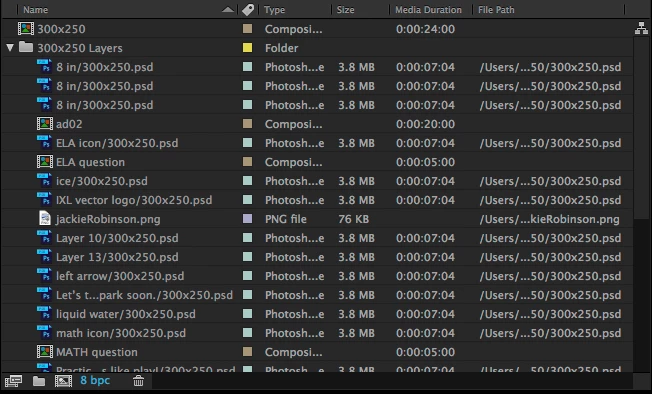
I've created and edited the comps within the 20s main comp with animations and effects. Now I need to extend the .psd layers(all ~7s) to the length of the main comp(20s).

I've tried dragging to extend their regions and right-clicking > Time > Enable Time Remapping(this allows me to extend the region with keyframes, but the content still ends proportionally short of the containing comp duration).

When I right-click the .psd layer and click "Open Layer Source", the preview shows the layer duration extending to the same time as it shows in the timeline(~7s)...

but the green "render bar" only goes to 5s. And no content is showing while the playhead is at 6s, below...
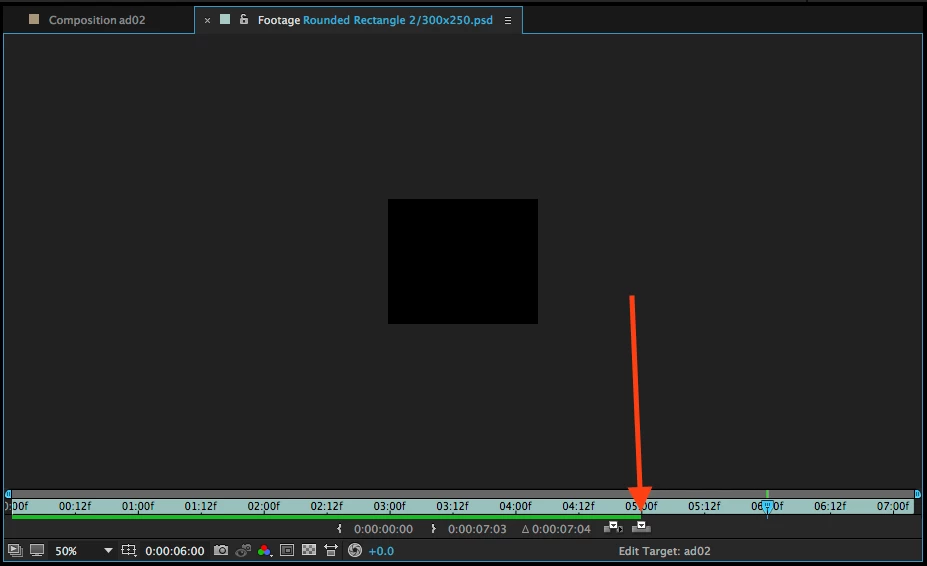
This is also reflected when I drag the playhead in the main comp timeline—the layers with this problem disappear at 5s even though their regions extend to 7s.

1. I need to get these layer regions to extend the length of my 20s comp.

2. It seems like the layer source only goes to 5s when I "Open Layer Source", so even though the region currently extends to ~7s, the 'content' only goes to 5s.

How do I get extend everything to 20-seconds without doing all of my keyframes/animations/effects over again?

Or is there a way to re-import just those layers at a longer duration, but keep all of my keyframes/animations/effects.

Using the latest Photoshop CC 2015.5 & After Effects CC v2015.3.

Thanks!
최고의 답변: Damnengine

I meant the screen prior to that one where you actually choose a file.


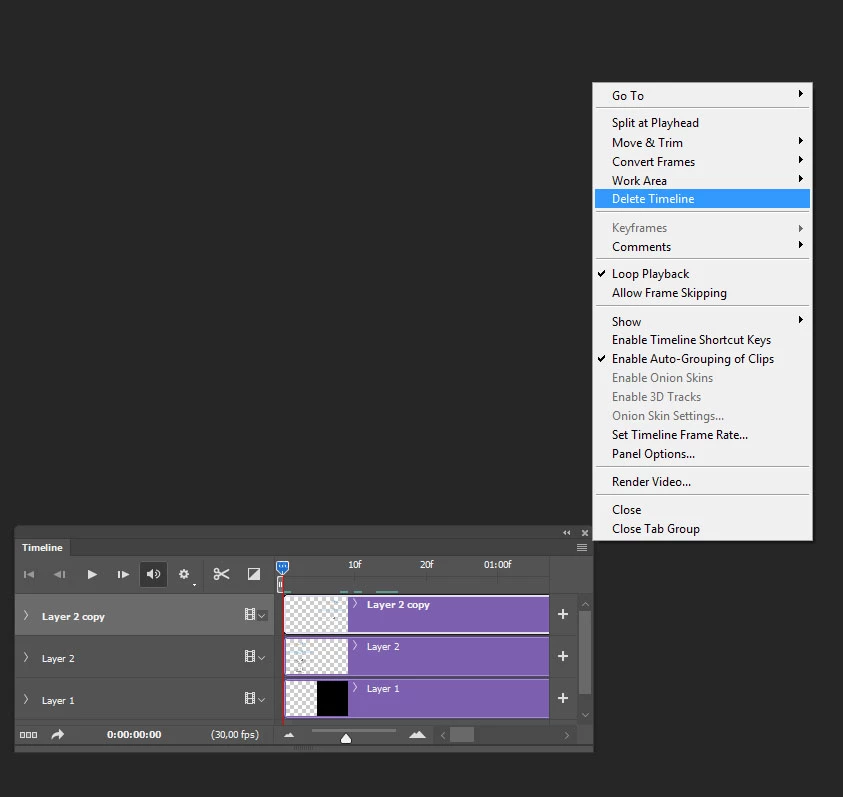
Pretty sure sskaz is onto it, check if there's a timeline attached to your psd in Photoshop and delete it:

You can also just freeze your layers in After Effects and just make them longer

4 답변

Participating Frequently
January 16, 2024

Oh, I encountered this "problem" 15 years ago when I was working in television. it didn't exist then. Now I will explain to you why this is not a "problem" at all.

The fact is that AE uses the settings of the LAST created composition when importing PSD files.
That is, if you just create a new composition for 15 seconds, then when you import the PSD, it will automatically make all the layers 15 seconds long. This rule has always worked since early versions of AE and has never changed. Good luck to everyone! I hope I helped someone

Participant
March 31, 2020

I figured it out, on the timeline in after effects, on those brown/bronze/goldish PSD layers, right click on the bar, press time > time stretch > and type in the new desired amount of time in duration you'd like. Hope this helped.

lukew66275192
Participant
May 6, 2020

I ran into this issue today and couldn't figure out why it didn't allow me to extend layers like the last one that I did.  The only real difference between the two files was that one of them was saved on my network folder, (browsed to by the actual network folder, not a mapped drive).  I was able to fix the problem by saving the file onto my desktop before importing it.  I have no idea why this fixed it but I'm happy that I found a fix.

Participant
November 7, 2016

Hi I just realised when you import the file in the first page if you click options and extend the page you'll see there is a selection for Photoshop Sequence you should uncheck this  ones and everything turns back to normal.

Inspiring
September 13, 2018

yay that was it! I had the same issue. Thanks for posting.

Szalam
Community Expert
Community Expert
June 27, 2016

I usually just drag the end of the layer in the timeline to extend it.

dmoz15
dmoz15작성자
Inspiring
June 27, 2016

Szalam , you'll see above that I've already tried that. That's the whole problem: the regions for these static .psd layers won't extend any longer than the ~7s at which they were imported.

dmoz15
dmoz15작성자
Inspiring
June 27, 2016

I'm sorry, I wasn't clear. Someone came into my office and I got distracted and clicked "Add Reply" before I meant to. I was saying that it should work to just extend it, so something is amiss. Photoshop layers usually only get an amount of time attached to them if AE imported them as an image sequence is it possible that when you were importing that little "PSD image sequence" box was checked?.


Ah, I gotcha, no problem.

I used File > Import > File... I then choose my .psd (no options present at this point), then I get the popup below and choose the option you see in the screenshot(no "PSD image sequence" box available)...

Have I imported the .psd incorrectly? Is there a way to re-import my file and retain my edits/animations/keyframes so far?