


Inspiring
September 16, 2017
해결됨

Hiding layers from the panel while being active? How?

  • September 16, 2017
  • 1 답변
  • 483 조회

Hello.
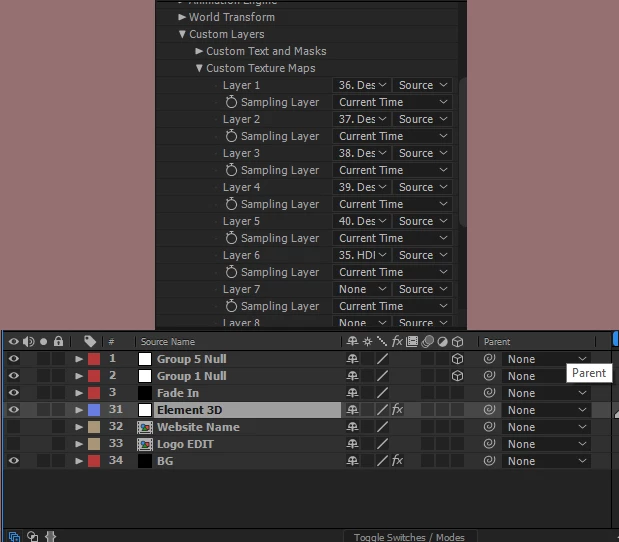
I got a template and I saw something interesting. It is an E3D logo reveal. Most of the layers were somehow hidden from the layers panel. When I went to

"Custom layers" -> "Custom Texture Maps" I saw that there are textures being loaded with a layer index from the layers panel but they are not visible in the panel itself. How do you do this?
    이 주제는 답변이 닫혔습니다.
    최고의 답변: angie_taylor

    Try disabling the Shy Layers button at the top of the Timeline panel. This should reveal any hidden or "Shy" layers. Please let me know if this helped you :-)

    1 답변

    angie_taylor
    Legend
    September 16, 2017

    Try disabling the Shy Layers button at the top of the Timeline panel. This should reveal any hidden or "Shy" layers. Please let me know if this helped you :-)

    GZEDITS작성자
    Inspiring
    September 16, 2017

    Thank you. It worked. It's so simple and I didn't know it.

    angie_taylor
    Legend
    September 16, 2017

    Thank you. Could you please mark my answer as correct for others with the same question? Thanks ;-)