
bryanoooo2
Known Participant
November 14, 2018
Answered

Identify Preset Used

  • November 14, 2018
  • 5 replies
  • 3487 views

Hi All

Is there a way to identify presets that have been applied to objects in an existing project.

For example If I open up an old project in which I used a particular text preset is there any way i can identify the one I used?

I know you can browse presets in Bridge, but i'm working on an old imac but if you have a lot to look through it could take some time.

Thanks in advance.

bryan
    This topic has been closed for replies.
    Correct answer Rick Gerard

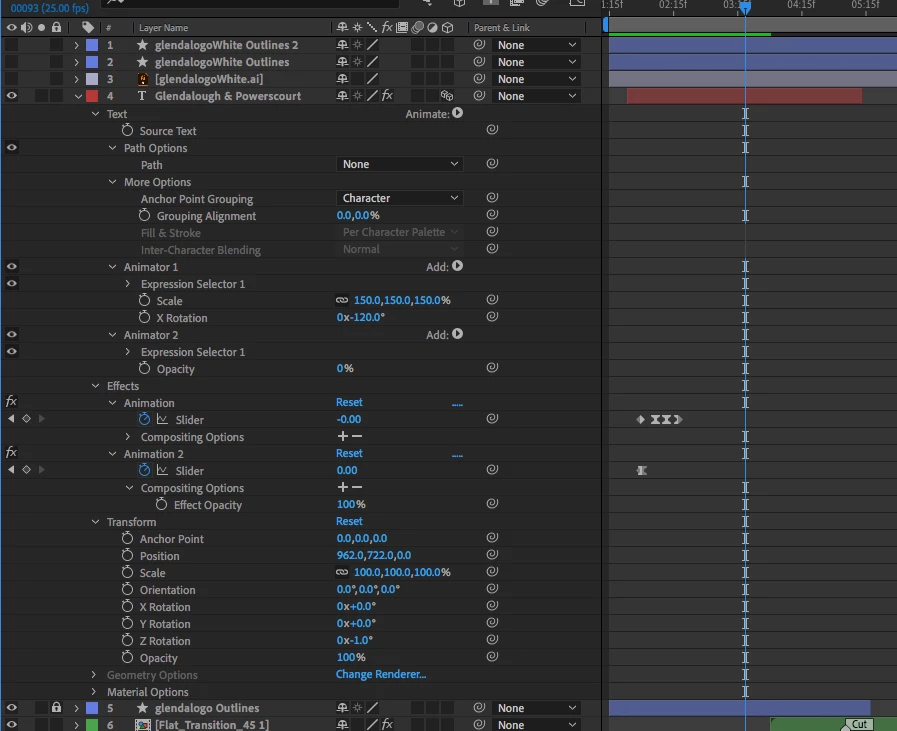
    If you just want to recreate the same effect select the text layer, press the U key twice to reveal all modified properties, select the Effects and Transform properties of the layer and save an animation preset.

    If you are trying to figure out what is going on do the same thing. Just press the U key twice and you will only see the things that have been modified in the layer to create the animation.

    5 replies

    Mo Moolla
    Legend
    November 15, 2018

    There are a few scripts out on that allows you to preview all presets in its own window within AE instead of using Bridge.

    Heres one

    AEViewer Media Browser for After Effects - YouTube

    AEViewer - aescripts + aeplugins - aescripts.com

    Roland Kahlenberg
    Legend
    November 15, 2018

    And here's an online gallery of AE's Text Presets - After Effects Text Animation Presets Preview Gallery

    Very Advanced After Effects Training | Adaptive & Responsive Toolkits | Intelligent Design Assets (IDAs) | MoGraph Design System DEV
    bryanoooo2
    Known Participant
    November 15, 2018

    Thank you, that's so helpful. for some reason my bridge won't play the preview of the presets so this is perfect

    Legend
    November 14, 2018

    bryanoooo2  wrote


    I know you can browse presets in Bridge, but i'm working on an old imac but if you have a lot to look through it could take some time.

    In other words "I could find this out myself but I expect someone else to do all the work for free." Nice.

    Mylenium
    Legend
    November 14, 2018

    Without seeing the preset in action this is utterly pointless. Different presets can still use identical features and just looking at some keyframes and properties doesn't tell us anything. Even the mere notion that anyone would know the presets by heart and could identify them just by looking at there parameters rendered output is actually pretty unrealistic. Even if you post your animation we'll all likely have to look it up and compare.

    Mylenium

    Rick GerardCommunity ExpertCorrect answer
    Community Expert
    November 14, 2018

    If you just want to recreate the same effect select the text layer, press the U key twice to reveal all modified properties, select the Effects and Transform properties of the layer and save an animation preset.

    If you are trying to figure out what is going on do the same thing. Just press the U key twice and you will only see the things that have been modified in the layer to create the animation.

    bryanoooo2
    Known Participant
    November 15, 2018

    Thanks Rick. That works perfectly.

    Roland Kahlenberg
    Legend
    November 14, 2018

    There's no way to tell from simply looking at the Timeline's innards. You may get better luck, here, if you posted an animation created with the Preset.

    Very Advanced After Effects Training | Adaptive & Responsive Toolkits | Intelligent Design Assets (IDAs) | MoGraph Design System DEV
    bryanoooo2
    Known Participant
    November 15, 2018

    Thanks Roland. Iappreciate the offer, but to be honest I posted the question because this is something that happens to me quite regularly. I just thought it was strange that when you drag a preset to an object, that the name of that preset is not recorded somehow to be identifiable in the future.

    Roland Kahlenberg
    Legend
    November 15, 2018

    A fair number of presets involve more than one effect or Text Animator Group. Things will also get messy if multiple Presets are applied. I don't think there's an elegant way to handle this which will suit the whims and fancy of every user. At times like this, I believe it's best to leave it to the user to take the initiative, to input their own comment, whichever way they find to be the most appropriate.

    Very Advanced After Effects Training | Adaptive & Responsive Toolkits | Intelligent Design Assets (IDAs) | MoGraph Design System DEV