
fakelawn
Participant
April 15, 2018
Answered

Issues with 3D Camera Tracker Since Most Recent Update

  • April 15, 2018
  • 27 replies
  • 18442 views

First off, I have searched and searched for someone else experiencing this issue and have been unable to find anything online. Adobe's phone support also proved fruitless.

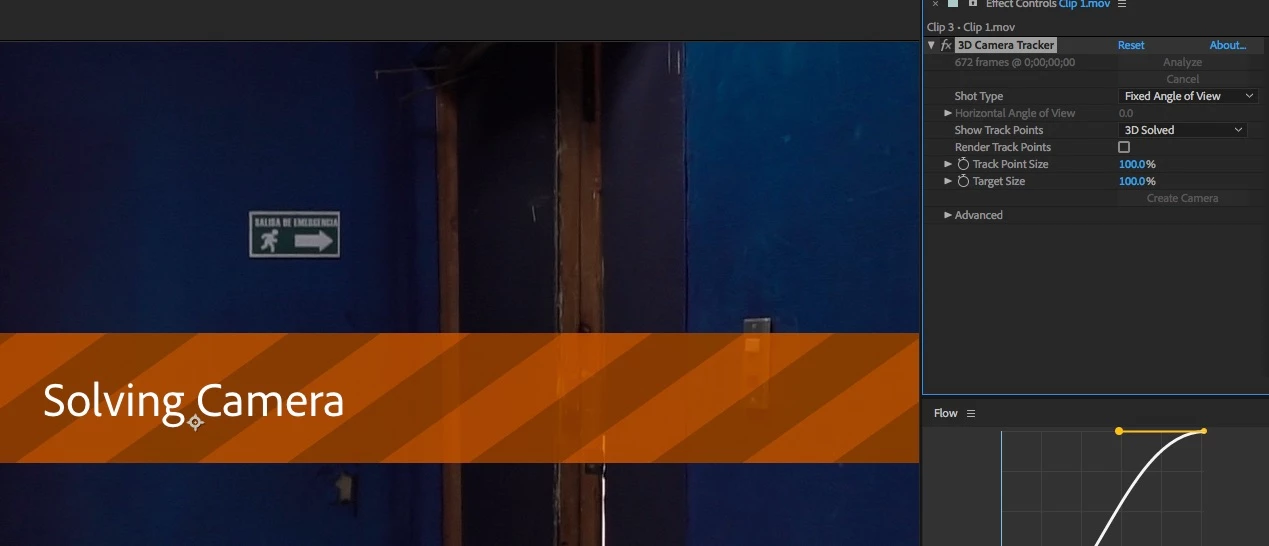
Since updating to the latest version of After Effects CC (version 15.1.0 - build 166), I have been having issues with the 3D Camera Tracker. When dragging the effect onto my footage, the usual initializing process begins and I get the blue "Analyzing in background step 1 of 2" banner across my footage. But under "Effects Controls" it no longer shows the percent complete or the number of frames it is working through, that area (just to the left of the stacked "Analyze" and "Cancel" buttons) is just blank. In addition, under the "Advanced" section, the "Average Error" lines are not returning actual values. Instead of numbers, I see this:  "Average Error: -" and below that "Average Error: %.2f pixels." The analysis phase then would eventually complete and move into the solving phase, and then nothing would happen. Often AE would totally lock up at this stage and I would be forced to end the process through Task Manager. Warp Stabilizer also seems to have stopped working, although I am having no problems using Warp Stabilizer in the latest version of Premiere CC. Originally I was using MOV files recorded off a GH5. These worked perfectly in the previous version of After Effects. And when I attempted to roll back to that previous version, they continue to work exactly as I would expect them to. Searching around online, I discovered that the latest version of AE no longer fully supports Quicktime files, so I suspected that might be the cause of my problems.

I immediately imported an mp4 file and tried that instead. Interestingly, this managed to successfully make it through the 3D Camera tracking process, but it still refuses to display the frames and overall progress at any point, and the "Average Error" sections continue to display:  "Average Error: -" and "Average Error: %.2f pixels."

All of these clips have been quite short and basic and had absolute no issues in previous versions of After Effects.

My computer is also more than beefy enough to handle these sorts of effects. I am running an Intel 8700k with 64gb of RAM. My video card is an EVGA GTX 1080 Ti SC2 with 11gb of video RAM. My work drive is a 1TB Samsung m.2 960 Pro. This a fully updated Windows 10 64bit system, and all of the other drivers are also up to date.

Adobe's phone support claimed to have not heard of anyone else having this issue. And basically refused to help unless I granted their out-of-country support team remote access to my computer. (Um, yeah, that's NOT gonna happen.)

I sincerely hope somebody is able to help me solve this problem. Or at least that others are able to confirm that they too are experiencing a similar bug.

Thank you.

This topic has been closed for replies.
Correct answer noec51612407

Finally WORK! but,  three months for ONE FIX update

Ok, thanks for remove BETA version Adobe After Effects CC 2018

Thank you very much!

27 replies

noec51612407Correct answer
Participating Frequently
July 18, 2018

Finally WORK! but,  three months for ONE FIX update
Ok, thanks for remove BETA version Adobe After Effects CC 2018

Thank you very much!

stefan_gru
Inspiring
July 20, 2018

Indeed, it would seem that updating to After Effects 15.1.2 (Build 69) fixes the bug. I was unable to get Track Camera to work until I updated just a moment ago. Jeez Luise.

Participant
July 31, 2018

just recently updated to 15.1.2 (Build 69) = Stuck with "Solving Camera" screen

GSPFilmworks
Known Participant
July 10, 2018

Hi folks!

I may have stumbled on a solution. I was trying to 3D camera track 30 seconds of footage, nothing special. I had the very same problems, mostly tracking would go through, but it would freeze at the "Solving Camera" stage. I was able to get it to track and solve when I broke it down to 3 second clips, each in their own comp. This is still useless since I can't stitch between the thee comps I created.

HOWEVER, on a whim I decided to change the name of the footage and it's comp in the project; the original file name is incredibly long, some 99 characters long, with underscores and one hyphen. I named the clip "footage" and the comp "Shorter name".

IT WORKED! I did have Solve Method set to "Typical", Detailed Analysis checked and Auto-delete Point Across Time unchecked.

UPDATE: I tried a different method and it crashed, so had to Task Manager kill the process to close. I then re-launched and imported the clip again, this time changing the name to "clip 1". Dragged the clip to "Make New Comp" and it created "clip 2" comp. Added "Track Camera" with the same settings as above (Typical Method, Detailed Analysis checked, Auto-delete Points Across Time unchecked.) and IT WORKED AGAIN!!

I very much hope this works for everyone else!

-- Greg Steinbrecher

UPDATE 2: I just ran a couple different settings and it looks like it's the Solve Method "Auto-Detect" is the problem child. I was thinking it was the name length or the name having odd characters, and perhaps it might still be an issue, however, "Auto-Detect" does seem to be the issue.

--GS

Participant
July 17, 2018

That's it. Take it off auto and it works perfectly. Thank you.

Participant
July 5, 2018

Been having the exact same problem. Can't accurately track any shot without knowing my average error. I don't have a fix besides downgrading at the moment, something needs to be done about this...soon.

JulesMolloy
Participant
June 22, 2018

Well, now it's now almost the end of June and 3D camera tracker and Warp Stabilizer are still broken in the most recent version of AE.

If this was an isolated event, it could perhaps be understandable (with a little communication from Adobe), but this is starting to become all to regular for my tastes.

Sadly, this kind of settles it for me, I'll be moving to another software suite after my current project is done because I just don't have time and budget to troubleshoot issues like this after every other software update from Adobe.

EDIT: just reverted to the previous version of AE and everything works totally fine again. I don't understand why they didn't roll-back this update.

alexc76805555
Participating Frequently
June 20, 2018

Also having the same issue.

Participating Frequently
June 12, 2018

Also having the exact same issue! This is RIDICULOUSLY ANNOYING!!!

sukuri
Participant
June 4, 2018

Same issue! any solution for this bug?

Community Expert
June 4, 2018

Use a previous version or wait for the update.

Kevin-Monahan
Community Manager
Community Manager
May 30, 2018
Kevin Monahan - Sr. Community and Engagement Strategist – Adobe Pro Video and Audio
Participant
May 31, 2018

Hi,

I'm having the exact same issue. I'm going to file the bug report above as well.

Participant
May 26, 2018

It's June.... and I'm having the same issue.

Participant
May 24, 2018

I'll add myself as another user experiencing the same issue as described...